Facebook Group Mention Monitoring: A Practical Setup Guide
Get Facebook group alerts in 60 seconds.
Groups Watcher finds the leads in your Facebook groups and sends them to you in 60 seconds, before your competitors reply, without using your Facebook account. 7 day trial for $1 with full features.
Start your $1 trialFacebook Group Mention Monitoring: A Practical Setup Guide
Facebook group mention monitoring means getting an alert when someone in a group names your brand, your competitor, your product category or the problem you solve, so you can reply while the thread is still fresh. You can do it by hand, with the alerts Facebook gives group admins, or with a monitoring tool that watches the groups you choose and pushes matching posts to Slack, email or your CRM. Which one fits depends on whether you run the group, how many groups you need to cover and how fast you need to answer.
This guide walks through each method, what it can and cannot see, how to write keyword filters that catch buyers instead of noise, and how to route alerts so the right person replies within minutes.
TL;DR
- Native tools (admin keyword alerts, engagement alerts, "Search this group") work well for groups you run, but they do little for the dozens of groups where your buyers actually ask questions.
- Good monitoring separates signals: recommendation requests, competitor mentions, problem descriptions and brand mentions each get their own alert stream.
- Speed decides who wins the thread. Alerts that reach you in about a minute, in a channel your team already watches, beat a daily scroll.
- Groups Watcher monitors public and private groups without your Facebook login, in any language, with a $1 seven-day trial.
- Reply like a helpful member, not an advertiser, and follow each group's own rules.
Table of Contents
- What mention monitoring actually covers
- What Facebook gives you natively
- What third-party monitoring can and cannot see
- Write keyword filters that find buyers
- Examples by business type
- Route alerts so someone answers fast
- Our perspective
- Try it on your own groups
- Is someone monitoring you on Facebook?
- Choosing a method: a short decision guide
- FAQ
- Sources
What mention monitoring actually covers
People use "mention" loosely, so it helps to split it into four kinds of post you may want to catch:
- Brand mentions. Someone names your company, product or founder, with praise, a question or a complaint.
- Competitor mentions. Someone asks for alternatives to a rival, or vents about one.
- Recommendation requests. Someone writes "Does anyone know a good..." with no brand named at all. These are usually the highest-intent posts.
- Problem descriptions. Someone explains a symptom, such as a leaking roof or a slow checkout flow, that your service solves.
Most of the pages that explain this topic focus on the first kind, tracking your own name. For a business that sells, the third and fourth kinds matter more, because the person is deciding right now and has not picked a vendor. A wedding photographer is rarely mentioned by name before the booking; she is asked for in a post that says "looking for a photographer for June in Austin."
If brand reputation is your main concern, our guide to monitoring brand mentions on Facebook and the piece on tracking brand sentiment in Facebook groups go deeper. The rest of this article leans toward lead-driven monitoring.
What Facebook gives you natively
Facebook offers several built-in ways to watch a group. Know them before you pay for anything, because for some situations they are enough.
Admin keyword alerts
If you are an admin or moderator, the group's admin tools let you set keyword alerts, so that posts or comments containing chosen words are flagged for the admin team. They are built for moderation: spotting spam, banned topics or heated arguments. They only work in groups you manage, which makes them a poor fit for finding customers in groups you merely belong to. We cover the setup step by step in Facebook group keyword alerts: how to get started.
Engagement alerts
Facebook has also let admins receive alerts when posts or comments draw a lot of reactions or replies. Social Media Today reported on the expansion of these engagement alerts in January 2021, including options for different interaction types. They tell you a thread is hot, not that it contains a buyer, so they are a community-management tool rather than a lead tool.
Get Facebook group alerts in 60 seconds.
Groups Watcher finds the leads in your Facebook groups and sends them to you in 60 seconds, before your competitors reply, without using your Facebook account. 7 day trial for $1 with full features.
Start your $1 trialSearch this group
Any member can open a group and use its search box to look for a word, a member or an exact phrase in quotes. It is useful for a one-off check, like seeing whether anyone has mentioned your brand in the last year. Results can be incomplete in large or older groups, and nothing about it is automatic: you have to remember to go and look.
Notification settings
As a member you can set a group to notify you about all posts, highlights, friends' posts or nothing. "All posts" is the closest native thing to monitoring, and it works only until the group posts a few hundred times a day. Then your phone becomes unusable and you mute it. If you want to see how far this approach can be pushed, read Facebook group notifications for every post.
The gap
Put together, the native options leave three holes for a business that wants customers:
- No keyword alerts in groups where you are not an admin.
- No filtering for intent, so you either see everything or nothing.
- No routing to the tools your team already uses, so alerts live on one person's phone.
That is the problem we built Groups Watcher to solve. Our walkthrough on keyword alerts in Facebook groups without being an admin explains how the approach works in practice.
What third-party monitoring can and cannot see
Before picking a tool, understand the visibility limits. Facebook groups can be public or private, and they can be visible or hidden in search, as the Electronic Frontier Foundation's guide to Facebook groups explains. Those settings shape what any outside method can reach.
A few practical consequences:
- Public groups are the easiest to cover, since their posts are visible to anyone.
- Private groups are where much of the best buyer conversation happens: local community groups, niche hobby groups, homeowner groups. Coverage here depends on how the tool is built, so ask any vendor exactly how it reaches private groups and whether it needs your login.
- Findability is skewed. Journalists who study group monitoring note that automated collection can watch many groups at once, but only a small share of groups can be found this way and they are not representative. The same source recommends protecting collected data and removing identifying details. For a business, the takeaway is to choose groups deliberately instead of assuming one search covers everything, and to treat the posts you collect as sensitive.
The login question deserves its own mention. Some monitoring methods work by logging into Facebook with your credentials, usually through a browser extension or a scraper, and reading the page as you. That ties the tool to your personal account, and anything that goes wrong lands on your profile. Groups Watcher never asks for your Facebook account or credentials, so your profile stays out of the picture entirely.
Write keyword filters that find buyers
The most common reason monitoring fails is not the tool but the keywords. One broad alert for your product name and every related word produces a flood, and a flooded inbox is an ignored inbox.
The approach that works is to build separate streams, each with a different purpose and a different response. Company guides on buyer intent from Syften and Alertly point the same direction: keep recommendation requests, competitor talk, problem descriptions and brand research apart, and prefer short phrases in the words customers really use. Exact phrases cut noise; matching all words widens the net at the cost of more irrelevant hits.
Stream 1: recommendation requests
Phrases like "looking for a", "can anyone recommend", "who do you use for" combined with your category. These are your hottest leads. Reply within minutes.
Stream 2: competitor mentions and alternatives
The competitor's name plus words such as "alternative", "switch", "cancel" or "disappointed". Someone venting about a rival is open to a better option, but reply with help, not with a pitch aimed at the rival.
Stream 3: problem descriptions
The symptom in plain language: "AC not cooling", "can't get my listing seen", "truck sounds loud after exhaust install". Few people describing a problem will use your industry's vocabulary, so write filters the way a frustrated customer talks.
Stream 4: brand mentions
Your name and common misspellings. Route these to whoever handles support or reputation, not to sales.
Tighten as you go
Start narrow, read the first week of alerts, then adjust. Add negative words for things that keep sneaking in, such as "hiring", "free" or "for sale" if you are not a seller. AI lead scoring helps here: instead of judging every match by hand, you sort by how likely a post is to be a real request. In Groups Watcher, scoring and alerts are unlimited on the plan, so you can run all four streams without a per-alert cost.
Examples by business type
The same system looks different depending on what you sell.
| Business | Groups to watch | Example filter | What the alert means |
|---|---|---|---|
| Real estate agent | Local community, neighborhood and relocation groups | "moving to" + city name, "looking for a realtor" | A buyer or seller who has not hired anyone yet |
| HVAC or home services | Homeowner and town groups | "AC not working", "need a plumber" | An urgent job that goes to the first good reply |
| Wedding or event vendor | Local wedding planning groups | "photographer" + month, "DJ recommendations" | A couple comparing vendors |
| Short-term rental host | Host and local travel groups | "co-host", "cleaner" + city | A host searching for help |
| Auto parts ecommerce | Vehicle-specific owner groups | "where to buy" + part or model | A buyer asking where to buy aftermarket parts |
| B2B software | Industry and founder groups | "alternative to" + rival, "anyone use a tool for" | A team shopping for exactly what you sell |
If you fit one of these, we have pages built for real estate agents, HVAC companies and local service businesses.
Route alerts so someone answers fast
An alert that sits unread in an inbox is worth nothing. Decide three things before you turn monitoring on.
Where alerts land. Put them where your team already works. Groups Watcher sends to Slack, Discord, email, Microsoft Teams, webhooks and CRM integrations, so a real estate team can send leads to a shared channel while a solo contractor gets an email on his phone. Our guide to setting up Facebook group instant notifications walks through the channels.
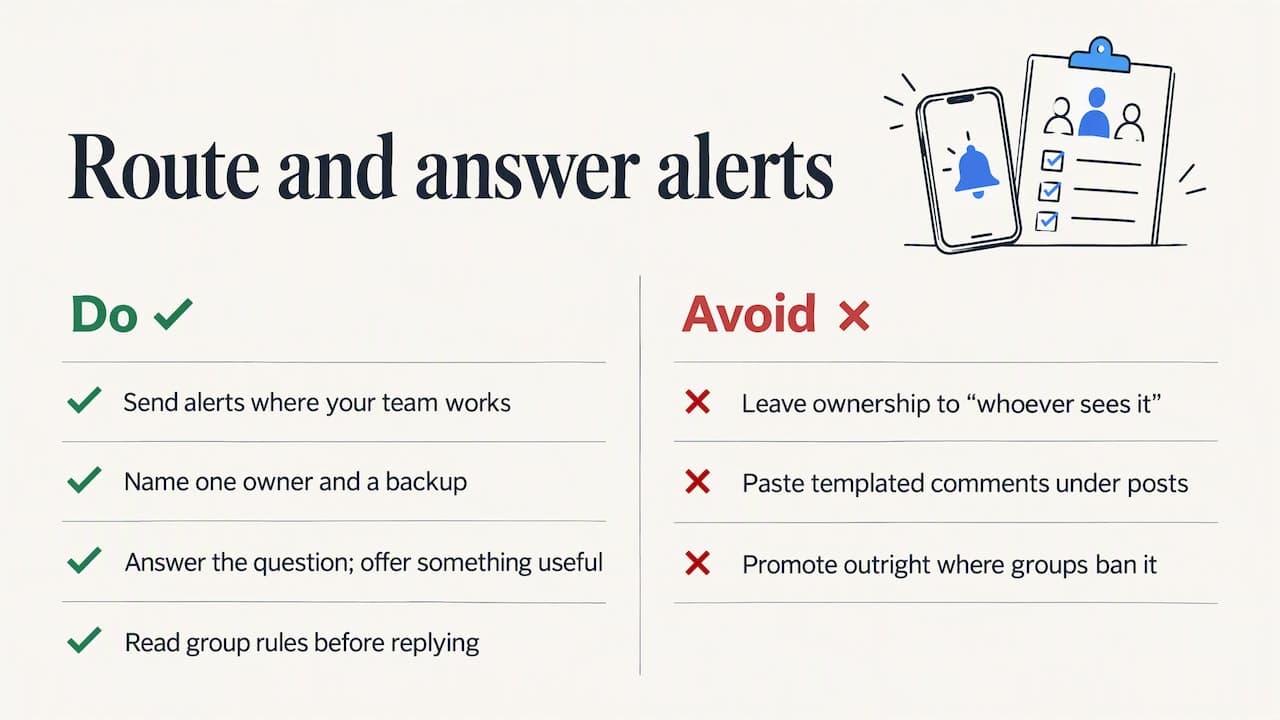
Who owns the reply. Name one person per stream, plus a backup. "Whoever sees it" means nobody replies.
What a good reply looks like. Answer the actual question first. Offer something useful, such as a price range, a quick diagnostic question or a link to a relevant page. Many groups ban outright promotion, so read the rules of each one before you reply. Where a group allows it, move to a private message only after the person engages.
Sending unsolicited commercial messages carries legal weight as well. The Federal Trade Commission has noted that some federal courts have applied CAN-SPAM to commercial messages sent through social network inboxes, feeds or walls. If you plan to message people at volume, talk to a lawyer who handles marketing law. For participation that stays on the right side of group etiquette, this piece on lead generation for local service businesses covers the broader approach.
One temptation to resist is automation of the reply itself. A templated comment pasted under fifty posts reads as spam and gets you removed from groups. Alerts should speed up a human, not replace one. If you are curious about the topic, we explain the trade-offs in auto commenting on Facebook group posts.
Our perspective
We built Groups Watcher on one belief: the leads in Facebook groups are real, but they expire quickly. A person who asks for a recommendation usually gets several answers in the first hour, and the later ones rarely win. So the metric we care about is not how many posts a tool can collect. It is how long it takes from the post going up to the right person seeing it.
That is why we alert within 60 seconds, why we filter for high-intent posts rather than dumping everything into your inbox, and why we never ask for your Facebook login. A monitoring setup that needs your personal account makes your livelihood depend on that account. We would rather you swap groups freely, run in any language and keep your profile entirely out of it.
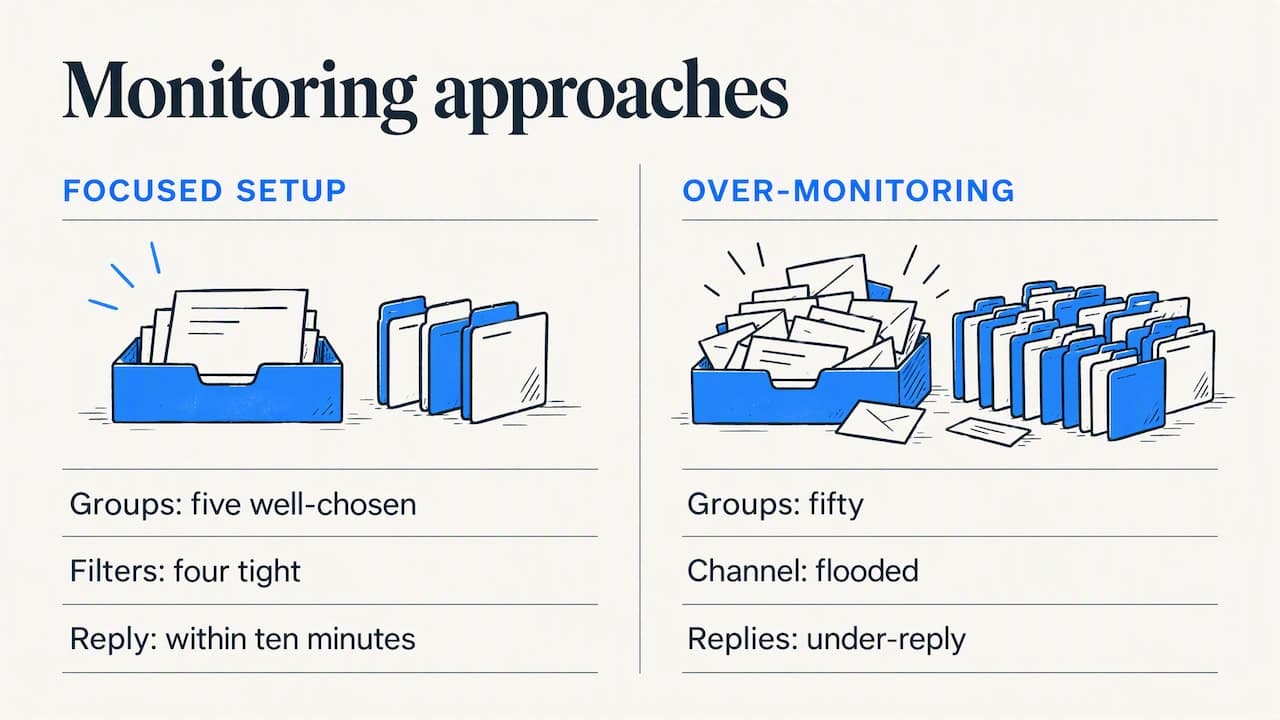
We also think most businesses over-monitor and under-reply. Five well-chosen groups and four tight filters, answered by a person within ten minutes, will beat fifty groups and a flooded channel every time.
— Groups Watcher Team
Try it on your own groups
Groups Watcher is a subscription: the Professional plan is $99 per month, and each extra group is $2 per month. You can start with a seven-day trial for $1. The plan includes the AI group finder, unlimited lead scoring and alerts, and the freedom to swap groups whenever a group stops paying off. Setup takes a couple of minutes, and you do not connect a Facebook account.
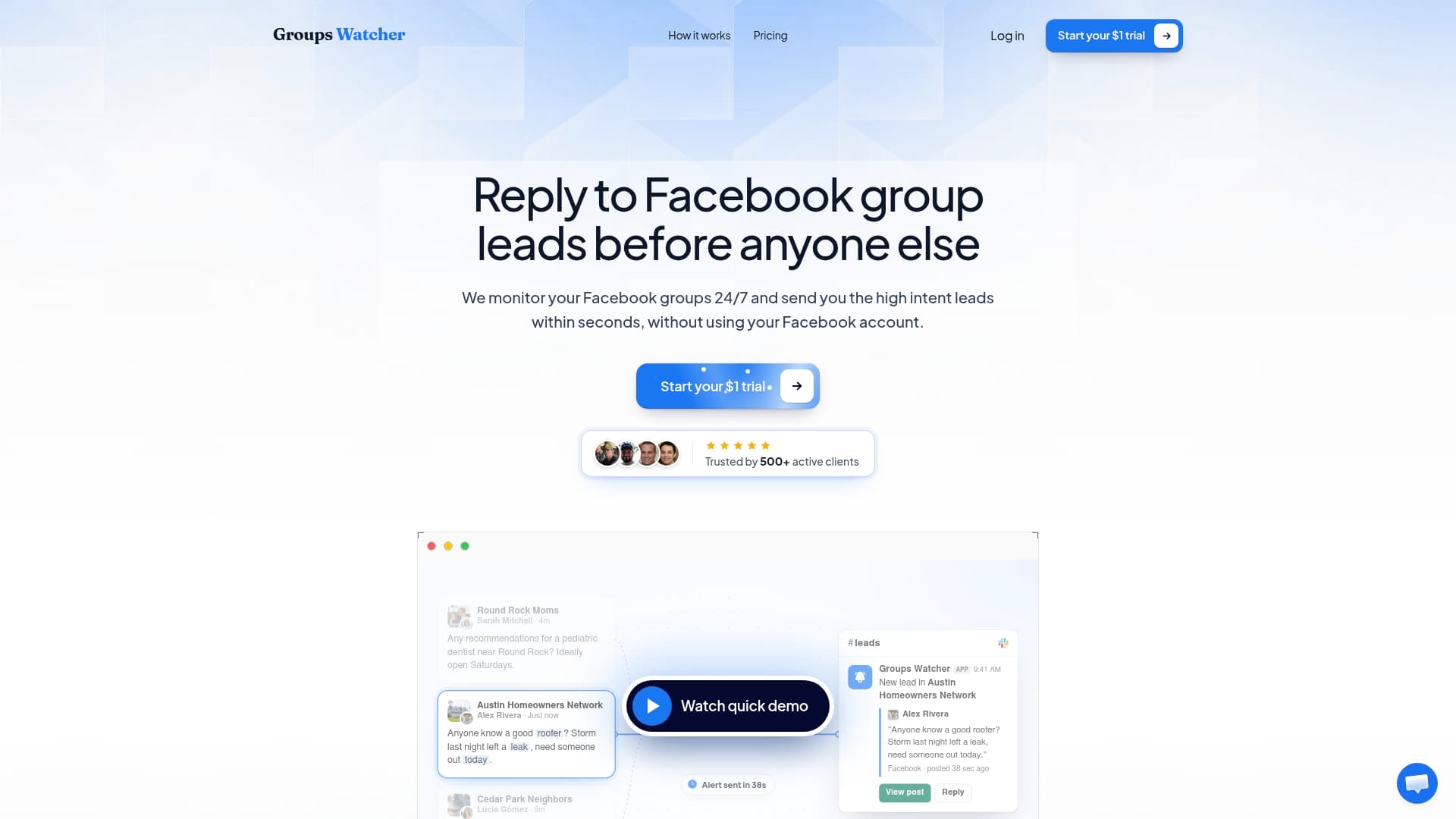
See what is included on the pricing page, or read how Facebook social listening works for teams who want the full picture across groups.
Is someone monitoring you on Facebook?
Readers also ask the reverse question. Facebook does not show you who looks at your profile or reads a public post, and no legitimate feature will reveal it. What you can do is reduce what is visible. Check who can see your posts, and treat anything posted in a public group as readable by anyone. The EFF's guidance on group privacy, linked above, is a good starting point for understanding what public, private and hidden groups expose.
For businesses, the honest framing is simple: monitoring tools read posts that are already visible in groups to members or to the public. They do not read private messages or personal profiles. If you worry about your own posts, avoid putting phone numbers, addresses or other personal details in group threads.
Choosing a method: a short decision guide
- You run the group and want moderation help: use admin keyword alerts.
- You only need to check your brand name now and then: use Search this group with an exact phrase.
- You belong to a few groups and can scroll them daily: notifications for highlights may be enough.
- You need leads from many groups, quickly, without risking your account: use a dedicated monitoring tool. Our comparison of what to look for in a keyword group tracking tool lists the criteria that matter, and the longer guide to monitoring Facebook groups for keywords and leads covers the full workflow.
Whichever you choose, run it for two weeks and count three things: alerts received, replies sent and conversations started. If the replies are not turning into conversations, the fix is almost always the filter or the response time, not the number of groups.
FAQ
Can I monitor Facebook groups for keywords if I am not an admin?
Yes. Admin keyword alerts only work in groups you manage, but a third-party monitoring tool can watch groups you do not run and alert you on matching posts. Groups Watcher does this without connecting to your Facebook account. Our guide on monitoring group keywords without admin access shows the steps.
Does monitoring work in private groups?
It depends on the method. Private groups limit what is visible to outsiders, and any tool should be able to tell you plainly how it reaches them. Groups Watcher monitors both public and private groups without needing your Facebook login.
How many keywords should I track?
Start with fewer than you think. Three or four tight phrases per stream, written the way customers talk, beat a long list of broad words. Review the first week of alerts, add negative words for the noise and expand only after the signal is clean.
How fast do I need to reply?
As fast as you realistically can. Recommendation threads fill with answers within the first hour, so a reply in minutes has a real advantage. Real-time alerts exist for exactly this reason: Groups Watcher delivers them within 60 seconds of a matching post.
Does it work in languages other than English?
Yes. Groups Watcher supports posts in any language, so you can watch Spanish-speaking neighborhood groups or international industry groups with the same setup. Write your keywords in the language the group uses.
Sources
- Facebook Expands Engagement Alerts for Groups, Adds New Alert Options (Social Media Today)
- Facebook Groups: Reducing Risks (Electronic Frontier Foundation)
- Monitoring and Reporting Inside Closed Groups and Messaging Apps (DataJournalism.com)
- Buying Intent Alert Tool for B2B SaaS (Syften)
- How to Find Buyer Intent Keywords (Alertly)
- Candid answers to CAN-SPAM questions (Federal Trade Commission)
Recommended
Stop checking Facebook groups by hand.
Groups Watcher finds the leads in your Facebook groups and sends them to you in 60 seconds, before your competitors reply, without using your Facebook account. 7 day trial for $1 with full features.