Sources of Leads in Facebook Groups: Where Buyers Show Up
Get Facebook group alerts in 60 seconds.
Groups Watcher finds the leads in your Facebook groups and sends them to you in 60 seconds, before your competitors reply, without using your Facebook account. 7 day trial for $1 with full features.
Start your $1 trialSources of Leads in Facebook Groups: Where Buyers Show Up
The best sources of leads in Facebook groups are local community groups, niche and interest groups, buy/sell groups, parent and school groups, and trade groups where your buyers (not just your peers) gather. The leads themselves are posts where someone names a need and asks who can help. The work is picking the right groups, recognizing those posts, and replying before anyone else does.
This guide walks through each group type, what it is good for, how to judge whether a group is worth your attention, and how to turn scattered posts into a steady flow of conversations.
TL;DR
- Match the group type to your business: local community groups for service businesses, niche and interest groups for e-commerce and specialists, trade groups only when your buyers are in them.
- A group's activity matters more than its size: recent posts, real comment threads and an active admin beat a big, quiet member list.
- The leads are requests that name the work and ask who can do it, or ask for a recommendation for what you sell. Advice questions, complaints and resolved requests are not leads.
- Speed decides who wins the conversation, so set up alerts instead of scrolling feeds by hand.
- Keep a simple record of every request: service, area, urgency, date and post link.
Table of Contents
- The six kinds of Facebook groups that produce leads
- Why groups work as a lead source
- How to find the right groups for your niche
- How to tell if a group is worth watching
- Which posts are real leads
- Keep a simple record of every request
- How to respond without sounding like an ad
- Monitoring groups without watching feeds all day
- Sources of leads by business type
- Our perspective
- Start monitoring your best groups
- FAQ
- Sources
The six kinds of Facebook groups that produce leads
Not every group is a lead source. SocialK's guide sorts the useful ones into town or neighborhood groups, parent or school groups, hobby groups, trade or professional groups, venue or event groups, and buy/sell groups. Each one produces a different kind of lead.
| Group type | Who posts | Best for | Typical lead post |
|---|---|---|---|
| Town or neighborhood | Residents | Plumbers, cleaners, movers, realtors, landscapers | "Can anyone recommend a roofer?" |
| Parent and school | Parents | Tutors, photographers, child care, party vendors | "Looking for a birthday party venue" |
| Hobby and interest | Enthusiasts | E-commerce brands, specialty retailers, coaches | "Where do I buy aftermarket parts for my truck?" |
| Trade and professional | Practitioners | B2B software, suppliers, consultants | "What tool do you use for this?" |
| Venue and event | Planners, couples | Wedding vendors, rental hosts, caterers | "Need a florist for June" |
| Buy/sell | Shoppers and sellers | Retailers, resellers, repair services | "ISO a used set of..." |
One caution from the same guide: trade groups can be full of peers rather than buyers. A software founder in a group for software founders will meet other founders. That is useful for learning, but your leads there come from the specific posts where someone asks for a solution like yours, not from the member list.
Local community groups
If you serve a geographic area, start here. Natural Poster's guide points out that people join local groups to deal with life in their area, so a lead from one is almost always inside your service area. That removes the most common time-waster in lead generation: answering someone you cannot serve.
A home services company can watch a dozen town groups and see requests for HVAC repair, gutter cleaning or a last-minute babysitter. We cover this approach in more depth in our guide to Facebook groups for local businesses.
Niche and interest groups
For e-commerce brands and specialists, geography matters less. The same guide notes that niche and interest groups let you reach buyers nationwide who already care about your category. A performance parts store does not need a town group. It needs the groups where truck owners ask what to buy and where to buy it.
The person asking "where do I find a cold air intake for my truck?" has already decided to buy. Your job is to be the answer.
Get Facebook group alerts in 60 seconds.
Groups Watcher finds the leads in your Facebook groups and sends them to you in 60 seconds, before your competitors reply, without using your Facebook account. 7 day trial for $1 with full features.
Start your $1 trialBuy/sell and recommendation groups
These groups are built around transactions, so intent is high by design. Shoppers post what they are looking for, and sellers answer. The volume is also high, which makes manual checking slow. This is where filters matter: you want only the posts that mention your product category, not every listing in the group.
Venue, event and wedding groups
Wedding vendors, short-term rental hosts and event suppliers find leads in groups tied to a venue, a city's wedding scene or a type of event. Requests here are time-sensitive. Someone planning a date wants quotes from three vendors by the weekend, and the first helpful reply tends to shape the shortlist.
Trade and professional groups
B2B brands and software companies can find leads here, but in a different way. The value is in posts where a member asks for a tool, complains about a current one, or names a competitor. Those are buying conversations. General chatter is not.
Why groups work as a lead source
Groups concentrate people around one topic, location or problem. BlueTone Media reported in January 2025 that posts in Facebook groups receive 18% more comments and 10% more shares than Page posts, and that group posts often reach more people organically. Whatever the exact figure in your market, the pattern is plain: group conversations are active, and active conversations are where someone says out loud that they need help.
The difference from an ad is who starts the conversation. In a group, the buyer raises their hand first. You are responding to a stated need, not interrupting.
How to find the right groups for your niche
Start with searches built from four kinds of terms, as Natural Poster suggests:
- Location terms: your city, county, neighborhood, or the towns you serve.
- Niche and industry terms: the category your product or service sits in.
- Buyer-intent terms: words like "recommendations," "looking for," "where to buy."
- Adjacent audiences: people who buy alongside your customers. A wedding photographer might look at engagement, venue and bridal groups.
After you join a few relevant groups, Facebook starts suggesting similar ones. That chain is a cheap way to widen the list.
Searching by hand is slow, and it only shows you what Facebook surfaces. Our AI-driven group finder is designed to suggest relevant groups for your niche so you spend your time on conversations, not on searching.
How to tell if a group is worth watching
A group with 50,000 members and no conversation is worth less than a group of 3,000 where people ask questions daily. PilotPoster's October 2026 guide says a useful group has recent posts from many members, real comment conversations and an active administrator, and that member count alone is not enough.
Run a five-minute check on any candidate group:
- Recency: Are the latest posts from this week, or from months ago?
- Variety of voices: Do many members start discussions, or only the admin?
- Real replies: Do comments contain conversation, or just one-word reactions?
- Admin presence: Is someone moderating and answering?
- Relevance: Is the content still about the topic the group was made for?
- Size: ZenMaid's guide suggests looking for at least 1,000 members unless you live in a very small town or rural area.
Then keep score. Track which groups produce requests you could actually answer, and drop the ones that do not. Because our service lets you swap groups at any time, you can rotate out quiet groups without penalty and replace them with better ones.
Which posts are real leads
The group is the source. The post is the lead. SMM Energy's guide on buying signals draws the line well: strong signals are a request that names the work and asks who can do it or when someone is available, and a recommendation request for a service you provide.
Examples of strong signals:
- "Does anyone know a good electrician who can come this week?"
- "Looking for a photographer for a 120-guest wedding in October."
- "Who sells lift kits for a 2019 Silverado that ship fast?"
- "We're unhappy with our current CRM. What are people using?"
Things that look like leads but usually are not:
- Advice-seeking: "Why is my faucet dripping?" may be a person who wants an explanation, not a plumber.
- Complaints: venting about a contractor is not a request to hire one.
- DIY questions: the person intends to do it themselves.
- Trade discussions: peers comparing notes.
- Resolved requests: a thread where someone already got three recommendations and chose one.
SMM Energy's own point is worth keeping in mind: specificity helps you prioritize but does not prove intent. A detailed post still needs a human to read it. That is also where identifying the right decision makers matters for B2B: a request from someone who owns the budget is worth more than one from someone gathering ideas.
For a deeper look at reading these posts, see our guide on how to find buyers asking in Facebook groups.
Keep a simple record of every request
Even with great alerts, you learn faster when you record what you see. A spreadsheet with columns for the service requested, area, urgency, date, post link and the text of the post works well, and a second tab can count which businesses get named in recommendation threads. You will learn which groups repeat, which requests are seasonal and which competitors are getting recommended.
The record also helps with follow-up. Requests go cold fast, and follow-up automation is built around the same idea: capture the need, note the details, and respond before interest fades. If you use a CRM, send each qualified lead straight into it. Our walkthrough on CRM integration for Facebook leads shows how.
How to respond without sounding like an ad
The reply decides whether a post becomes a customer. A few habits help in any group:
- Answer the question first. If someone asks about timing, give timing. If they ask for a recommendation, say what you do and where you work.
- Be specific and short. Two or three sentences that show you read the post beat a paragraph of company history.
- Offer a next step. A quick question, an offer to send details, or an invitation to message you.
- Read the group's rules before you reply, and follow how the group expects members to behave. Some groups welcome business replies on request posts; others prefer a comment that invites a private message.
- Do not paste the same text everywhere. Each reply should mention something from that person's post.
- Be a member, not just a seller. Answer questions when you have a helpful answer, even when nobody is buying.
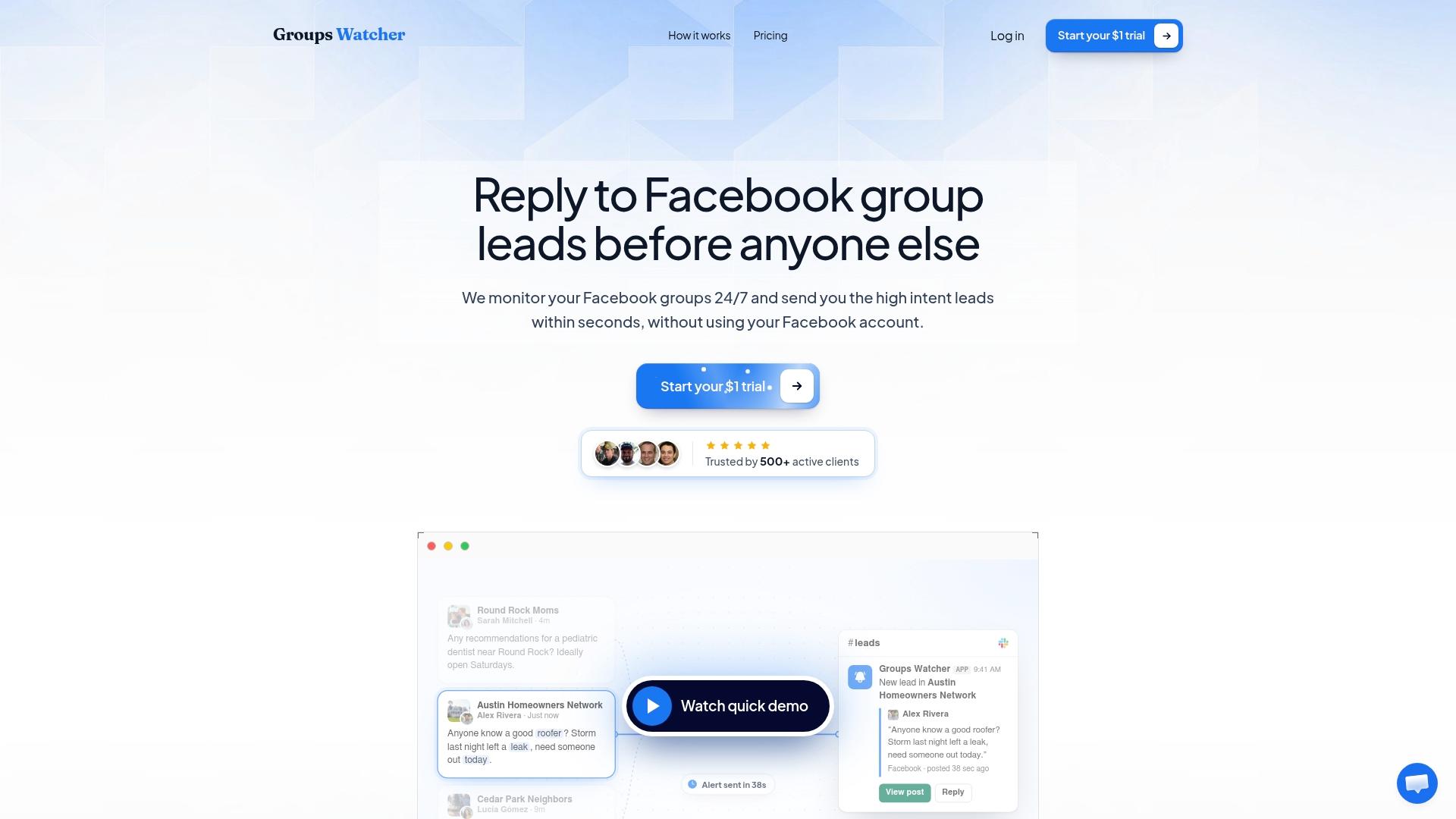
Timing matters as much as tone. The first helpful reply often gets the conversation. That is the reason we built Groups Watcher to send alerts within 60 seconds of a matching post.
Monitoring groups without watching feeds all day
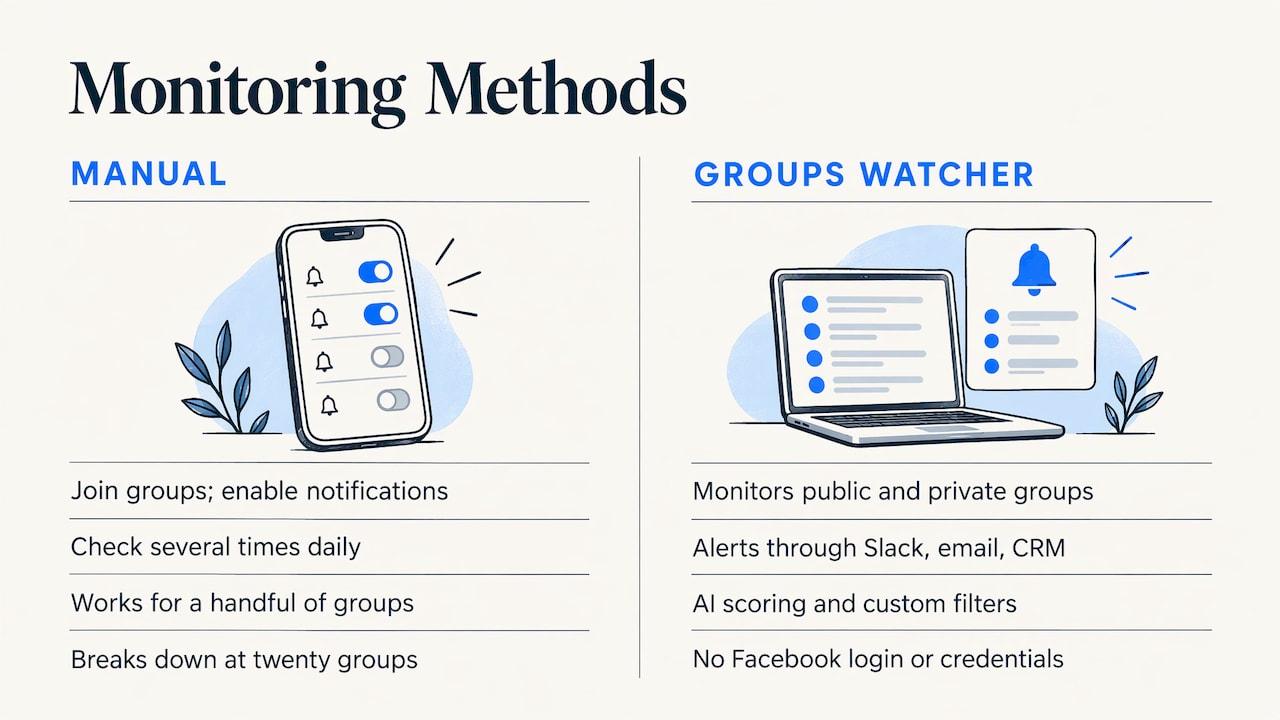
You can follow the manual route: join the groups, turn on notifications, and check them several times a day. It works for a handful of groups. It breaks down at twenty, when most posts are irrelevant and the good ones are buried.
Groups Watcher monitors public and private Facebook groups for posts that match your criteria and sends an alert through Slack, Discord, email, Teams, webhooks or a CRM integration. It does not need your Facebook account or credentials, so there is no login to manage. AI lead scoring and custom filters are designed to separate high-intent posts from general chatter, and the service supports posts in any language.
If you want the setup details, see how to set up Facebook group instant notifications, or read our guide to monitoring Facebook groups for lead generation.
Sources of leads by business type
The same groups do not work for everyone. Here is where to start.
- Local service businesses (plumbing, cleaning, HVAC, landscaping): town and neighborhood groups, plus parent and school groups for family-focused requests. See our page on Facebook lead alerts for local service businesses.
- Real estate professionals: local community groups, relocation groups and neighborhood buy/sell groups, where people ask about areas, movers and agents. We have a page on group lead alerts for real estate agents.
- Wedding, event and rental hosts: venue, wedding planning and city event groups.
- E-commerce and parts stores: hobby, vehicle and enthusiast groups where owners ask where to buy.
- B2B and software: trade groups, looking for tool requests and mentions of competitors.
Business owners who want to broaden their local visibility beyond groups can also look at local SEO for service businesses, which complements what you find in community conversations.
Our perspective
Most advice about Facebook groups tells you to join, post helpful content and wait. That is slow, and it hides the fact that the best leads are already being typed into groups every day by people ready to hire or buy.
We built Groups Watcher around one idea: the group is the source, and speed is the advantage. When someone posts a request, the business that answers first and answers well usually starts the conversation. Alerts that arrive within 60 seconds change who gets that first reply.
We also believe monitoring should not put your own account in the middle. Groups Watcher works without your Facebook credentials, so lead monitoring does not depend on your personal login. Combined with AI lead scoring, custom filters and the ability to swap groups at any time, you can test new sources of leads whenever a niche or season changes.
Our advice: pick groups where your buyers talk, define what a good lead looks like, and let alerts do the watching.
Groups Watcher Team
Start monitoring your best groups
Groups Watcher gives you AI-driven group discovery, AI lead scoring, custom filters and real-time alerts through the tools your team already uses. The Professional plan is $99 per month, extra groups are $2 per month per group, and you can start with a 7-day trial for $1. You can see the details on the pricing page or learn how Facebook social listening works.
If you are comparing tools first, our overview of lead alert software lays out the types available.
FAQ
Where do I find my leads on Facebook?
Look in the groups where your customers already talk: local community groups, niche and interest groups, buy/sell groups and event groups. Within them, the leads are posts that name a need and ask for a provider or a recommendation. Alerts help you catch those posts quickly instead of scrolling.
How many Facebook groups should I monitor?
Start with a small set you can judge properly, such as five to ten, and keep the ones that produce requests you can answer. Drop quiet groups and add new ones as you learn. With Groups Watcher you can swap groups at any time, and extra groups are $2 per month each.
Do I need a large group to get leads?
No. An engaged group of a few thousand members can beat a huge, quiet one. Check recent posts, real comment threads and an active admin before size. If you are in a small town or rural area, a smaller group can still be the best source you have.
How do I tell a lead from a general question?
A lead names the work and asks who can do it, when someone is available, or who to recommend. Advice questions, complaints, DIY questions and threads that already have an answer are rarely leads. AI lead scoring and filters help sort them, and a quick human read confirms the best ones.
Can I find leads in Facebook groups without using my own account?
Yes. Groups Watcher monitors groups for matching posts and sends alerts without needing your Facebook account or credentials. You still reply to prospects yourself, in the way each group expects.
Sources
- How to Find Facebook Groups for Your Business (Natural Poster)
- Facebook Groups for Business (SocialK)
- How to Leverage Facebook Groups for Local Business Leads (BlueTone Media)
- How to Find Facebook Groups to Join for Marketing in 2026 (PilotPoster)
- How to get leads from Facebook without buying ads (ZenMaid)
- Spotting Real Buying Signals in Local Group Posts (SMM Energy)
- Decision Makers in a Company: Who They Are and How to Find Them
- Follow-up automation that keeps leads from going cold
- Local SEO for small service businesses
Recommended
Stop checking Facebook groups by hand.
Groups Watcher finds the leads in your Facebook groups and sends them to you in 60 seconds, before your competitors reply, without using your Facebook account. 7 day trial for $1 with full features.