Finding Service Requests in Facebook Groups Before Competitors Do
Get Facebook group alerts in 60 seconds.
Groups Watcher finds the leads in your Facebook groups and sends them to you in 60 seconds, before your competitors reply, without using your Facebook account. 7 day trial for $1 with full features.
Start your $1 trialFinding Service Requests in Facebook Groups Before Competitors Do
Every day, people post things like "Need a reliable cleaner for a move-out this Friday" or "Who sells lift kits for a 2019 F-150?" in local and niche Facebook groups. The business that answers first, with a relevant reply, usually gets the conversation. The hard part is not finding groups. It is seeing the right post within minutes, among thousands of posts you have no reason to read. The most dependable way to do that is to stop scrolling and let a monitoring tool watch the groups for you and alert you when a post matches what you sell. That is what Groups Watcher does, without asking for your Facebook login.
This guide covers what a real service request looks like, how to find the groups where they appear, how to judge and answer a post, and how to set up a routine that does not eat your day.
TL;DR
- A service request worth chasing names a service, a place you cover and a timeframe. Vague "anyone know a plumber?" posts need a clarifying question first.
- On a live request, the first two or three responders get most of the attention, so speed decides who wins the conversation.
- Manual checking works for one or two groups. Beyond that, alerts on keywords save hours and stop you missing posts overnight or while you are on a job.
- Groups Watcher watches the groups you choose and sends an alert within 60 seconds through Slack, Discord, email, Teams, webhooks or your CRM, with no Facebook credentials required.
- Reply to what the person asked, in the thread, and keep it short and local.
Table of Contents
- What a service request in a Facebook group actually looks like
- Why the first replies win
- Step 1: Find groups where your customers ask
- Step 2: Decide what counts as a lead for you
- Step 3: Monitor without living in the feed
- Step 4: Score the post in 30 seconds
- Step 5: Reply like a neighbor, not an advertiser
- Examples by business type
- What it costs to run
- Start getting alerts for your own service requests
- Our perspective
- FAQ
- Sources
What a service request in a Facebook group actually looks like
A service request is a post where a member asks for a person or company to do something, or asks where to buy something. They come in a few recognizable forms:
- Direct hire: "Looking for a photographer for a wedding in Tampa, June 14th, budget around $2,500."
- Recommendation ask: "Who do you all use for lawn care in Frisco?"
- Product search: "Where can I find aftermarket exhaust parts for a Silverado that ship fast?"
- Competitor mention: a member complaining about, or asking for alternatives to, a vendor in your category.
- Urgent need: "Garage door spring just snapped, anyone available today?"
Not all of them deserve the same effort. One guide to buying signals in local group posts separates posts by specificity: a named service, a location and a timeframe make a request you can price and schedule, while a bare "any plumbers about?" needs a question back. It also sorts posts into types such as request to hire, request for advice, already resolved, complaint and DIY question, each with its own respond-or-skip handling.
That sorting is the real skill. Reading every post is not.
Why the first replies win
On an active request, attention concentrates early. A carpet cleaning marketing playbook notes that the first two or three responders get most of the attention on a live request, and that a group with 4,000 engaged local members beats a dead group of 40,000. Another local lead guide for fencing companies suggests responding to recommendation posts made within the last 24 to 48 hours, and says its clients see the best results in groups of 10,000 or more members.
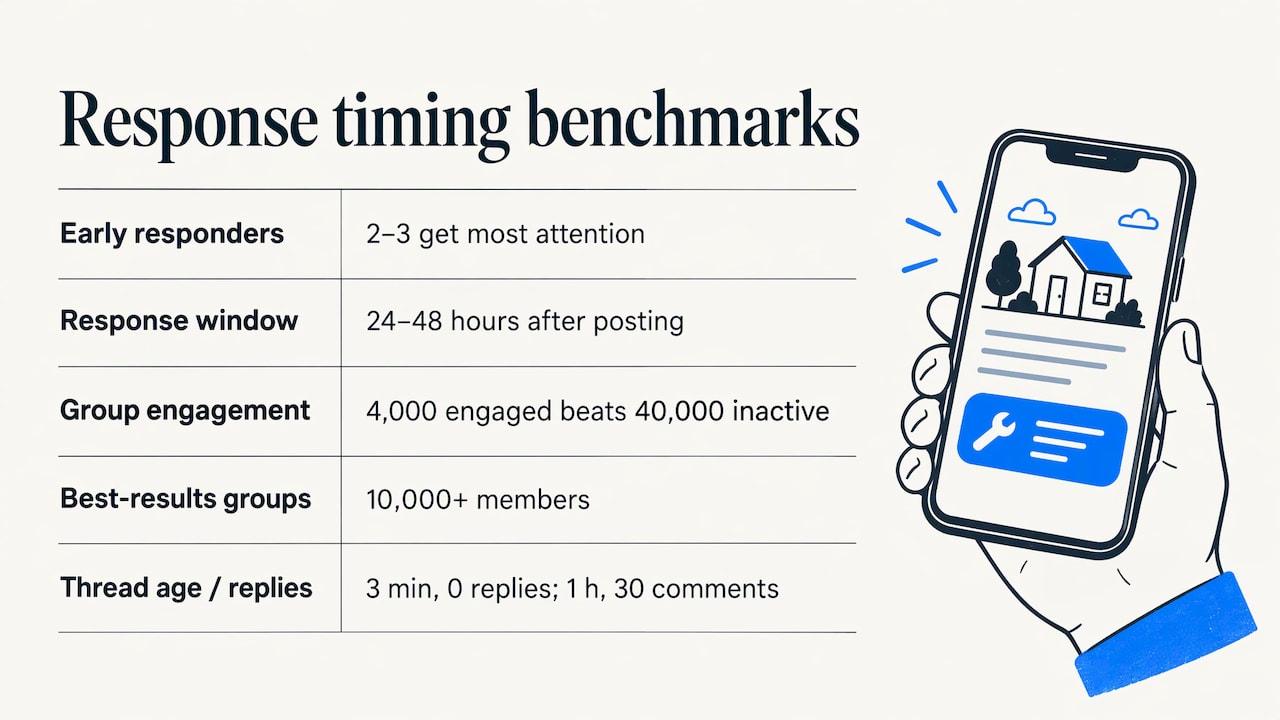
Take those as a range, not a rule. The practical point is the same: a request that is an hour old with 30 comments is a crowded thread, and one that is three minutes old with none is yours to lose. If you run a two-person crew, a boutique real estate team or an e-commerce store, you cannot sit in a feed all day. You need the post to come to you.
Step 1: Find groups where your customers ask
Start with where your buyers actually talk, not where your industry talks. A wedding florist gets more from a "Tampa Brides 2027" group than from a florist networking group. A performance parts store gets more from a truck-model owners group than from a general auto group.
Get Facebook group alerts in 60 seconds.
Groups Watcher finds the leads in your Facebook groups and sends them to you in 60 seconds, before your competitors reply, without using your Facebook account. 7 day trial for $1 with full features.
Start your $1 trialA few ways to build your list:
- Search by place. Use Facebook's search with the Groups filter and combine your city or county with words like community, neighbors, homeowners, buy sell trade or moms. Local guides for home service businesses suggest joining five to ten active local groups rather than dozens.
- Search by niche. Add the vehicle model, the hobby, the neighborhood, the property type or the event type your customers share.
- Search by intent words. Terms such as recommendations, referrals and "ask [city]" often surface groups built around asking for help, as one group-finding guide describes.
- Check activity. A group that posts around ten or more times a day is usually alive enough to be worth your attention. For a broader framework on judging whether a group is worth your time, see this resource on checking group quality before you commit.
Groups Watcher includes an AI-driven group finder, so you can discover relevant groups without hunting by hand, and you can swap groups at any time if one turns out quiet. Our guide to Facebook groups for local businesses walks through the selection process in more depth.
Step 2: Decide what counts as a lead for you
Before you set any alerts, write down your buying signals. This takes ten minutes and saves weeks of noise.
| Business type | Phrases that signal a request | Phrases worth ignoring |
|---|---|---|
| Cleaning company | "deep clean," "move-out cleaning," "need a cleaner," "recommend a cleaning service" | "I clean my own," "best cleaning hack" |
| Real estate agent | "looking for a realtor," "selling my house," "first-time buyer," "relocating to" | Listings from other agents, market commentary |
| Wedding vendor | "need a DJ," "photographer for," "venue recs," "date is" | "Just got married, thanks everyone" |
| Garage door company | "spring broke," "door won't open," "opener not working," "need repair" | "How do I lubricate my door" |
| Auto parts store | "where to buy," "aftermarket," "lift kit for," "anyone sell" | Show-and-tell build photos |
| B2B software | "alternative to," "looking for a tool that," a competitor's name plus "issues" | Job postings, self-promotion |
Three habits make the list work:
- Combine a need word with a context word. "Need" alone catches everything. "Need" plus your service plus your area catches requests.
- Include competitor names. A member complaining about another vendor is a request in disguise.
- Include misspellings and slang your customers use. People type "gutter cleaning" as "guter clening" more often than you would think.
Our post on Facebook group keyword alerts shows how to turn a list like this into working filters.
Step 3: Monitor without living in the feed
There are two ways to watch groups for requests.
By hand. Join the groups, turn on notifications, and run daily keyword searches inside each one. This works for a handful of groups and keeps you close to the community. Its weakness is timing: notifications bury requests under unrelated activity, and a daily search finds a post hours after the thread is already full.
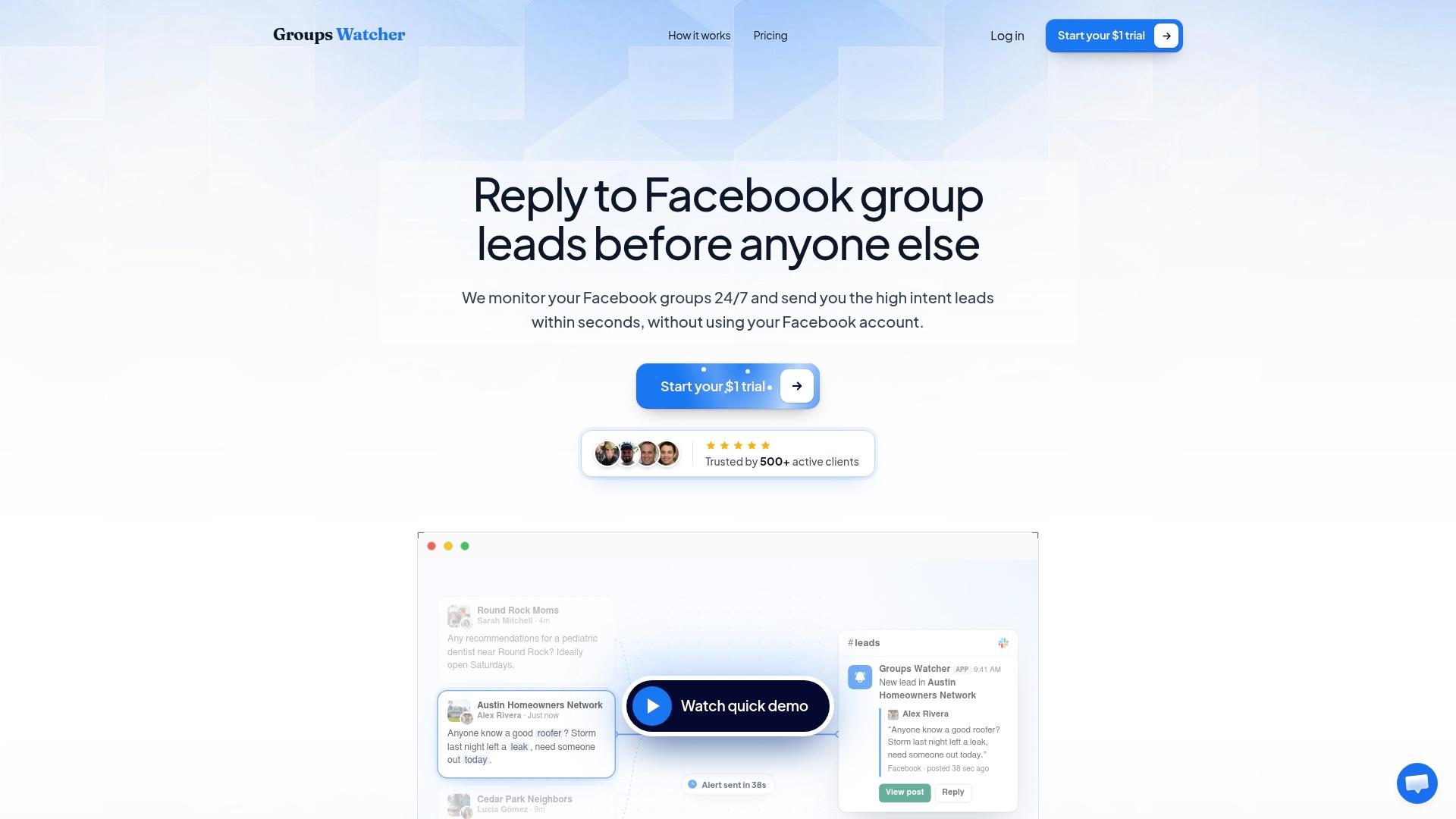
With alerts. You tell a monitoring tool which groups and which criteria matter, and it pings you the moment a matching post appears. With Groups Watcher, the alert arrives within 60 seconds of the post, and you choose where it lands: Slack, Discord, email, Microsoft Teams, a webhook, or your CRM, among 10+ channels.
Two details matter for real businesses:
- No Facebook account access. Groups Watcher works without your Facebook credentials, so your personal or business profile is never handed over to a third-party tool. That means there is no login to put at risk.
- Any language. Posts are matched in any language, which helps if you serve Spanish-speaking, Portuguese-speaking or other communities alongside English ones.
If you are not an admin of the groups you want to watch, that is fine. Our page on keyword alerts in Facebook groups without being an admin explains how that works, and the public group monitoring guide covers catching leads in 60 seconds.
Step 4: Score the post in 30 seconds
When an alert arrives, run a fast check before you type anything. Groups Watcher applies AI lead scoring to help you see which posts look like real buying intent, and you can then apply your own judgment with five questions:
- Is it a request or a conversation? "Who do you use for X?" is a request. "What do you think of X?" may be only a debate.
- Is it in your service area? If the person is forty miles outside your range, skip it or say so politely.
- Is there a timeframe? "This week" or "before the 20th" means they plan to buy soon.
- Is it already resolved? If the poster edited the post to say they hired someone, move on.
- Is it a good fit for your price point? A post asking for the cheapest option may not be your customer.
Here is a worked example. An alert reads: "Need someone to clean a 3-bedroom rental after tenants moved out, Kansas City, this weekend." The service is named, the place is clear and the deadline is two days away. That is a request you can quote. Compare it with "Anyone know a good cleaner?" posted in a group that covers three states. You would ask where the person is before investing time.
Step 5: Reply like a neighbor, not an advertiser
A good reply is short, specific to the post and easy to say yes to. Compare these:
- Weak: "We offer the best cleaning services in the area! Call us for a free quote at..."
- Better: "Hi Dana, we do move-out cleans in Kansas City and have a slot Saturday morning. Happy to quote if you tell me the square footage."
The second answers what the person asked, shows you cover their area and gives them one easy next step.
Some habits keep you welcome in a community:
- Reply in the thread first. The person asked publicly, so a public answer is the natural start. A local marketing playbook warns that cold DMs to members who never asked for your service risk a spam complaint, and that consent matters.
- Offer to continue in messages only once the person has shown interest in your answer.
- Stay on topic. A reply to a request is not an invitation to pitch something unrelated.
- Use a real person's voice. Local lead guides recommend replying from a personal profile rather than a business page, because members trust people more than logos.
- Skip posts that are not requests. Jumping into a complaint thread or a DIY question with a sales pitch costs you goodwill.
One more point. Do not reply to everything. A dozen well-chosen replies a week beat fifty generic ones.
Examples by business type
Home services. A garage door company sees "spring snapped, need help today" at 7:40 a.m. With an alert, a dispatcher replies by 7:41. Without one, the thread has six answers by lunch. We built a page on lead alerts for garage door companies and another for cleaning companies that show typical keywords.
Real estate. Agents can watch neighborhood and relocation groups for "looking for an agent," "thinking of selling," or questions about specific school districts. See Facebook group lead alerts for real estate agents.
Events and hospitality. Wedding vendors and short-term rental owners can watch bridal, event planning and travel groups for date-specific requests, where a timeframe is usually in the post itself.
E-commerce. A performance parts store can set alerts for model names plus phrases like "where to buy" or "anyone sell," and reply with a link to the exact part category.
B2B and software. Watch for "alternative to" and competitor names in industry groups, and answer the problem the person described instead of pitching features.
For a wider view of how this works for service businesses, our overview of Facebook lead alerts for local service businesses is a good next read.
What it costs to run
The Professional plan is $99 per month and includes access to monitoring, the AI group finder, and unlimited lead scoring and alerts. Extra groups are $2 per month per group. A 7-day trial costs $1 one-off, so you can see real alerts from your own groups before committing to a month. The pricing page has the current details.
To judge the value, use your own numbers. If an average job is worth a few hundred dollars, one extra booked request a month covers the plan.
Start getting alerts for your own service requests
If you want requests to come to you instead of searching for them, Groups Watcher is built for this. Pick your groups or let the AI group finder suggest them, set the phrases that signal a request, and choose the channel where you want the alert. No Facebook login is needed, and alerts reach you within 60 seconds. Start with the $1 trial on the pricing page.
If you want to see how it fits your category first, the local service business page shows examples, and the Facebook social listening page explains how monitoring covers mentions beyond direct requests.
Our perspective
Most businesses treat Facebook groups as a place to post. We think of them as a place to listen. People in a group tell you exactly what they need, in their own words, at the moment they need it. That is the best lead signal a small business can get.
The problem has always been attention. Nobody can read forty groups every hour. So requests get missed, and the business that happened to be scrolling wins the job. We designed Groups Watcher so that the business with the clearest idea of its customer wins it instead.
We also believe monitoring should not put your profile on the line. That is why Groups Watcher works without your Facebook credentials. You decide which groups to watch, you set the criteria, and an alert lands in Slack, Discord, email, Teams or your CRM within 60 seconds. What you do next, a helpful and human reply, is still yours.
Groups Watcher Team
FAQ
How do I find people asking for my services in Facebook groups?
Join or monitor local and niche groups where your customers talk, then watch for posts that name a service, a place and a timeframe. Searching each group by hand works for a few groups. A monitoring tool such as Groups Watcher alerts you within 60 seconds when a post matches your keywords, so you do not have to check manually.
What should I say when I answer a service request?
Answer what the person asked, confirm that you cover their area and offer one easy next step, such as a quote or an open date. Keep it to two or three sentences and reply in the thread first. Move to messages once the person shows interest.
Do I need to be a group admin to monitor requests?
No. Groups Watcher monitors groups for keywords whether or not you manage them, and it does not need your Facebook login. You choose the groups and set the criteria, and alerts go to the channel you pick.
How many groups should I watch?
Start with five to ten active groups close to your service area or niche, then adjust based on which ones produce real requests. Groups Watcher lets you swap groups at any time, and extra groups cost $2 per month each.
Does it work in languages other than English?
Yes. Groups Watcher supports posts in any language, so you can watch groups where members write in Spanish, Portuguese or other languages and still get alerts on your keywords.
Sources
- Spotting Real Buying Signals in Local Group Posts
- Carpet Cleaning Facebook Group Marketing Playbook
- How to Use Facebook Groups to Generate More Fencing Leads
- Facebook Groups for Home Service Businesses
- How to Find Facebook Groups for Your Business
- Facebook Marketing Strategy To Generate Handyman Leads
- Facebook Solo Ad Groups: Vet Vendors
Recommended
Stop checking Facebook groups by hand.
Groups Watcher finds the leads in your Facebook groups and sends them to you in 60 seconds, before your competitors reply, without using your Facebook account. 7 day trial for $1 with full features.