Safe Facebook Group Monitoring for Lead Alerts
Get Facebook group alerts in 60 seconds.
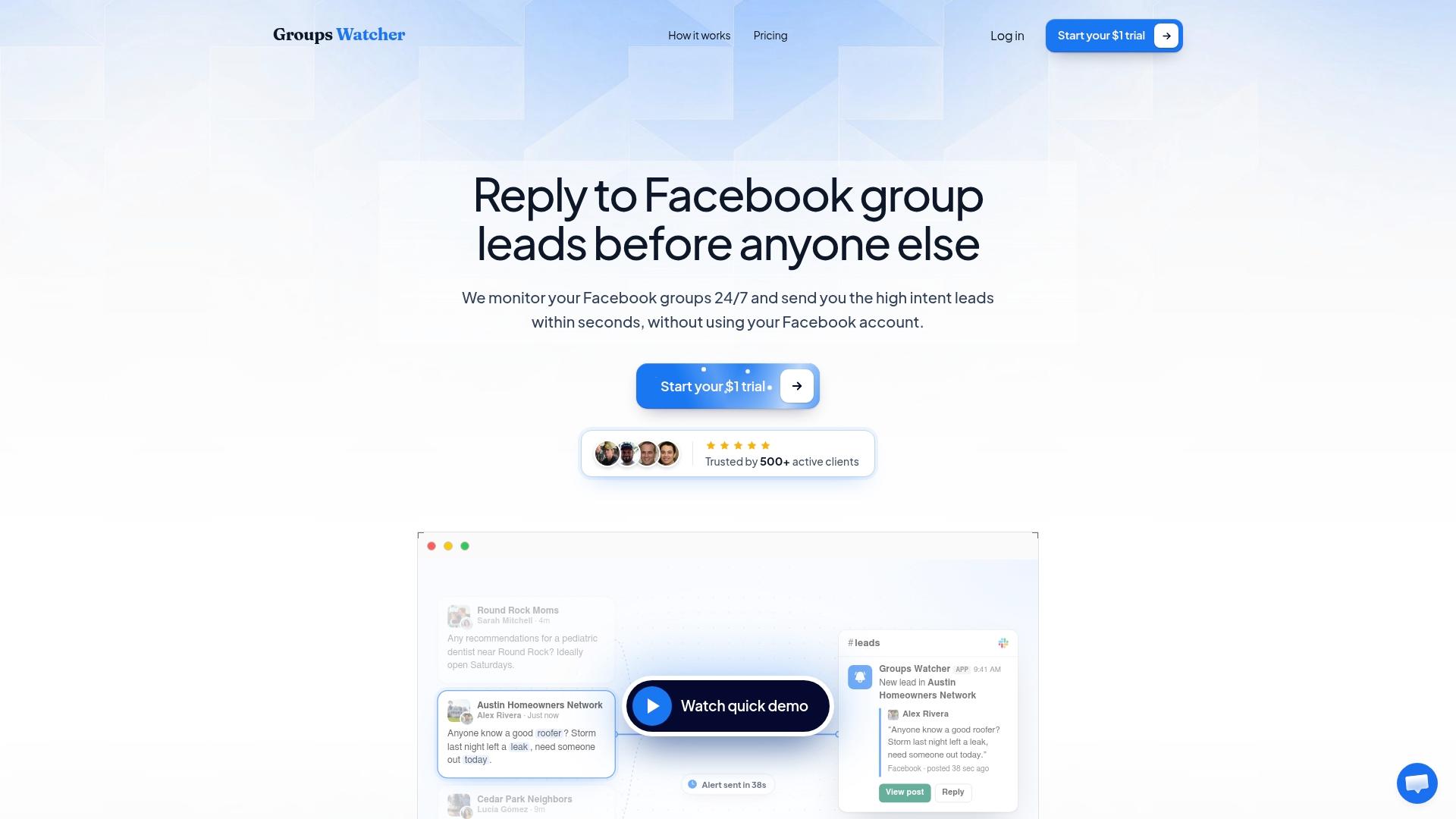
Groups Watcher finds the leads in your Facebook groups and sends them to you in 60 seconds, before your competitors reply, without using your Facebook account. 7 day trial for $1 with full features.
Start your $1 trialSafe Facebook Group Monitoring for Lead Alerts
Safe Facebook group monitoring comes down to three things: your own Facebook account never sits in the middle, you watch groups where buyers actually talk, and you handle what you collect like the customer data it is. Groups Watcher is built around the first one. It watches public and private groups for high-intent posts and alerts you within 60 seconds, without asking for your Facebook login or access to your account.
This guide walks through the whole routine for a U.S. business: what "safe" has to cover, how to pick groups, how to set filters that catch buyers instead of noise, where to send alerts, and how to check a post before you reply.
TL;DR
- Safe monitoring protects three things: your Facebook account, your data handling and your reputation in the group.
- Groups Watcher works without your Facebook credentials, so your personal or business profile is never part of the setup.
- Public groups show posts to anyone, while private groups show them only to members, so check which type you are watching and plan your outreach accordingly.
- Tight keyword and context filters, plus a 30-second check of the post and its author, keep your replies relevant and welcome.
- A $1 seven-day trial lets you run the full routine on your own groups before the $99 per month Professional plan starts.
Table of Contents
- What "safe" has to cover
- Why monitoring without your login is the safest setup
- Public and private groups: what you can see and do
- Choose groups where buyers actually post
- Set filters that catch buyers, not chatter
- Route alerts to the person who will answer
- Verify the post before you reply
- Handle lead data responsibly
- Your first week of safe monitoring
- Start with the $1 trial
- Our perspective
- FAQ
- Sources
What "safe" has to cover
Most people searching this phrase are worried about one thing: losing a Facebook account they use for their business. That is a fair worry, but it is only one of three risks.
Account risk. Any setup that needs your username, password or an active session from your profile ties your livelihood to that login. Groups Watcher is designed so there is nothing to tie: it does not use any Facebook credentials, which is how it avoids the account restrictions that come with login-based monitoring.
Data risk. An alert contains a person's name, words and sometimes a location or phone number. Once it lands in Slack, your CRM or a spreadsheet, it is personal information you are responsible for. Privacy rules in some states, California most notably, put clear duties on businesses that collect it. We cover those below.

Reputation risk. A reply that ignores what the person asked, or that lands in a group where promotion is unwelcome, costs you more than the lead is worth. Safe monitoring includes knowing when and how to answer.
Why monitoring without your login is the safest setup
The difference between tools is simple. Some need you to hand over a Facebook account so they can browse on your behalf. Others, like Groups Watcher, watch the groups you select and send you the matching posts, with no account connection at all.
With the second kind, three things follow in practice:
Get Facebook group alerts in 60 seconds.
Groups Watcher finds the leads in your Facebook groups and sends them to you in 60 seconds, before your competitors reply, without using your Facebook account. 7 day trial for $1 with full features.
Start your $1 trial- You do not have to join dozens of groups with a profile that carries your name and your business page.
- A teammate leaving the company does not take a logged-in session with them.
- You can swap groups at any time, because switching what you monitor is a setting, not a new profile to warm up.
Groups Watcher also supports posts in any language, which matters in markets like Miami, Houston or Los Angeles, where a buyer may well write in Spanish. For a closer look at the method, our guide on how to monitor Facebook groups safely goes through it step by step.
Public and private groups: what you can see and do
Knowing the group type tells you how visible a post is and how careful your reply should be. According to Meta's help pages, anyone on or off Facebook can see posts, comments and shares in a public group. In a private group, only current members can see the content and the member list, and joining requires admin approval unless the group has limited membership turned on.
What that means for lead work:
- Public groups are the simplest place to start. A post asking for a recommendation is already open to everyone, so a prompt, helpful answer feels natural. Our write-up on public Facebook group monitoring shows how to catch those posts in 60 seconds.
- Private groups often hold the most candid questions, because members feel among neighbors. Groups Watcher monitors private groups as well as public ones. Treat what you see there as shared among members, and keep your reply useful and low-key.
Group type can also change. Per the same Meta page, a private group can be switched to public, but earlier private content stays visible only to former members, admins and moderators. If a group you watch changes its settings, review how you engage there.
Choose groups where buyers actually post
Safe monitoring wastes no effort on dead groups. Before you add one, look at activity and geography. A ZenMaid guide on getting leads from Facebook groups, updated May 22, 2025, suggests groups of at least 1,000 members (smaller is fine in very small or rural areas), recent posts within the past 30 days, and coverage of your service area. Different marketers set higher bars: one painting-lead agency reports its best results with groups of 30,000 or more members and daily posts.
Use these as starting points, not rules. A 2,500-member town group where people ask "who can fix my deck?" twice a week beats a 60,000-member national group full of memes.
A practical shortlist by type of business:
- Real estate agents: neighborhood and city groups, relocation groups ("moving to Austin"), renter and landlord groups.
- Wedding and event vendors: local wedding planning groups, bridal groups, venue and vendor recommendation threads.
- Short-term rental owners: host communities, local travel groups, groups for visiting nurses or contractors who need stays.
- Ecommerce stores: enthusiast groups. A performance parts store watches truck and car build groups, where someone asks where to buy aftermarket parts.
- B2B and software brands: industry and role-based groups where people ask for tool recommendations or complain about a competitor.
Groups Watcher includes an AI-driven group finder to surface relevant groups, and extra groups beyond your plan cost $2 per month per group, so you can add a group when a niche proves itself and drop it when it goes quiet.
Set filters that catch buyers, not chatter
The filter is where monitoring either works or drowns you. Alert fatigue is the main reason teams stop looking at lead notifications, so build the filter around buying intent, not topic alone.
Start with intent phrases
People rarely write your product name. They write what they need. Typical intent phrases include "looking for," "can anyone recommend," "need a," "who do you use for," "quote," "switching from" and "where can I buy." Combine them with your category words:
- A wedding photographer: "photographer" with "recommend," "available," or "budget."
- A real estate agent: "realtor," "agent," "selling my house," "first-time buyer."
- A parts store: a vehicle model with "where to buy" or "cold air intake."
- A software brand: your competitor's name, plus words like "alternative," "too expensive" or "cancel."
Our guide to Facebook group keyword alerts covers building these lists, and the one on mention monitoring covers brand and competitor names.
Add context, then let scoring sort the rest
A keyword alone matches a recommendation request and a rant equally. Groups Watcher adds AI lead scoring and customizable filters on top of keywords, so posts that read like real buying intent rise to the top. Review your first week of alerts and adjust:
- Note which alerts you would have answered and which you ignored.
- Remove or narrow the keywords behind the ignored ones.
- Add the phrases you spotted in answered ones that you had not listed.
- Repeat weekly for the first month, then monthly.
If you want to catch replies as well as posts, see how to monitor comments in Facebook groups.
Route alerts to the person who will answer
Speed matters because a recommendation thread fills with answers quickly. The alert has to reach the person who can reply, in the tool they already watch.
Groups Watcher sends alerts through Slack, Discord, email, Microsoft Teams, webhooks and CRM integrations. A workable routing plan:
- Solo owner: email or a phone-friendly channel, so the alert reaches you between jobs.
- Sales team: a shared Slack or Teams channel, with the first person to react claiming the lead with an emoji.
- Multiple locations or services: separate channels per region or product, so a Dallas realtor does not see Seattle leads.
- Pipeline tracking: a CRM or webhook connection, so every lead has a record and a follow-up date.
The details are in our guide to alert integrations for Slack, Discord, email and CRM, and the instant notification setup page shows the setup flow. If you watch many groups at once, multiple group monitoring alerts explains how to keep them organized.
Verify the post before you reply
A fast alert still deserves a 30-second check. This is the step that keeps your outreach welcome.
- Read the whole post and its comments. Someone may already have given the answer, or the poster may have narrowed the request in a comment.
- Check location and timing. Does the person live in your service area, and is the need current? A post asking about a wedding date next week may be beyond your capacity.
- Look at the author's context. A real local member asking for help is a lead. A promoter posting "DM me" is not.
- Match your answer to the question. Mention one specific thing that fits their request, such as your open date, your inventory, or your neighborhood experience.
- Follow the tone of the group. Where promotion is unwelcome, answer helpfully and let your profile do the introducing. Where recommendations are the whole point of the thread, give a short, clear reply with how to reach you.
- Log it. Record the lead, the group and your reply in your CRM, so you know which groups pay off.
Access to read a group is not the same as permission to message everyone in it. One 2026 admin guide makes the point that reading access does not equal posting permission. Answer the people who asked, not everyone who is there.
Handle lead data responsibly
Once an alert lands in your inbox or CRM, you hold personal information. Keep it simple:
- Store only what you need to follow up: the post link, the person's name as shown, the request and your notes.
- Limit access to the people who respond to leads.
- Delete leads that go nowhere after a set period.
If you do business with California residents, the state's privacy regulations apply to covered businesses. The California Privacy Protection Agency's current CCPA regulations require a Notice at Collection from businesses that control the collection of personal information, and a pre-use notice with an opt-out link for businesses using automated decision-making technology in certain cases. Whether the rules cover you depends on your size and data volume, so ask your attorney. Baker McKenzie's attorneys, in their summary of California's 2025 privacy legislation, advise businesses to review how they collect and share data, update public disclosures, and make sure they can answer consumer privacy requests efficiently. Your privacy policy should describe how you handle inquiries that come from social channels.
Your first week of safe monitoring
Here is a plan that fits the trial.
- Day 1: pick 5 to 10 groups using the activity and location checks above, and add your intent phrases.
- Days 2 to 3: connect one alert channel and answer every relevant alert within minutes.
- Days 4 to 5: trim keywords that produced noise and add phrases you noticed.
- Days 6 to 7: count leads answered, conversations started and jobs or sales opened, group by group, and keep the best groups.
For the wider picture of how monitoring fits into your pipeline, see our quick guide to Facebook group lead monitoring. Local service businesses can also read about Facebook lead alerts for local service businesses.
Start with the $1 trial
Groups Watcher is a subscription: the Professional plan is $99 per month, with extra groups at $2 per month per group, and a 7-day trial for $1. It covers AI group discovery, AI lead scoring, and alerts through your chosen channels, without connecting a Facebook account. Pick a few groups where your buyers ask questions, set your phrases and see how fast the alerts arrive. See the plans and start the trial.
If you want to see how monitoring turns into a listening practice across groups, our Facebook social listening page explains the approach.
Our perspective
We built Groups Watcher on one belief: a business should never have to put its Facebook account on the line to hear a customer ask for what it sells.
The best leads in Facebook groups are time-sensitive. Someone asks for a photographer, a realtor, or a set of wheels, and within an hour the thread is full. The business that answers first, with something specific, usually wins the conversation. That is why our alerts arrive within 60 seconds, and why we send them where your team already works: Slack, Discord, email, Teams, webhooks and your CRM.
We also think safety and speed come from the same design choice. Because Groups Watcher needs no Facebook credentials, there is no login to protect, no session to share with a new hire and no profile to rebuild. You choose the groups, we watch them, and you can swap them whenever the market changes.
Pair that with AI scoring and sharp filters, and your day starts with a short list of people who are ready to buy instead of a feed to scroll.
Groups Watcher Team
FAQ
Is it safe to monitor Facebook groups for leads?
It is when your own account is not part of the setup, you choose active groups in your market, and you handle the information you collect carefully. Groups Watcher monitors groups without your Facebook credentials, so there is no login of yours involved. Reply only to people who asked, in a tone that suits the group.
Can I monitor private Facebook groups?
Yes. Groups Watcher monitors both public and private groups. Remember that in a private group, only members can see the content, so keep your replies helpful and in the spirit of the conversation.
Do I need to give Groups Watcher my Facebook password?
No. Groups Watcher works without your Facebook account or credentials. You pick the groups and the alert channels, and the alerts come to you.
How fast do alerts arrive, and where do they go?
Alerts are designed to reach you within 60 seconds of a matching post. You can receive them in Slack, Discord, email, Microsoft Teams, through webhooks, or in your CRM.
What does it cost to try?
The 7-day trial costs $1 one time. After that, the Professional plan is $99 per month, and each extra group is $2 per month. See the pricing page for the current plan details.
Sources
- Differences between public and private Facebook groups (Meta Help)
- How to get leads from Facebook without buying ads (ZenMaid)
- Facebook Group Rules: A Guide for Admins and Marketers (Group Posting)
- CCPA regulations, Title 11, Division 6 (California Privacy Protection Agency)
- US: Wrapping Up California's Busy Privacy and Cybersecurity Legislative Year (Baker McKenzie)
Recommended
Stop checking Facebook groups by hand.
Groups Watcher finds the leads in your Facebook groups and sends them to you in 60 seconds, before your competitors reply, without using your Facebook account. 7 day trial for $1 with full features.