Real-Time Facebook Group Alerts: Catch Buyers the Minute They Ask
Get Facebook group alerts in 60 seconds.
Groups Watcher finds the leads in your Facebook groups and sends them to you in 60 seconds, before your competitors reply, without using your Facebook account. 7 day trial for $1 with full features.
Start your $1 trialReal-Time Facebook Group Alerts: Catch Buyers the Minute They Ask
Someone in a local Facebook group posts, "Can anyone recommend a wedding photographer for June?" Within the hour, a dozen replies pile up, and the person has usually made a shortlist. Real-time Facebook group alerts exist to put you in that first handful of replies. Groups Watcher watches the groups you pick, sends an alert within 60 seconds when a post matches your criteria, and does it without asking for your Facebook login.
This guide explains how Facebook's own group notifications behave, what a lead-focused alert needs to do differently, and how to set up alerts for keywords, products, services and competitor mentions so that the right posts reach you in the tool your team already uses.
TL;DR
- Facebook's built-in group notifications are designed for members following a community, and they are filtered, scored and ranked before anything reaches your phone.
- A lead alert needs three things: speed, a filter for buying intent, and delivery to a place you actually look, such as Slack, Discord, email, Teams, a webhook or a CRM.
- Groups Watcher sends alerts within 60 seconds, scores posts with AI, works in any language and needs no Facebook credentials.
- Start with a $1, 7-day trial, then the Professional plan is $99 per month, with extra groups at $2 per month each.
Table of Contents
- How Facebook's own group notifications work
- Why the first replies win
- What a lead-focused alert needs to do
- What this looks like in different businesses
- How to set up real-time group alerts, step by step
- Writing alert criteria that find real requests
- Routing alerts so someone acts within minutes
- Try it on your own groups
- Our view: alerts should find leads, not add noise
- FAQ
- Sources
How Facebook's own group notifications work
Facebook lets a member choose how loudly a group speaks to them. Depending on the group, you can usually pick between all posts, highlights, posts from friends, or nothing at all. On desktop you open the group, use the Joined button and choose Manage notifications. In the mobile app the same menu sits behind the three-dot icon. The setting saves on its own.
That is enough to follow a community you care about. It is a different job from lead hunting, for three reasons.
Notifications are ranked, not just delivered. Meta explains that a notification starts when something happens in a group you follow, then passes through your settings, is scored by AI models and ranked, and a push alert goes to your device only if push is enabled in your device settings. The same page notes that the models and signals behind this change frequently. The system is built to decide what you personally are most likely to care about, not to hand you every post that mentions a keyword.
There is no keyword filter for members. The notification levels are about how many posts you see, not what the posts say. If you are in forty groups, "all posts" means forty groups of chatter, from memes to member introductions, and the one post asking for your service sits somewhere in the pile.
You have to be a member, and you have to be the one reading. Native alerts arrive on your personal account's phone. They do not post into a team Slack channel or a CRM, and they do not tell a colleague to jump in.
Group admins get a little more. The USDA's toolkit for WIC breastfeeding support groups, for example, describes new post notifications set to all posts as one of the options managers can turn on to keep up with their own community. That is moderation of a group you run. It does not help when the buyers are in groups you do not run.
Get Facebook group alerts in 60 seconds.
Groups Watcher finds the leads in your Facebook groups and sends them to you in 60 seconds, before your competitors reply, without using your Facebook account. 7 day trial for $1 with full features.
Start your $1 trialWhy the first replies win
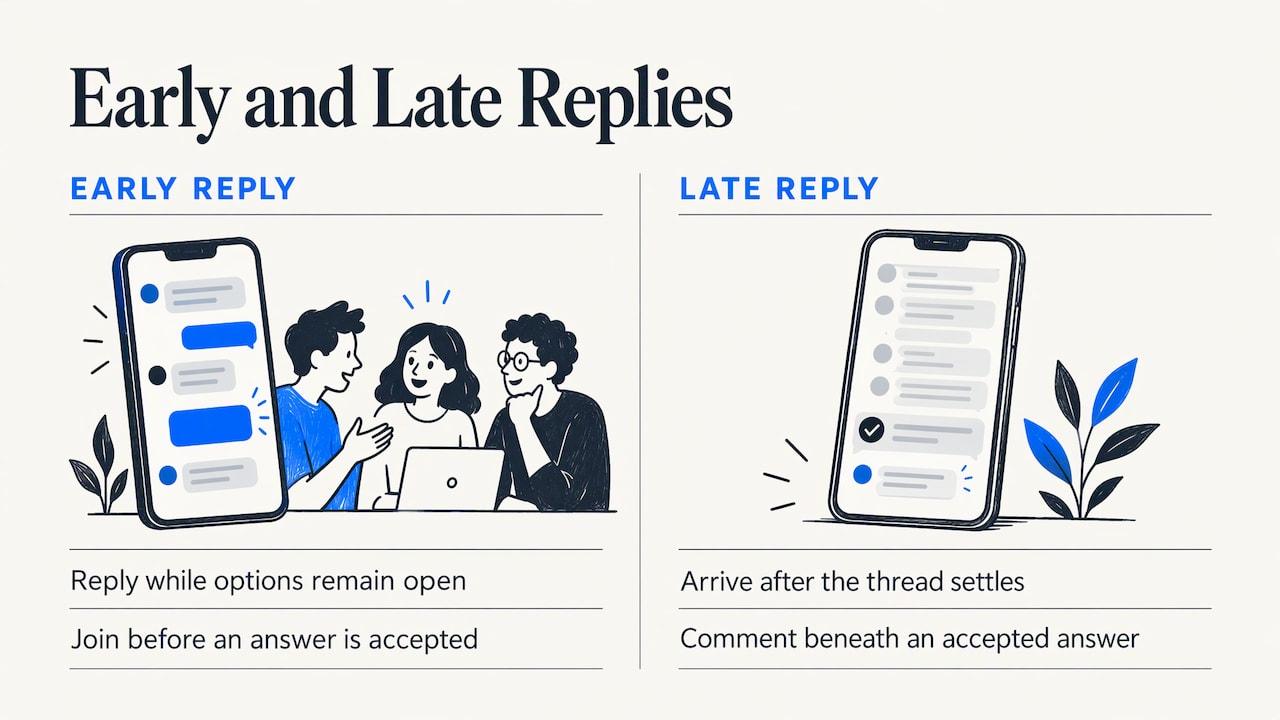
In a group, a request for a recommendation is a live conversation. Members answer quickly, the original poster reads replies as they land, and a post slides down the feed as newer ones arrive. A lead that you spot the next morning is often a thread that is already settled.
That is the practical case for real-time alerts: not more information, but earlier information. When you are among the first to respond, you are part of the decision. When you arrive late, you are one more comment under an answer that has already been accepted.
Speed alone creates its own problem, though. If every post in a busy group pings your phone, you will mute the channel within a day. A useful alert system pairs speed with selectivity.
What a lead-focused alert needs to do
Group notifications tell you that a group is active. A lead alert tells you that a person is asking for what you sell. Four features separate the two.
Match on what people actually write
People rarely type your product category. They write "anyone know where to find a lift kit for a 2019 Silverado," "looking for a realtor who knows the east side," or "our CRM is driving us crazy, what do you use?" Your alert criteria should reflect that language: the problem words, the question phrases, your product or service names and the names of your competitors.
Groups Watcher lets you set custom filters for exactly this and sends an alert only when a post in your selected groups matches them. It also supports posts in any language, which matters in local groups where requests are written in Spanish, Portuguese, Vietnamese or a mix.
Score intent, not just keywords
A keyword match is a starting point. "Wedding photographer" appears in advertisements, in congratulations and in people sharing their own photos. The post you want is the one where someone is asking for a photographer. Groups Watcher applies AI lead scoring to filter for high-intent posts, and lead scoring and alerts are unlimited on the plan, so a busy week does not run into a cap.
Deliver to where you work
An alert is only fast if somebody sees it. Groups Watcher sends alerts through Slack, Discord, email, Microsoft Teams, webhooks and CRM integrations, across more than ten channels in total. A solo owner can take them by email. A sales team can route them to a shared Slack channel. A developer can push them into an internal tool through a webhook.
Keep your personal account out of it
Groups Watcher monitors public and private groups without requiring access to your Facebook account or credentials. Nothing about your login is shared, so there is no password to hand over and no connected account to manage. That is a real advantage for agencies and teams, where several people would otherwise need to be signed in to the same profile.
What this looks like in different businesses
The same setup works across very different industries. What changes is the group list and the phrases.
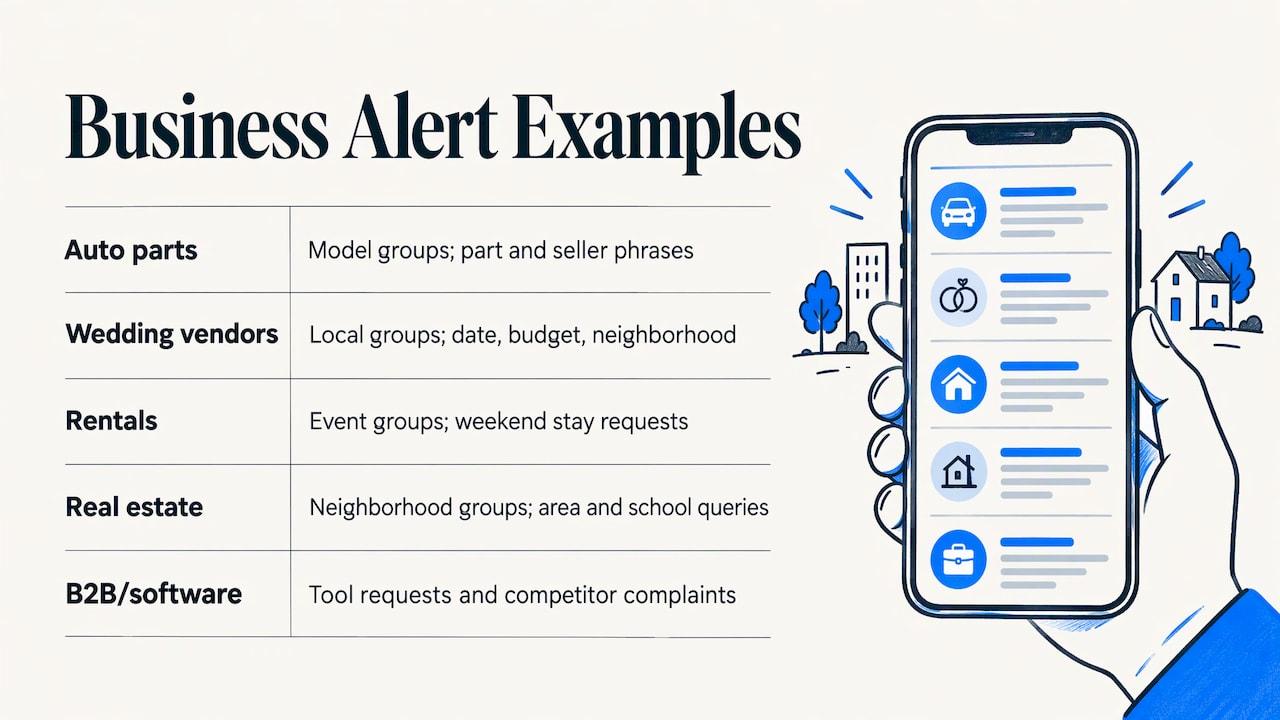
A performance auto parts store. The truck owner who asks where to find aftermarket parts is typing a purchase request in a model-specific group. Filters built around the part type, the model and phrases such as "where can I find" or "who sells" bring those posts to the top. A message from your store while the thread is young gets noticed.
A wedding vendor. Photographers, florists, DJs, venues and planners can watch local wedding and city community groups for requests tied to a date, a budget or a neighborhood. An alert in the first minute lets you reply with availability while the couple is still collecting options.
A short-term rental owner. Owners with an Airbnb can watch local event, wedding and travel groups for people looking for places to stay around a specific weekend. A request such as "need a place for eight people near the venue" is a booking in waiting.
A real estate professional. Agents can watch neighborhood and relocation groups for people asking about areas, schools, landlords or agents. Keywords for your service area and phrases about buying, renting or selling help to separate real requests from general chat.
A B2B or software brand. Two kinds of posts matter: someone asking for a tool in your category, and someone complaining about or naming a competitor. Tracking your competitors' names alongside problem phrases shows you the moments when a buyer is open to switching. For a deeper look at the idea, our guide to Facebook social listening covers how brand and competitor mentions fit into the picture.
How to set up real-time group alerts, step by step
Here is the routine from first group to first reply, with where each step tends to go wrong.
- Decide who you are listening for. Write down the three or four situations in which a buyer posts: the question they ask, the product or service they name, the place or date they mention. The common mistake is starting with your own marketing language. Buyers use their own words.
- Pick the groups. Look for groups where your buyers ask questions, not groups where your competitors advertise. Local groups, hobby and vehicle-specific groups, and industry groups are usually richer than huge general ones. Groups Watcher's AI-driven group finder suggests relevant groups so you do not have to search by hand, and the groups you monitor can be swapped at any time, so a group that stays quiet can be replaced without starting over.
- Set your filters. Add the phrases from step 1, including product names, service types, locations and competitor names. Start broad enough to catch variations, then tighten after a week of real alerts. Our walkthrough on setting up Facebook group keyword alerts goes through filter wording in more detail.
- Choose the channel. Send alerts to the place where the person who will reply already works: a Slack or Discord channel for a team, email for an owner, a CRM or webhook if leads should be logged automatically.
- Respond like a person. Answer the question first. Mention what you do only if it fits the question, and offer to continue by message if the poster is open to it. A short, relevant reply from someone who clearly read the post stands out from the template pitches buyers see everywhere.
- Review weekly. Look at which alerts led to conversations and which were noise, then adjust keywords and swap groups accordingly. Extra groups are $2 per month each, so widening your coverage is a small step.
If you are not an admin of the groups you want to watch, that is no obstacle. We explain the approach in our guide to keyword alerts in Facebook groups without being an admin.
Writing alert criteria that find real requests
The quality of your alerts depends on the quality of your phrases. A few patterns work across industries.
- Request phrases. "Looking for," "anyone recommend," "where can I find," "who does," "need a" and "any suggestions for" signal a person asking, not advertising.
- Specific nouns. The part number, the venue name, the neighborhood, the software category. Specific words cut noise more than any other change.
- Competitor names. Posts that name a competitor are often comparisons, complaints or requests for alternatives.
- Urgency words. "This weekend," "ASAP," "by Friday" or a date often mark a decision that is about to be made.
- Spelling variants and other languages. Because posts in any language are supported, add the phrases your local buyers really use.
Read your first fifty alerts closely. You will quickly see which phrases bring in useful posts and which ones bring in announcements, and you can refine from there.
Routing alerts so someone acts within minutes
The best filter is wasted if the alert lands in an inbox nobody opens until the afternoon. Treat routing as part of the setup.
- Solo owner: email or a Slack channel on your phone, with notifications switched on for that one channel only.
- Small team: one shared channel in Slack, Discord or Teams, with a simple rule: the first person to react with an emoji owns the reply.
- Sales team with a CRM: send alerts through a CRM integration or webhook so each lead is logged with the post, the poster and the time, and follow-up does not depend on memory.
- Agency: use a separate channel for each client so replies are quick and nobody has to sort by account.
Our overview of live alerts from Facebook groups shows how the 60-second flow works in practice.
Try it on your own groups
If you are ready to see what your own groups produce, the $1, 7-day trial of Groups Watcher gives you a week of alerts to judge by. After that, the Professional plan is $99 per month and includes monitoring, the AI group finder, and unlimited lead scoring and alerts. Extra groups are $2 per month per group.
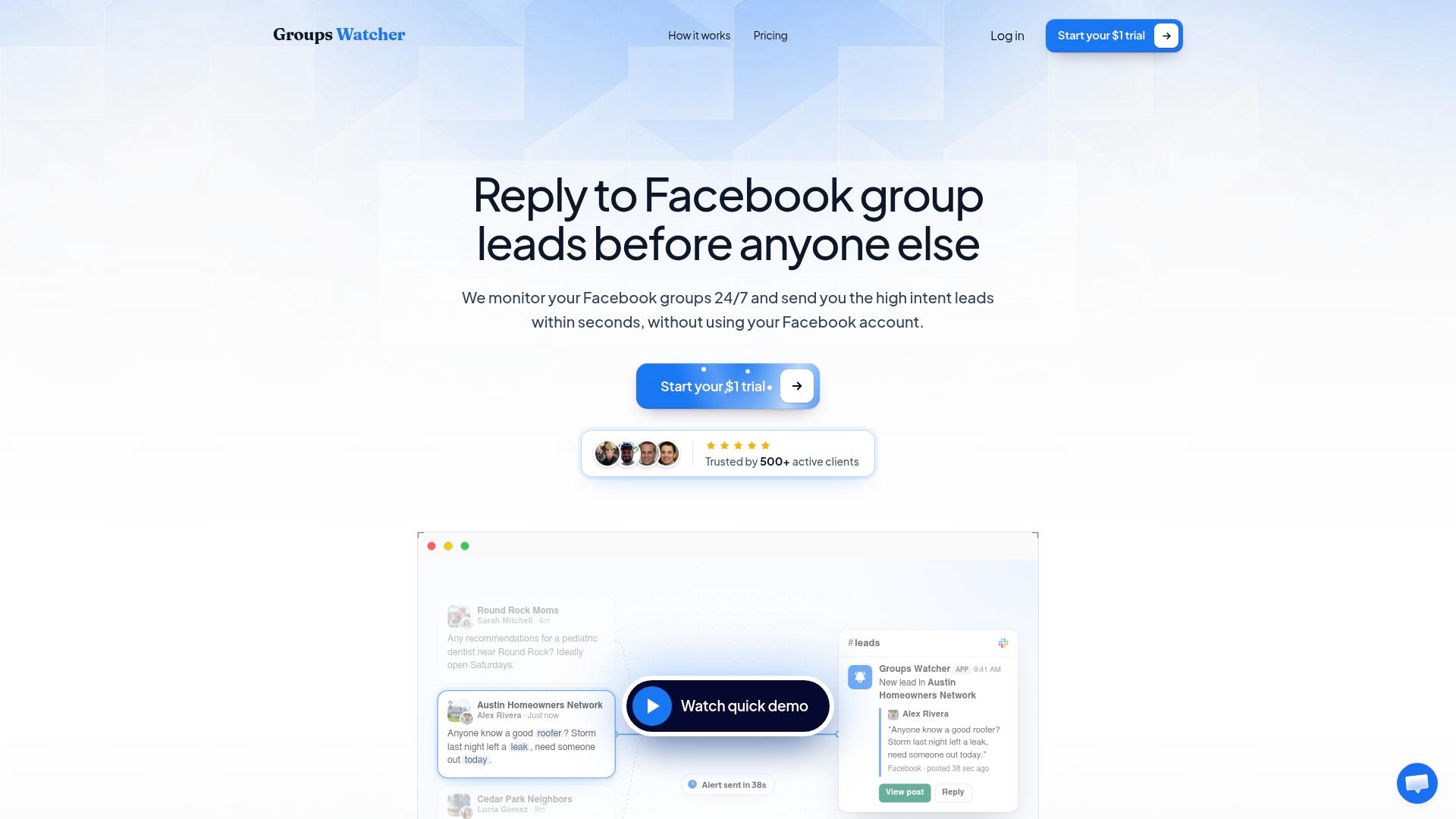
You can start from the Groups Watcher homepage, choose your groups, set your phrases and pick the channel where alerts should arrive.
Our view: alerts should find leads, not add noise
Most people who search for Facebook group alerts begin in the notification settings, and that makes sense. But a notification setting answers the question "how often do I want to hear from this group?" A business owner is asking a different question: "who in these groups wants to buy what I sell, right now?"
We built Groups Watcher around that second question. Alerts arrive within 60 seconds of a matching post. AI scoring filters for high intent so that your channel carries requests, not chatter. Filters work in any language, and alerts go to Slack, Discord, email, Teams, webhooks and CRMs, so the lead reaches the person who can answer it.
We also think the setup should not put your own profile in the middle. Groups Watcher works without your Facebook credentials, so your account is not part of the monitoring, and you can swap groups whenever your market shifts.
The result we aim for is simple: you see the post while the conversation is still open, and you answer first.
Groups Watcher Team
FAQ
Can I get an alert for every new post in a Facebook group?
Yes, inside Facebook a member can choose the all posts level for a group, and managers can turn on new post notifications for groups they run. Those alerts cover every post, with no filter for what it says, and Facebook still filters and ranks notifications before pushing them. For leads, a keyword and intent filter that sends only matching posts works better, and that is what Groups Watcher does.
How fast are Groups Watcher alerts?
Groups Watcher sends an alert within 60 seconds when a post in a monitored group matches your criteria. You choose where it arrives: Slack, Discord, email, Teams, a webhook or a CRM integration. That timing lets you reply while the thread is still new.
Do I need to give Groups Watcher my Facebook login?
No. Groups Watcher monitors groups without requiring access to your Facebook account or credentials. You select the groups and your criteria, and the alerts come to the channels you choose. You can read more in our guide to group alerts without being a member.
Can I set alerts for competitor names or specific products?
Yes. You can set custom filters for product names, services, locations, problem phrases and competitor names, and AI lead scoring helps surface the posts where someone is actually asking for a solution. Posts in any language are supported, so the same setup works for local and international groups.
How much does it cost to monitor more groups?
The Professional plan is $99 per month. Each extra group is $2 per month, and you can swap groups at any time. A $1, 7-day trial lets you start before committing to the plan.
Sources
- Facebook Notifications, Meta Transparency Center
- WIC Breastfeeding Facebook Support Groups Toolkit, USDA
Recommended
Stop checking Facebook groups by hand.
Groups Watcher finds the leads in your Facebook groups and sends them to you in 60 seconds, before your competitors reply, without using your Facebook account. 7 day trial for $1 with full features.