Multiple Group Monitoring Alerts for Facebook Groups
Get Facebook group alerts in 60 seconds.
Groups Watcher finds the leads in your Facebook groups and sends them to you in 60 seconds, before your competitors reply, without using your Facebook account. 7 day trial for $1 with full features.
Start your $1 trialMultiple Group Monitoring Alerts for Facebook Groups
To monitor many Facebook groups at once, you need one place where every group feeds the same set of keyword and intent filters, and one alert stream that sorts matches by channel and priority. Checking groups by hand stops working at around five. Buying questions get buried in minutes, and you find them hours after a competitor has answered. This guide shows how to set up multi-group alerts that stay quiet until a real prospect posts.
TL;DR
- Treat your groups as one portfolio: one set of intent filters applied across all of them, with a few group-specific tweaks.
- Pick groups for relevance and activity first, size second. Join or follow only those where your buyers ask questions.
- Send alerts to the channel your team already lives in, such as Slack, Discord, email, Teams or a CRM, and tune filters whenever alerts go unanswered.
- Reply fast and helpfully, following each group's rules, not with a pitch.
- Groups Watcher watches public and private groups without needing your Facebook login, and alerts arrive within 60 seconds.
Table of Contents
- Why watching many groups breaks down
- How to monitor multiple Facebook groups for leads
- Keep alert volume useful as you add groups
- Do you need to join every group, or use your own account?
- Beyond leads: mentions of your brand and competitors
- Replying without sounding like an ad
- We've seen the same pattern across industries
- Try it on your own groups
- Industry setups worth copying
- A 30-day rollout plan
- FAQ
- Sources
Why watching many groups breaks down
One group is easy. You open it, scroll, and spot the post asking for a recommendation. Ten groups is a different job. Each has its own rhythm, its own posting hours and its own noise: memes, self-promotion, polls, off-topic arguments. The posts you care about are a tiny share of the feed.
Three things go wrong in practice:
- Missed posts. A request like "anyone know a good cleaner in Plano?" can collect a dozen answers within an hour. If you arrive on the second page of comments, the buyer has usually chosen.
- Alert overload. The fix many people reach for is to notify on everything. Within a week the notifications get muted, and the muting is worse than not having them.
- Scattered effort. Different filters in different groups, different people checking different tabs, no record of who replied to what.
The answer is not more effort. It is a monitoring setup that treats all your groups together and only interrupts you when a post looks like a sale.
How to monitor multiple Facebook groups for leads
The basic design has four parts: a group list, a filter set, an alert route and a reply routine. Get each right and adding the twentieth group costs almost nothing.
Step 1: Build a group list by buyer, not by topic
Start from the person who pays you, not from your industry label. A wedding photographer does not need "photography" groups. They need groups where engaged couples and wedding planners ask for vendor recommendations. A performance parts store does not need general car groups. It needs groups for specific truck models, where owners ask where to find aftermarket parts.
A few guidelines when choosing:
- Active conversation. Look for daily posts with real comments, not just announcements.
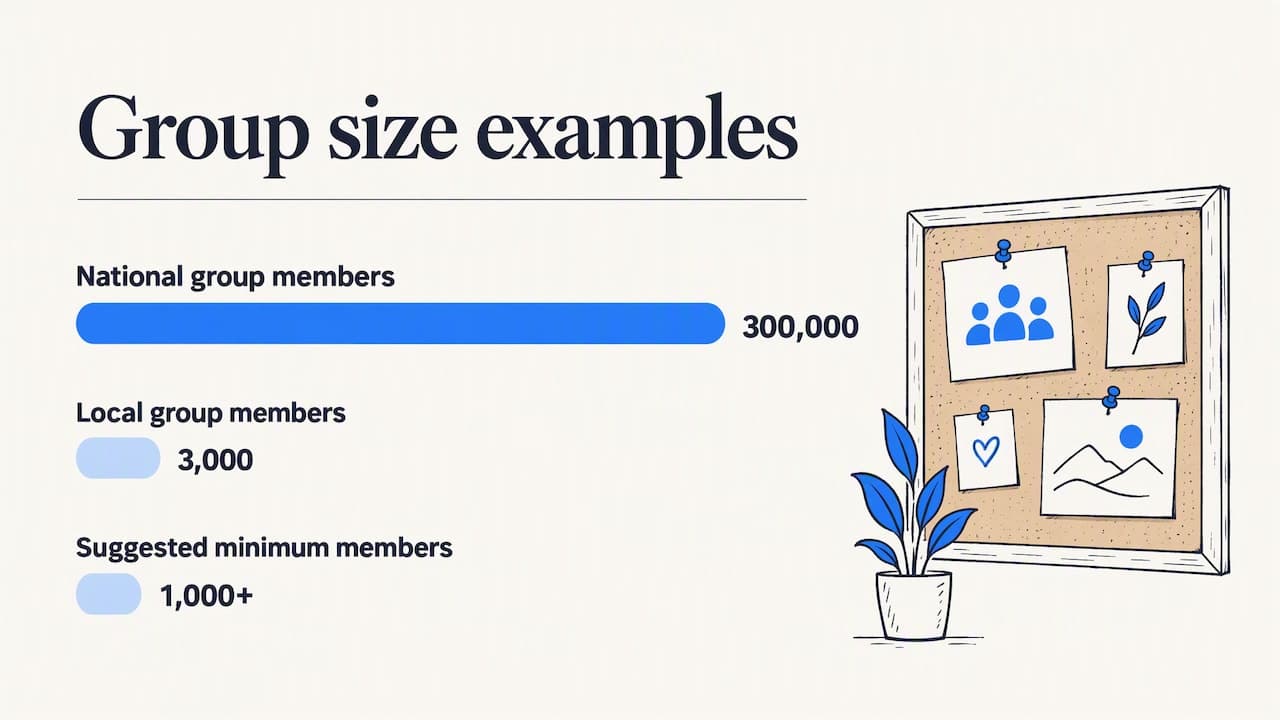
- Members in your service area. For local businesses, a group of 3,000 people in your metro beats a national group of 300,000. One local marketing guide suggests groups of at least 1,000 members, with an exception for very small towns and rural areas, along with active conversations and members in your service area, per ZenMaid's guide to getting leads from Facebook.
- Phrases buyers actually type. The same guide advises searching for the phrases your ideal customer would use, such as "can anyone recommend." That also works for finding groups: search for audience or problem phrases rather than broad industry labels, then apply the Groups filter, as PilotPoster's group-finding guide recommends.
- Mix of group types. Include local community groups, niche interest groups, and groups where your competitors' customers complain.
Do not spend a month agonizing over the perfect list. Start with a dozen candidates, watch what they produce, and swap out the weak ones. Groups Watcher lets you swap groups at any time, and its AI group finder suggests candidates so you are not relying on manual searching alone.
Get Facebook group alerts in 60 seconds.
Groups Watcher finds the leads in your Facebook groups and sends them to you in 60 seconds, before your competitors reply, without using your Facebook account. 7 day trial for $1 with full features.
Start your $1 trialStep 2: Write one filter set and reuse it
A filter set is the list of words and patterns that make a post worth your attention. Build it in three layers:
| Layer | What it catches | Example for a cleaning company |
|---|---|---|
| Intent phrases | The way people ask for help | "looking for", "can anyone recommend", "need a", "who do you use" |
| Service terms | What you actually sell | "deep clean", "move out", "house cleaner", "maid" |
| Competitor or pain terms | People unhappy with the alternative | Competitor names, "cancelled on me", "no show" |
An alert should fire when a post combines intent with a service term, not when either shows up alone. "Cleaning" alone matches cleaning tips, product reviews and job-seekers. "Recommend" plus "cleaner" matches a buyer.
For a deeper walkthrough of how keyword rules work, see our guide to Facebook group keyword alerts. If you are not an admin of the groups you follow, this explanation of keyword alerts without admin access covers what is possible.
On top of keywords, AI lead scoring helps. Instead of matching strings only, the tool reads the post and rates how likely it is to be a real request. That is what keeps volume manageable when you scale from five groups to fifty, and it supports posts in any language, which matters in multilingual local communities.
Step 3: Decide where alerts land
The best channel is the one someone already checks within minutes. Groups Watcher sends alerts through Slack, Discord, email, Teams, webhooks and CRM integrations, so you can pick based on how your team works:
- Solo owner on the move: email or a private Slack channel on your phone.
- Small sales team: a shared Slack or Teams channel, so whoever is free claims the lead.
- Agency or multi-brand operation: one channel per client or per service line.
- Pipeline-driven teams: webhooks or a CRM integration so every match becomes a record automatically.
Splitting by channel is the simplest form of alert grouping. A real estate team might send buyer-side requests to one channel and renter requests to another, so each agent sees only what they can act on. Our page on lead alerts for real estate agents shows how that looks for that industry.
Step 4: Create a reply routine
An alert with no owner is just noise. Decide in advance:
- Who answers first, and what is the target response time?
- What counts as a good reply (a helpful answer, a question, a link to a relevant page)?
- Where do you log the outcome, so you learn which groups and filters actually produce customers?
Speed matters because alerts arrive within 60 seconds of a matching post, which means you can be among the first answers rather than the fifteenth. That advantage is easy to waste if the alert sits in an inbox until tomorrow.
Keep alert volume useful as you add groups
Every new group adds posts. Without upkeep, the signal-to-noise ratio slides and people begin to ignore the channel. Observability teams have dealt with this for years, and their rule carries over well. New Relic's documentation on managing alert quality advises measuring alert volume and engagement, and removing or changing alerts that do not lead to investigation or action. For leads, "action" means a reply.
A simple weekly review does the job:
- Count. How many alerts came in, per group?
- Mark. How many did someone reply to?
- Cut or refine. A group with plenty of alerts and no replies needs tighter filters or should be swapped out. A group with few alerts and several wins deserves more keywords, not fewer.
- Add. If you keep finding leads by hand that the alerts missed, add the phrase that appeared in those posts.
A few more habits keep the stream clean:
- Negative terms. Exclude words that signal the wrong audience, such as "hiring", "free", "giveaway" or "for sale" if you are not a seller.
- Separate high and low intent. Route "need someone today" posts to the loud channel and softer research posts ("thinking about…") to a daily digest.
- Don't mute, tune. Muting a channel is a silent failure. Tightening a filter is a fix.
A worked example: a local service business with 12 groups
Imagine a cleaning company in a mid-sized US metro. It follows 12 groups: four neighborhood groups, three moms' groups, two landlord and property manager groups, two relocation groups and one for local small businesses.
The owner writes one filter: intent phrases ("recommend", "looking for", "anyone know") plus service terms ("cleaner", "cleaning service", "move out clean"). Neighborhood and moms' groups route to a shared channel for the booking coordinator. Landlord and relocation groups route to a second channel for the owner, because those leads tend to be larger move-out and turnover jobs. After two weeks, the owner sees that the small business group produced alerts but no replies, so it is swapped for another neighborhood group. The structure stays the same and only the inputs change.
The local-services page covers this scenario in more detail: Facebook lead alerts for local service businesses.
Do you need to join every group, or use your own account?
It depends on the group type. Public group content is visible to anyone, on or off Facebook, while private group content is visible only to current members, as Meta's help page on public and private groups explains.
That is why many people hesitate to monitor at scale: they picture logging in with a personal profile and scrolling dozens of groups. Groups Watcher is built differently. It monitors public and private groups without asking for your Facebook account or credentials, so there is no login to hand over and nothing tied to your personal profile. For the fuller picture of how that works, read our overview of Facebook social listening.
Beyond leads: mentions of your brand and competitors
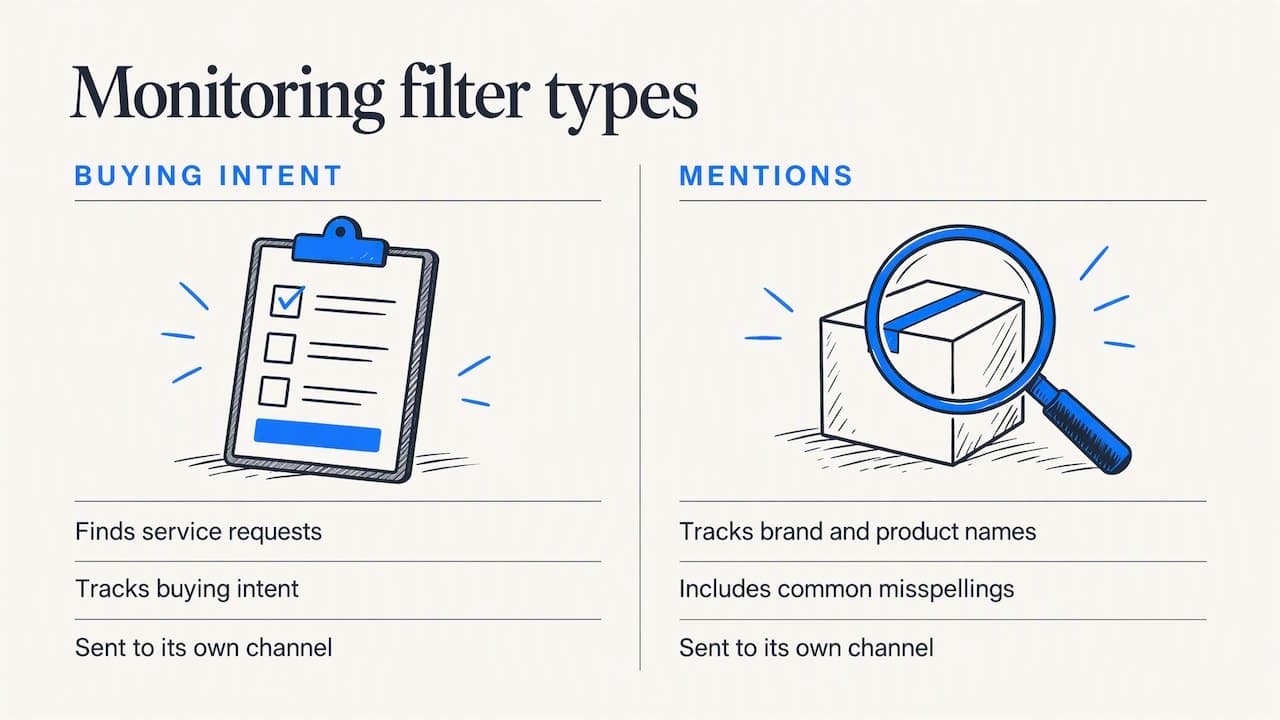
The same multi-group setup can watch for more than requests. Add your brand name, product names and common misspellings, and you will hear when someone recommends you, complains about you, or asks whether you are any good. Add competitor names, and you will see the moment a dissatisfied customer starts looking around.
Many teams run both: one filter set for buying intent, another for mentions, each sent to its own channel. Our practical setup guide to group mention monitoring and the article on monitoring brand mentions on Facebook cover the setup. Teams that want the end-to-end process can start with Facebook group lead monitoring.
If you also work other local channels, the logic carries over. Local search and map listings catch people who are already hunting for a provider, while group alerts catch people who are asking their neighbors. A practical look at tracking local leads from Google Maps shows how service businesses can measure that other side, and the two sources complement each other.
Replying without sounding like an ad
Getting the alert first is only half of it. People in groups ask neighbors, not vendors, and a canned pitch gets ignored or removed. The reply habits that work are consistent across local marketing advice: read the group's rules, answer the question helpfully, and avoid pushy messaging. Follow any group-specific limits on business posts and avoid flooding the feed, as Kenmore Media's guide to Facebook groups for local businesses puts it.
A reply structure that tends to work:
- Answer the actual question first ("For a move-out clean, ask for a written scope and whether supplies are included").
- Say who you are in one line, honestly.
- Offer the next step in a low-pressure way, such as a comment or a direct message if the person is open to it.
When you have alerts from many groups, keep one short reply template per situation and adapt it. Never paste the same message in several groups.
We've seen the same pattern across industries
We built Groups Watcher around one idea: the lead is in the post, and the only thing standing between you and it is time. When a business follows ten or twenty groups, the work of reading them is what breaks, not the willingness to answer.
That is why we designed the product to run without your Facebook account. You should not have to hand over a login to find out who needs your service. Alerts reach you within 60 seconds, through the channels your team already uses, so the person who asks "where can I find this?" hears from you while the thread is still short.
We also think scale should come from filtering, not from more screens. AI lead scoring and custom filters are meant to cut a flood of posts down to the handful that deserve a reply, and group swapping at any time means a group that underperforms is a five-minute fix, not a sunk cost.
Groups Watcher Team
Try it on your own groups
If you already know which groups your customers talk in, the quickest test is to point alerts at them and see what comes in. Groups Watcher starts with a 7-day trial for $1, then the Professional plan is $99 per month. If you need to cover more groups, extra groups are $2 per month per group. Details are on the pricing page.
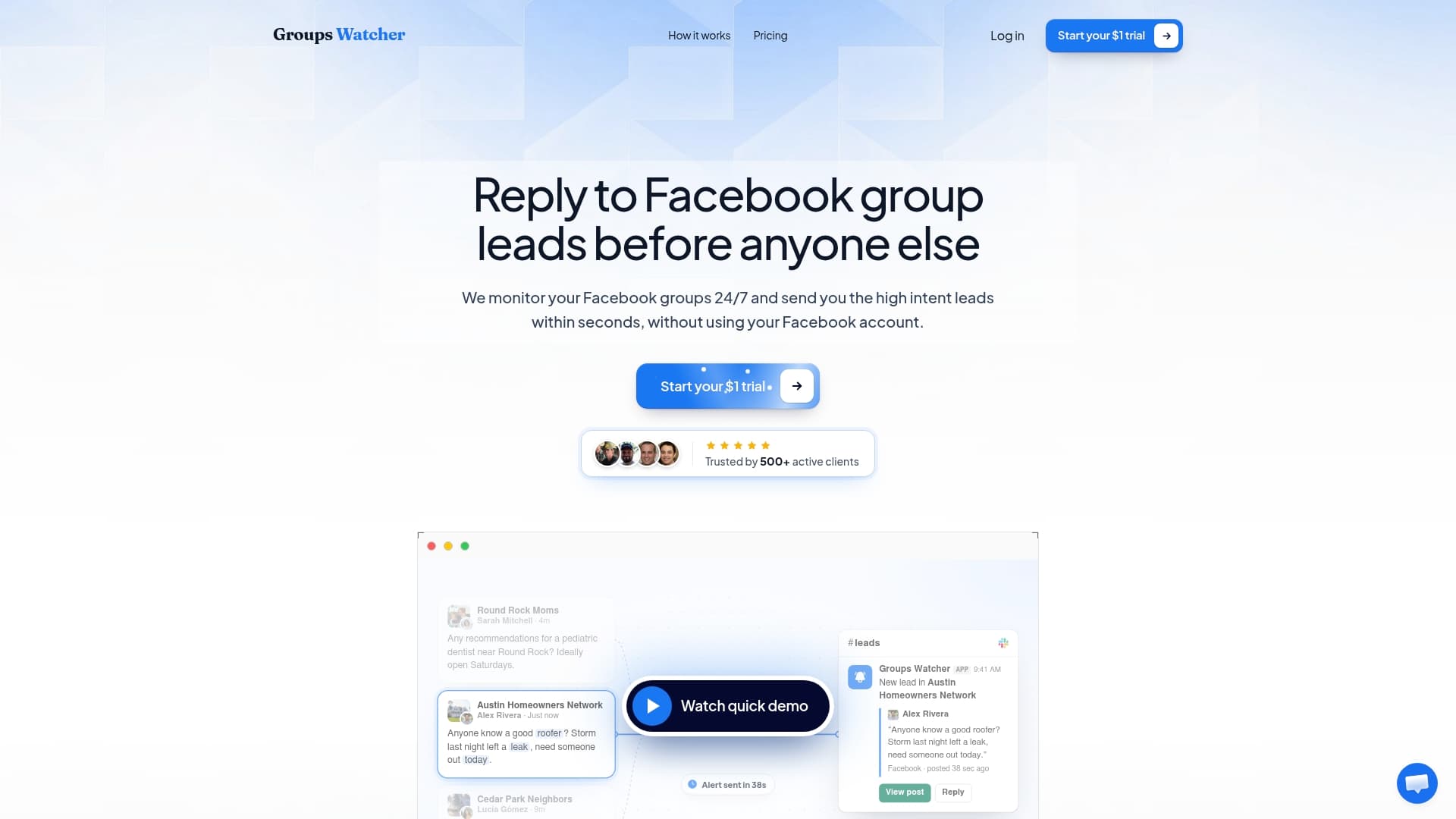
You can also start at Groups Watcher, pick your groups with the AI group finder, and send your first alerts to Slack or email in the same sitting.
Industry setups worth copying
The same structure adapts to different businesses. A few patterns:
- Real estate: buyer, seller and rental requests split by neighborhood group, with alerts to the agent who covers that area. See alerts for real estate agents.
- Ecommerce: product-finder questions ("where can I buy…") in hobby and vehicle groups, with matches sent to the person who can reply with a relevant link. See alerts for ecommerce sellers.
- Cleaning companies: recommendation requests in neighborhood and parent groups, plus move-related posts. See alerts for cleaning companies.
- Bookkeepers: small business owners asking for help with taxes or books in local business groups. See alerts for bookkeepers.
- Software and B2B: posts asking for a tool in your category, or complaining about a rival, routed to sales through a webhook or CRM.
A 30-day rollout plan
Week 1: Choose 10 to 15 groups. Write your first filter set with intent plus service terms. Send alerts to one channel.
Week 2: Reply to every alert, even if it is only to learn. Note which groups and phrases produce real prospects.
Week 3: Add negative terms, split high and low intent, and swap out the two weakest groups.
Week 4: Review reply rate and leads won per group. Keep what works, add groups that look like your best performers, and assign owners per channel.
By the end of the month you have a routine that scales: adding a group is a minor change, not a new workload.
FAQ
How many Facebook groups should I monitor at once?
Start with 10 to 15 that match your buyers closely, then adjust based on which ones produce replies. A smaller list of active, relevant groups beats a long list of noisy ones. Because you can swap groups at any time, you do not need to get the list right on day one.
Can I get alerts from several groups in one channel?
Yes. Alerts from all your selected groups can go to a single Slack, Discord, Teams or email destination, or you can split them across channels by group, service or priority. Many teams use one shared channel for general leads and a separate one for urgent or high-value matches.
How fast do the alerts arrive?
Groups Watcher sends an alert within 60 seconds of a matching post appearing in a selected group. Delivery channels include Slack, Discord, email, Teams, webhooks and CRM integrations.
Do I need to be a member of each group or give you my Facebook login?
No login is needed. Groups Watcher works without your Facebook account or credentials, and it covers public and private groups. For how that works in your situation, see our guide on keyword alerts when you are not an admin.
How do I stop getting irrelevant alerts?
Combine intent phrases with service terms, add negative keywords, and review which alerts led to replies each week. Remove or rewrite any filter that keeps firing without producing action, which is the same principle used in alert quality management.
Sources
- How to get leads from Facebook without buying ads (ZenMaid)
- How to Find Facebook Groups to Join for Marketing (PilotPoster)
- Manage your alert quality (New Relic Documentation)
- Differences between public and private Facebook groups (Meta Help)
- How to Use Facebook Groups to Grow Your Local Business (Kenmore Media)
- Google Maps lead playbook for service businesses
Recommended
Stop checking Facebook groups by hand.
Groups Watcher finds the leads in your Facebook groups and sends them to you in 60 seconds, before your competitors reply, without using your Facebook account. 7 day trial for $1 with full features.