Live Alerts From Facebook Groups: Get Leads in 60 Seconds
Get Facebook group alerts in 60 seconds.
Groups Watcher finds the leads in your Facebook groups and sends them to you in 60 seconds, before your competitors reply, without using your Facebook account. 7 day trial for $1 with full features.
Start your $1 trialLive Alerts From Facebook Groups: Get Leads in 60 Seconds
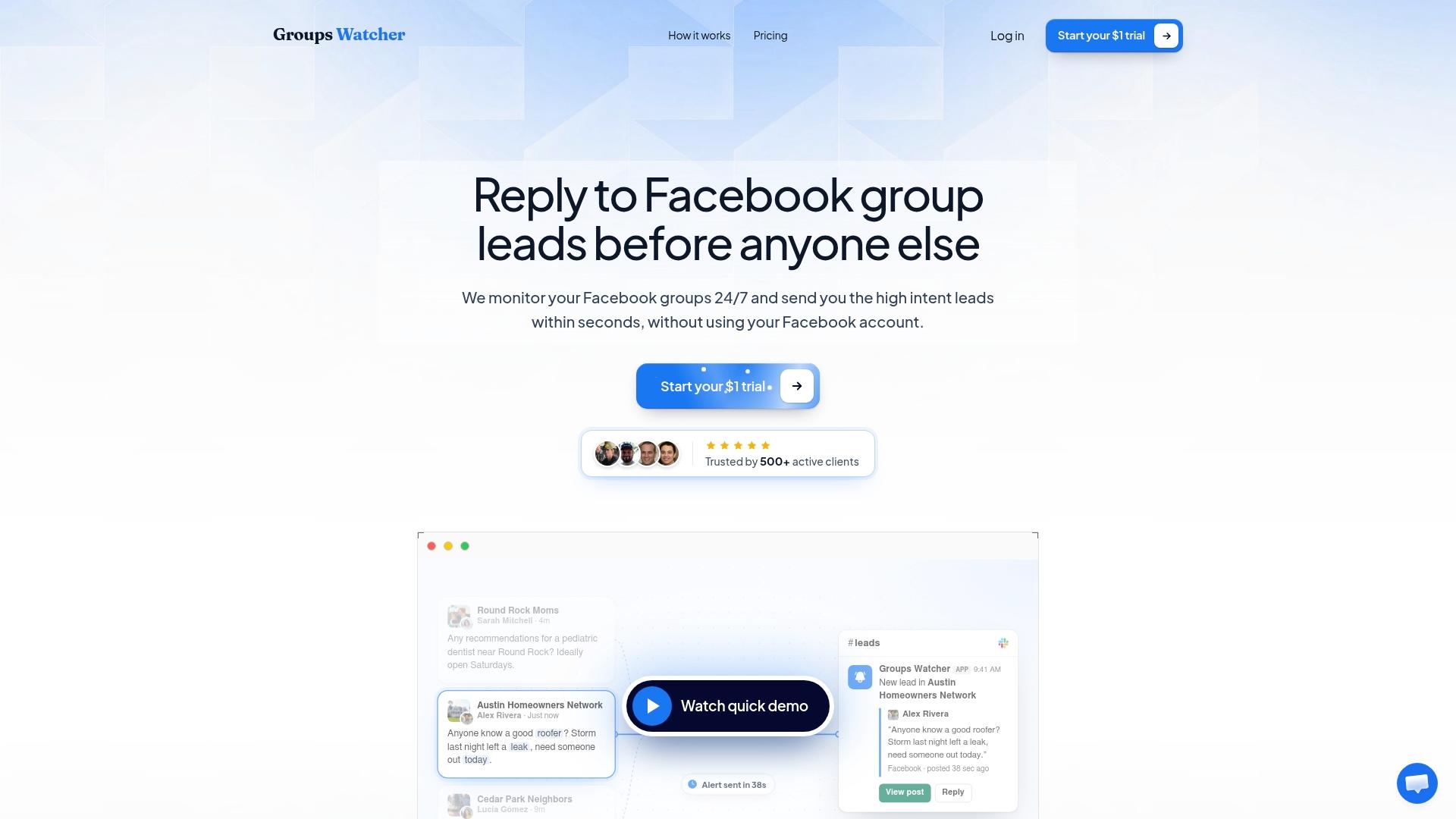
The best way to get live alerts from Facebook groups is to set up keyword and intent filters on the groups where your buyers ask for help, and have each matching post pushed to the channel your team already watches. Groups Watcher does this without your Facebook login: it sends an alert within 60 seconds of a matching post, through Slack, Discord, email, Teams, webhooks or your CRM. A wedding photographer, a realtor or an auto parts store then sees the question while it is still new and can be the first useful answer.
This guide shows how to set that up, what to filter for in your industry, and how to reply so you win the conversation instead of getting ignored.
TL;DR
- A live alert is only useful for leads if it fires on the post's meaning (someone asking for your service or product), not on every post in the group.
- Groups Watcher alerts you within 60 seconds of a matching post, with no Facebook account access, in any language, across public and private groups.
- Pick groups where buyers ask questions, write filters around the phrases they actually use, and send alerts to a channel someone checks all day.
- Reply with a direct answer to the question asked and hold the pitch until the person asks for more.
- The 7-day trial costs $1. The Professional plan is $99 per month, and extra groups are $2 per month each.
Table of Contents
- What "live" means when you are hunting for leads
- How to set up live Facebook group alerts with Groups Watcher
- Filters that work by industry
- Why alerts beat checking groups by hand
- A note on Facebook's built-in notifications
- Getting alerts when you are not a group admin
- Replying without sounding like an ad
- How to keep from missing relevant posts
- What it costs
- Our perspective
- FAQ
- Sources
What "live" means when you are hunting for leads
Facebook's own group notifications tell you that someone posted. A lead alert tells you that someone posted something you can sell against. Those are different jobs.
Consider the posts that actually turn into revenue:
- "Can anyone recommend a florist for a June wedding near Tampa?"
- "Looking for a CRM that works with our help desk, we're leaving our current one."
- "Where do I buy aftermarket exhaust parts for a 2019 Silverado?"
- "Moving to Austin next month, who is a good buyer's agent?"
Each of these is a person with a need, a budget and a short attention span. They usually collect a handful of replies within the first hour, and the first useful, specific answer tends to set the tone for everything after it. That is why speed matters more than reach: you are not trying to see more posts, you are trying to see the right three posts a day before anyone else answers them.
A good setup for this has four parts:
- The right groups, where your buyers ask for recommendations.
- Filters that match how buyers phrase a need.
- Fast delivery to a place where someone will see it.
- A reply routine so the alert turns into a conversation.
The rest of this article goes through each one.
How to set up live Facebook group alerts with Groups Watcher
Groups Watcher is built around the four parts above. Here is the routine, step by step, with what to watch for at each point.
Get Facebook group alerts in 60 seconds.
Groups Watcher finds the leads in your Facebook groups and sends them to you in 60 seconds, before your competitors reply, without using your Facebook account. 7 day trial for $1 with full features.
Start your $1 trialStep 1: Choose the groups where buyers ask
Start with where your customers talk. Local community groups, niche hobby groups, industry peer groups and "recommendations" groups are the usual winners. Realtors look at neighborhood and relocation groups. Wedding vendors look at engagement and local wedding planning groups. Ecommerce owners look at owner and enthusiast groups for the vehicle, gadget or hobby they sell for.
The common mistake is picking only the biggest groups. Big groups are noisy, and a request can be buried in minutes. A smaller group with strong buying intent often produces better leads per alert. Our AI-driven group finder suggests groups relevant to your offer, so you are not limited to the ones you already know about. You can also swap groups at any time, so a group that stays quiet can be replaced by a better one without starting over.
Groups Watcher monitors public and private groups, and it does not need your Facebook account or credentials. You never hand over a login to get started, which also means no one on your team has to share a personal profile.
Step 2: Write filters the way buyers talk
Buyers do not write "seeking a provider of commercial cleaning services." They write "anyone know a good cleaner for my office?" Your filters should reflect that.
A practical way to build them:
- Need phrases: "looking for," "anyone recommend," "where can I find," "who do you use for."
- Your category words: the service or product, plus common synonyms and the slang buyers use.
- Competitor mentions: if you sell software, a post naming a rival and complaining about it is one of the warmest signals you can get.
- Exclusions: words that mark job seekers, spam or people selling the same thing as you.
Groups Watcher supports customizable filters and AI lead scoring, so alerts are limited to posts that look like genuine intent. Scoring is unlimited on the plan, so you do not ration it. Because it supports every language, a Spanish-language neighborhood group or a bilingual community group is as easy to watch as an English one.
If you want to go deeper on filter wording, our guides on Facebook group keyword alerts and how to monitor Facebook groups for keywords walk through examples.
Step 3: Send alerts where your team already works
An alert that lands in an inbox nobody opens until Thursday is not live. Pick the channel that matches how you work:
- Slack or Microsoft Teams for sales and support teams that live in chat.
- Discord for community-minded or creator-led businesses.
- Email for solo owners who check mail constantly.
- Webhooks and CRM integrations to create a lead record automatically and assign it to a person.
Groups Watcher delivers to 10+ channels, so you can route different groups to different people. Real estate leads can go to the agent covering that area, and parts requests can go to whoever handles the sales chat. For a closer look at the mechanics, see our setup guide for Facebook group instant notifications.
Step 4: Reply inside the first few minutes
The 60-second alert gets you to the post. What you do next decides whether it becomes a lead. The next sections cover that, because a fast reply that reads like an ad is worse than a slow, helpful one.
Filters that work by industry
The table below shows the kind of signals each type of business can watch for. Adapt the wording to your own market.
| Business | Groups to watch | Signals worth an alert |
|---|---|---|
| Real estate agent | Neighborhood, relocation, first-time buyer groups | "moving to," "buyer's agent," "selling our house," "any good realtors" |
| Wedding or event vendor | Local wedding planning, engagement, party planning groups | "looking for a photographer," "DJ recommendations," "venue for 80 guests" |
| Short-term rental host | Local host groups, travel and relocation groups | "need a cleaner," "co-host," "property manager" |
| Ecommerce store | Owner and enthusiast groups for your product niche | "where to buy," "best place for," "anyone know a shop that sells" |
| B2B software | Industry peer and professional groups | "alternative to," "switching from," "anyone use a tool for" |
| Local service business | City and county community groups | "need a plumber," "who do you recommend for," "urgent" |
Our pages on lead alerts for local service businesses and Facebook group lead alerts for bookkeepers show how one trade turns these signals into a routine.
Why alerts beat checking groups by hand
Manual checking has a built-in problem: you only see what is on the screen when you happen to look. A busy group can push a request off the first page in a short time. Marketers who rely on scrolling end up reading old posts, which means replying to a question that already has six answers and a chosen provider.
Monitoring also matters for a broader reason. Watching conversations to understand what your market wants is a core part of social listening, and small teams get real value from it. This social listening strategy for small business explains the approach, and Facebook groups are one of the richest places to apply it because people ask for specific recommendations there. Our own overview of Facebook social listening covers how that turns into a lead pipeline.
An alert system gives you three things scrolling cannot:
- Consistency. It works at 6 a.m. on a Sunday, which is when many home-service and event questions get posted.
- Focus. You see matching posts only, so there is no reason to open a group just to browse.
- Shared visibility. A channel alert can be seen by the whole team, so a lead is not stuck with whoever is logged in.
A note on Facebook's built-in notifications
Facebook offers its own notification controls inside groups you have joined, and it is worth knowing how they behave so you can set expectations.
Per group, you can choose among All Posts, Highlights, Friends' Posts or Off. WIRED notes that Highlights is often the default and covers suggested posts and posts by friends. According to How-To Geek, in groups with fewer than 250 members you are notified of every post, while in larger groups you get notified when a friend posts or when Facebook decides to send one.
These settings answer the question "did someone post?" They do not answer "did someone post something I can sell to?" In an active group, All Posts becomes a stream of every topic, which is the opposite of a lead filter. A GroupBoss guide also points out that delivery depends on layers: the group setting, Facebook's notification settings and your phone's own permissions.
Phone-level delivery has its own mechanics too. Tencent's explanation of Facebook push notifications describes how a notification passes through Apple's or Google's push services and is displayed according to your device settings, including quiet hours and Focus modes.
With Groups Watcher, matching alerts go to Slack, Teams, email or your CRM instead, so they sit in the tools your team already treats as work. For a fuller comparison of the two approaches, read our guide to Facebook group notifications for every post and the walkthrough on making group push notifications work for you.
Getting alerts when you are not a group admin
Some group tools, like admin keyword alerts, are built for the people who run a group. A Group Leads post describes the admin path as Moderate group, then Keyword alerts, and notes that the alerted member does not know the alert fired. That helps moderators, but most businesses looking for leads are members or are not in the group at all, not admins.
Groups Watcher is designed for that situation. You pick groups and criteria, and the monitoring does not depend on holding an admin role or on connecting your Facebook account. Our guide to keyword alerts in Facebook groups without being admin goes through the setup.
Replying without sounding like an ad
Speed gets you noticed. Tone gets you hired. A few habits separate the replies that convert from the ones that get ignored.
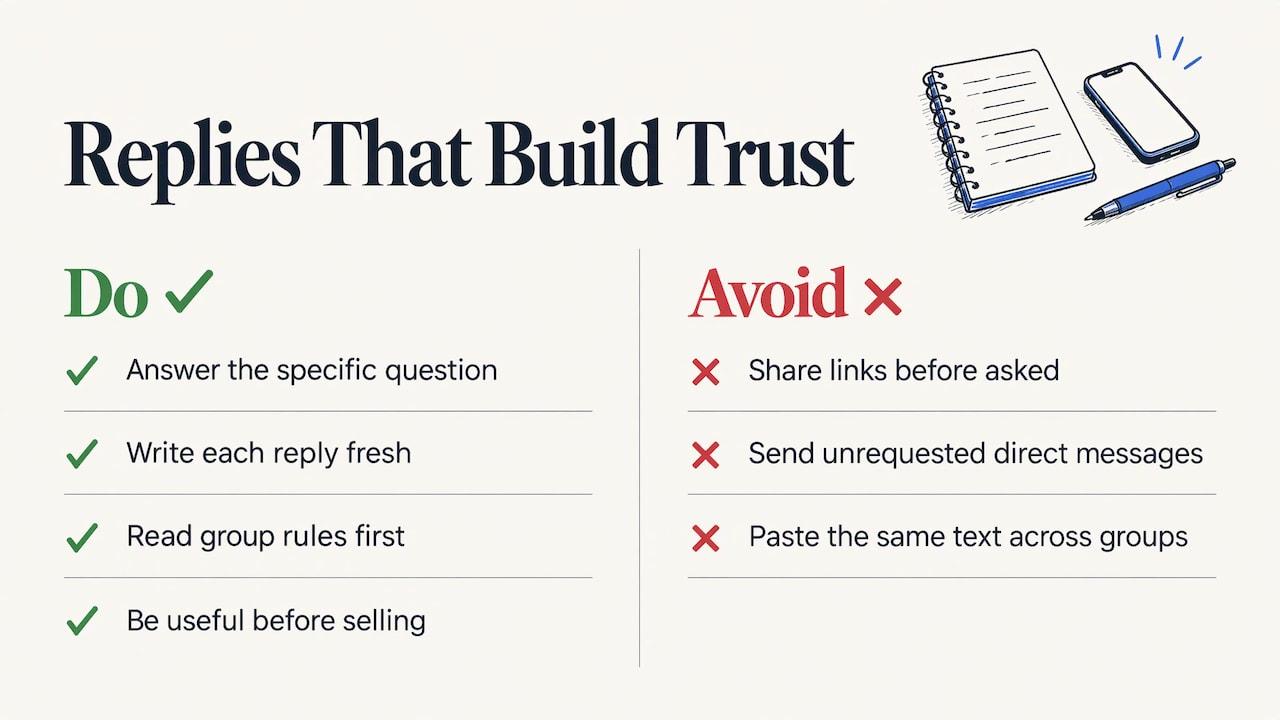
Answer the question that was asked. If someone wants a recommendation for a DJ who plays 90s music, say what you do for that specific request. Mike Finocchiaro's small business guide recommends answering what was asked, writing each reply fresh instead of pasting the same text into several groups, and waiting to share a link until someone asks for it.
Read the group's rules before the first reply. Some groups allow promotion only on set days or in a pinned thread. The same guide says many groups restrict self-promotion, and a quick read of the rules tells you whether to reply publicly or add value and let the person come to you.
Be useful first. A reply that solves part of the problem, such as a price range, a timeline or a quick tip, earns trust. Conbersa's B2B guide describes the difference between a buyer who pulled you in and one you pushed on; its pipeline playbook advises answering inbound messages helpfully and letting the member steer toward business.
Do not send unrequested direct messages. A public reply keeps you inside the conversation. Wait for the person to message you, or invite them to, rather than opening a cold DM.
Protect your standing in the group. The same Conbersa guide notes that moderated groups enforce their rules quickly, and losing access to a group full of your ideal customers is hard to undo. Thoughtful replies are the safest way to stay in good standing.
Keep a simple record. Note the group, the person's role or company, and what you discussed. A CRM works, and so does a spreadsheet. Groups Watcher can push alerts straight into your CRM through integrations or webhooks, so the lead record starts the moment the alert does.
A worked example
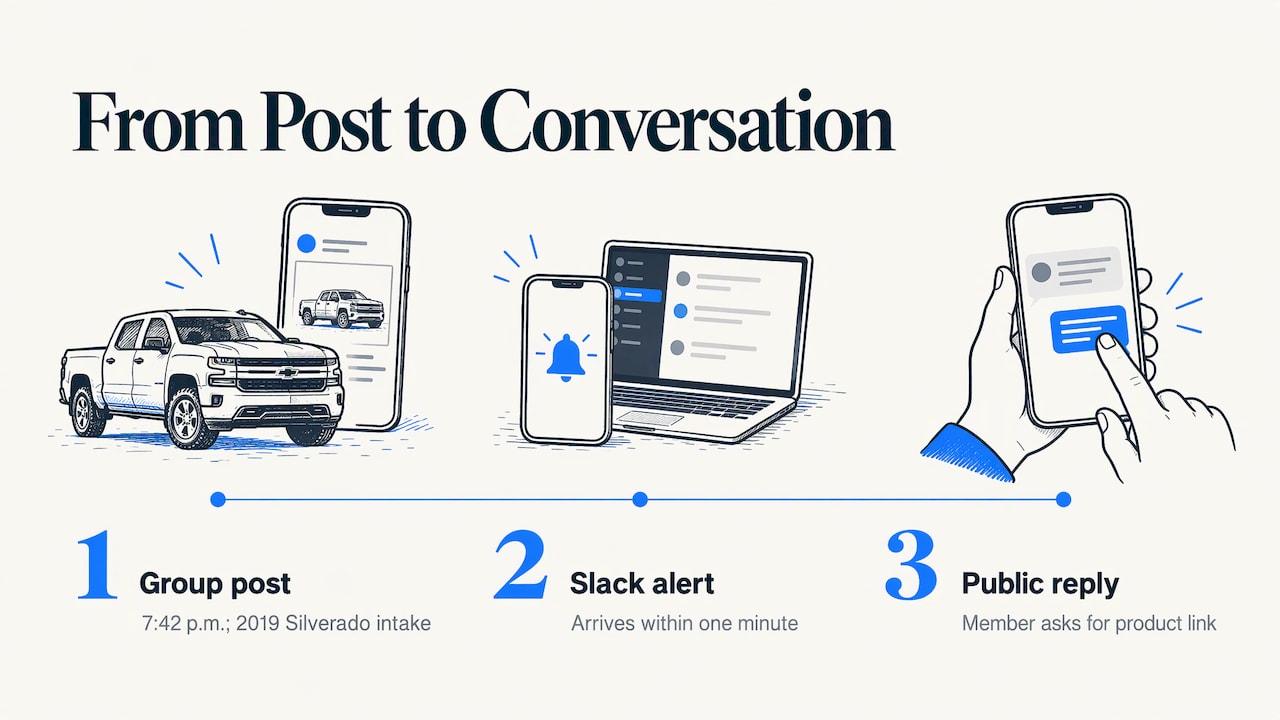
Imagine a performance auto parts store watching three truck owner groups. It sets filters for "where to buy," "aftermarket," "cold air intake" and a few model names. At 7:42 p.m. a member posts asking where to find a specific intake for a 2019 Silverado.
The alert lands in the store's Slack channel within a minute. Whoever is on shift replies in the thread: they name the part that fits, mention the typical fitment and say they can share the product page if the member wants it. The member asks for the link, and a public question becomes a customer conversation. Nobody scrolled a feed to make that happen.
A realtor, a florist or a SaaS sales rep follows the same pattern, with different words in the filter.
How to keep from missing relevant posts
A few habits keep a monitoring setup sharp over months:
- Review your filters monthly. Look at which alerts led to conversations and which were noise, then adjust the phrases.
- Add synonyms and local slang. Buyers in different regions name the same thing differently.
- Watch for competitor mentions as their own filter, with its own channel, so a switching request never gets lost among general leads.
- Rotate groups. If a group produces nothing for a few weeks, swap it for another. Groups Watcher lets you change groups at any time.
- Cover more than one language if your market is multilingual. Filters work in any language.
- Assign an owner. One person should be responsible for each alert channel during business hours.
What it costs
The 7-day trial costs $1 one time, so you can run your real filters against your real groups. The Professional plan is $99 per month and includes monitoring, the AI group finder, and unlimited lead scoring and alerts. Extra groups are $2 per month each. If one closed job pays for many months of the plan, the math is simple, and you can see current details on the pricing page.
Ready to try it? Start your $1 trial at Groups Watcher and put your first filters on the groups where your customers ask.
Our perspective
Most businesses we talk about already know that their customers are in Facebook groups. What they lack is a way to be there at the right moment, so we built Groups Watcher around that moment.
We think a lead alert should do three things. It should arrive within a minute, because a recommendation thread moves quickly. It should be filtered for intent, so that your team reads requests and not chatter. And it should not ask you to hand over your Facebook login, because your account is a business asset and should stay yours.
That is why the product works without Facebook credentials, scores leads with AI, supports every language and sends alerts to the tools you already use, from Slack and Discord to Teams, email, webhooks and your CRM. Whether you sell wedding photography, homes, software or truck parts, the principle is the same: hear the question first, answer it well, and let the conversation do the selling.
Groups Watcher Team
FAQ
Can I get live alerts from Facebook groups without giving out my Facebook login?
Yes. Groups Watcher monitors the groups you choose without requiring your Facebook account or credentials. You select groups and filters, and matching posts are sent to your chosen channel within 60 seconds.
Where can the alerts be sent?
Alerts can go to Slack, Discord, email, Microsoft Teams, webhooks and CRM integrations, among 10+ channels. Many teams route different groups to different channels so the right person sees each lead.
Does it work for groups in languages other than English?
Yes. Groups Watcher supports every language, so you can watch Spanish, Portuguese, French or any other language group with filters written in that language. That helps businesses serving multilingual communities.
How many groups can I monitor?
The Professional plan is $99 per month, and each extra group is $2 per month. You can swap groups at any time, so you can move your monitoring to wherever your buyers are asking.
What should I do after I get an alert?
Read the post and the group's rules, then answer the exact question with specifics. Hold your link until the person asks, and avoid unrequested direct messages. A fast, helpful reply is what turns an alert into a lead.
Sources
- WIRED: How to Change Those Spammy Group Notifications on Facebook
- How-To Geek: How to Stop Getting Notifications Every Time Someone Posts in a Facebook Group
- GroupBoss: How to Manage Facebook Group Notifications
- Tencent Push: Facebook Push Notifications Explained
- Group Leads Blog: What Can Facebook Group Admins See?
- My Small Towns: Are Facebook Groups Worth It for Your Small Business? (2026)
- Conbersa: How to Convert Facebook Group Networking into B2B Pipeline
- Conbersa: How to Use Facebook Groups for B2B Lead Generation
Recommended
Stop checking Facebook groups by hand.
Groups Watcher finds the leads in your Facebook groups and sends them to you in 60 seconds, before your competitors reply, without using your Facebook account. 7 day trial for $1 with full features.