Facebook Group Question Alerts: Get Notified of Buying Questions
Get Facebook group alerts in 60 seconds.
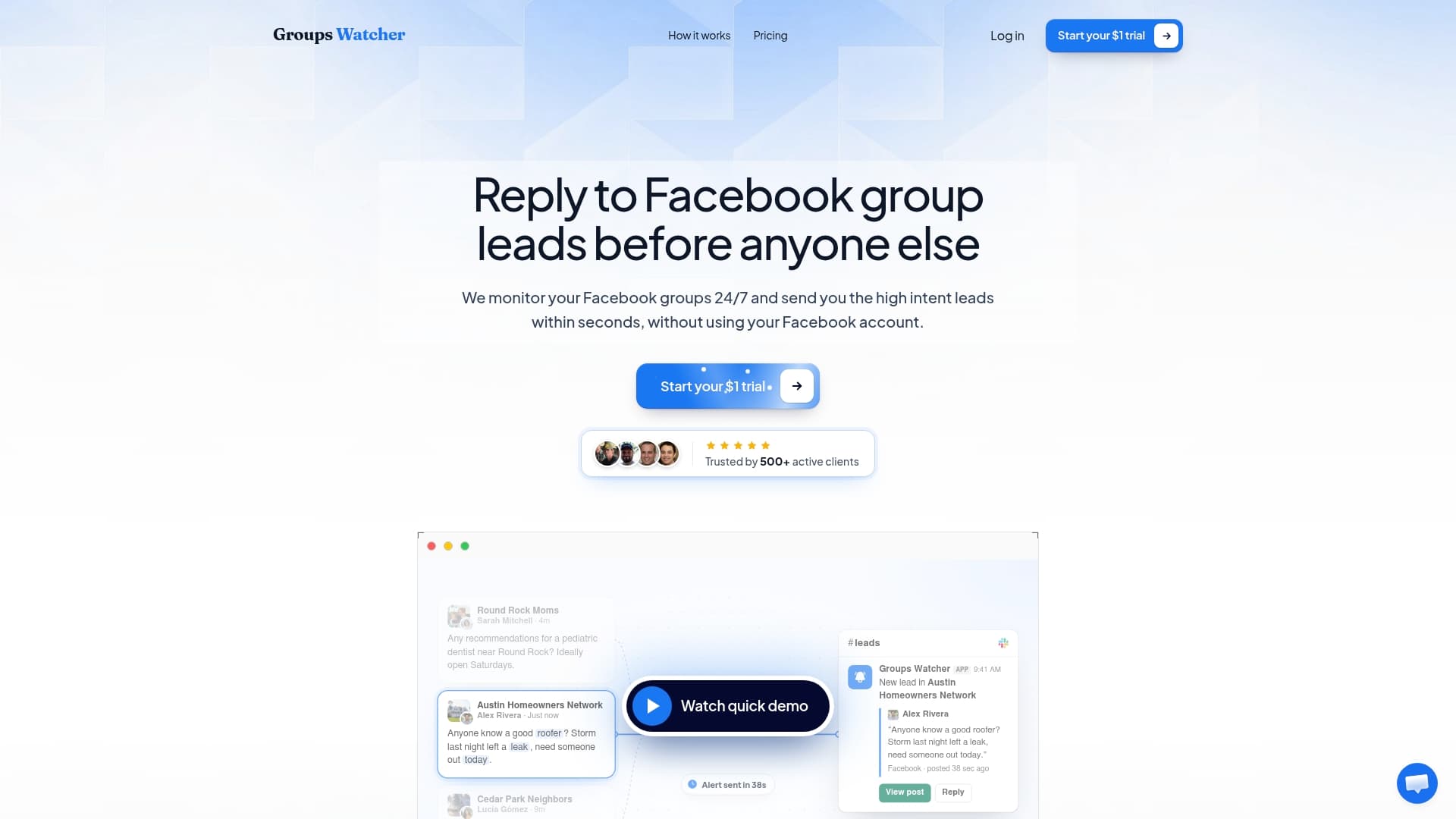
Groups Watcher finds the leads in your Facebook groups and sends them to you in 60 seconds, before your competitors reply, without using your Facebook account. 7 day trial for $1 with full features.
Start your $1 trialFacebook Group Question Alerts: Get Notified of Buying Questions
A Facebook group question alert tells you the moment someone posts a question you can answer, such as "Anyone know a good roofer?" or "Where do I find aftermarket parts for my truck?" Facebook's own notification settings can tell you about posts in groups you have joined. To catch only the questions that signal a buyer, across many groups and within a minute, you need a filter on top. This guide shows what the built-in options do, which questions are worth an alert, and how to set up a workflow that gets you in the thread first without annoying anyone.
TL;DR
- Facebook's built-in group notifications work per group and per post. Keyword alerts inside Facebook are a group admin tool, so they don't help you find buyers in groups you don't run.
- The questions worth alerting on are requests to hire, requests for advice, recommendation requests and "help me choose" posts. Resolved requests are not leads.
- Speed matters because buyers often choose from the first helpful replies. Groups Watcher sends alerts within 60 seconds to Slack, Discord, email, Teams, webhooks and CRMs.
- Start narrow: a handful of groups, tight keyword filters, and a reply that answers the question before it mentions you.
Table of Contents
- What a Facebook group question alert actually is
- What Facebook's built-in notifications can do
- Which questions are worth an alert
- Matching question types to filters
- Why public and private groups change what you can watch
- How to build a question alert workflow
- Answering without spamming
- Perspective: why we built alerts around questions
- Try it with your own groups
- How marketers use alerts to find the conversation
- FAQ
- Sources
What a Facebook group question alert actually is
There are two very different things people mean by this phrase.
The first is a notification that someone posted or commented in a group. Facebook offers this natively, and it is what most people want when they search for how to get notifications from a group.
The second is a lead alert: a message that fires only when a post matches what a buyer sounds like. It cares about the content of the question, not the fact that a post exists. That is the version a business owner, marketer or agent needs, because a busy group can publish hundreds of posts a day and only a few are people asking for what you sell.
The rest of this article is about the second kind, and how to build it on top of the first.
What Facebook's built-in notifications can do
On desktop, you open the group, click the "Joined" button and choose "Manage notifications." On the mobile app, you open the group, tap the "..." menu and pick "Manage notifications." From there you choose a level such as All Posts, Highlights, Friends' Posts or Off. You can also route some updates to email.
That works well for a few groups you care about. It starts to break down in three places:
- Volume. "All Posts" in an active group floods your phone. Most posts are photos, jokes or chatter, not questions about your service.
- No question filter. Facebook tells you a post exists. It doesn't tell you the post is someone asking for a plumber, a wedding photographer or a lift kit.
- Keyword alerts are for admins. Facebook has offered keyword notifications to some group owners, and they are meant for moderating: admins and moderators see them. If you are a business joining other people's groups to find customers, that feature isn't built for your job.
If you want the full walkthrough of the native settings, our guide on Facebook group notifications for every post covers each toggle.
Get Facebook group alerts in 60 seconds.
Groups Watcher finds the leads in your Facebook groups and sends them to you in 60 seconds, before your competitors reply, without using your Facebook account. 7 day trial for $1 with full features.
Start your $1 trialWhich questions are worth an alert
Not every question is a lead. Marketers who study local group behavior tend to sort buying signals into a few repeatable shapes, and a good alert is built around them.
Requests to hire
This is the clearest signal: the poster names a service and asks who can do it or when someone is available. "Looking for a landscaper to start next week" is a request to hire. The person has a budget and a deadline, and they are asking strangers for names.
These posts convert best when your reply lands while the poster is still scrolling. Whatever you use to log the inquiry afterward, a tool that can capture leads and orders into a CRM keeps the follow-up from slipping once the first reply is sent.
Requests for advice
Here the poster describes a situation and asks what to do, how to proceed or whether to hire someone. "Our basement took on water, do we need a pro or can we dry it ourselves?" is a request for advice from a person standing at the edge of a purchase. A helpful, specific answer earns trust, and the question of hiring comes up naturally.

Recommendation requests
"Can anyone recommend..." is a strong signal, but only when the thing requested is something you actually do. A request for a dentist is noise to a car detailer. This is why a filter on the service itself matters more than a filter on the words "recommend" or "looking for."
"Help me choose" posts
These are the highest-signal type. Someone comparing two options and asking the group to weigh in is close to a decision, and the replies reveal the criteria and the language buyers use. That language is worth copying into your own listings and ads.
Competitor mentions
For software and B2B brands, a post asking for alternatives to a competing tool, or complaining about one, is as good as a direct request. Add competitor names to your filters so these show up alongside direct questions.
Posts to ignore
A post where someone reports the work is finished, or says they no longer need help, is a resolved request. The need is already met, so a reply is wasted effort and can look tone-deaf. Good filtering, human or AI, drops these.
Matching question types to filters
| Signal | Example post | What to filter on |
|---|---|---|
| Request to hire | "Need a mover for Saturday, who's free?" | Service name plus words like need, hire, available, quote |
| Request for advice | "Is it worth replacing the whole roof or just patching?" | Service or product name plus how, should, worth, or cost |
| Recommendation request | "Recommend a good realtor in Tampa?" | Service name plus recommend, suggestions, anyone know, plus your area |
| Help me choose | "Torn between two coilovers, thoughts?" | Product category plus versus, or, which, best |
| Competitor mention | "Anyone switched off [tool]?" | Competitor names, alternative, switch, cancel |
| Resolved | "Update: got it fixed, thanks!" | Exclude: update, fixed, no longer needed |
Treat this table as a starting point. Your first week of alerts will show which phrases your local groups really use.
Why public and private groups change what you can watch
Who can see a post depends on the group type. In public groups, anyone on or off Facebook can see what members post, comment on and share. In private groups, shared content is visible only to current members.
That difference shapes your strategy. Public groups are the easiest places to find questions, while private groups often hold the most engaged, niche communities. Groups Watcher monitors both public and private groups, and it does so without asking for your Facebook account or credentials. That detail matters if you manage several brand profiles or simply don't want to hand over a login to monitor groups.
How to build a question alert workflow
1. Pick groups where people ask, not post
Look for groups where members ask for recommendations and help, and skip groups dominated by memes and self-promotion. Facebook group guidance for sales points the same way: choose groups where people discuss buying decisions. Local community groups, neighborhood groups, hobby and vehicle groups, and industry groups for your buyer are good starting points. Our AI group finder can suggest relevant groups if you are starting from scratch, and you can swap groups at any time as you learn which ones produce.
2. Write filters around the buyer's words
Start with your service or product name, add intent words from the table above, and add your location if you serve a limited area. Then add your exclusions. A realtor might watch for "moving to," "relocating," "looking for an agent" and "first time buyer." A performance parts store might watch for a truck model plus "where can I find" or "who sells." Our guide to monitoring Facebook groups for keywords and leads goes deeper on phrase building.
3. Send alerts where you already work
An alert you see an hour late is a missed lead. Route notifications to the tool your team checks all day: Slack, Discord, Microsoft Teams, email, a webhook, or your CRM. Groups Watcher supports all of these, and posts in any language are handled. For a small team, a dedicated Slack channel works well because the person who is free can claim the lead with an emoji.
4. Reply to the question first
Answer what was asked. If someone wants to know how long a fence repair takes, tell them. Offer your name or a link only after you have been useful, and match the group's tone. Many groups welcome business owners who help and quickly tire of those who drop a pitch.
5. Test the whole chain
Before you rely on it, run a week with a few groups and check three things: Did a real question trigger an alert? Did the alert arrive in your channel quickly? Did your filter let in too many unrelated posts? Tighten the keywords until most alerts are ones you would answer.
Answering without spamming
Speed and restraint go together. A few habits keep you welcome in the groups that feed you leads:
- Answer publicly with real information, then continue in a direct message only if the poster asks.
- Don't reply to every alert. Skip vague posts and resolved ones.
- Never paste the same message into several threads. Use the poster's own details so the reply is clearly written for them.
- Follow the group's own rules and respect admins' guidance on promotion.
- Keep a short list of your best helpful answers for common questions, then edit each one for the person asking.
Group members remember who was useful. A reply that solves a problem tends to bring in direct messages and recommendations from other members later.
Perspective: why we built alerts around questions
We started Groups Watcher because we kept seeing the same thing: a buyer asks a clear question in a Facebook group, three people answer within minutes, and the business that would have been perfect finds the thread two days later.
Native notifications tell you a post exists. They don't tell you whether it matters. We built Groups Watcher so the alert itself carries the judgment: AI lead scoring and customizable filters surface high-intent posts, and the alert reaches you within 60 seconds in the channel your team already uses.
We also think monitoring shouldn't mean handing over your personal login. Groups Watcher works without your Facebook account or credentials, so there is nothing to connect and no profile of yours tied to the monitoring. Add that it supports every language and lets you swap groups whenever you like, and you can adjust your coverage as quickly as the market moves.
Our advice to every new user is the same: start with a few groups, write filters in your buyer's own words, and reply with an answer, not a pitch.
Groups Watcher Team
Try it with your own groups
Groups Watcher monitors the Facebook groups you choose and alerts you within 60 seconds when a post matches your criteria. You can start with the 7-day trial for $1. After that, the Professional plan is $99 per month, and extra groups are $2 per month per group. You can see the details on the pricing page, or go to Groups Watcher to get started.
If you want to see how this looks in your line of work, we have pages for local service businesses, real estate agents and ecommerce sellers.
How marketers use alerts to find the conversation
Marketers use group alerts the way they use any targeting: to put the message in front of the right person at the right moment. Advanced targeting technology in paid media narrows an audience before the ad runs. A question alert works the other way around. The person has already raised a hand, and your job is to be there when they do.
That is why a few well-chosen groups can beat a broad campaign for certain businesses. Wedding vendors, short-term rental hosts, tree services, agents and parts sellers all depend on someone asking a specific question at a specific time. For more on this approach, read our guide to monitoring Facebook groups for lead generation and the quick guide to group lead monitoring.
FAQ
Can Facebook alert me when someone asks a specific question in a group?
Facebook lets you choose a notification level for each group you have joined, but that covers posts in general, not the question's meaning. Keyword notifications inside Facebook are aimed at group admins and moderators. To be alerted only when a post matches a buying question, you can use a monitoring tool such as Groups Watcher.
How do I turn on notifications for a Facebook group?
Open the group, select "Joined," then "Manage notifications," and pick a level such as All Posts or Highlights. On mobile, tap the "..." menu in the group and choose "Manage notifications." Menu names can shift as the app updates, so look for the notifications option near the join button.
How fast do I need to respond to a group question?
As fast as you reasonably can. Group questions are often answered within minutes, and replies stack up quickly. Groups Watcher sends alerts within 60 seconds so you can be among the first helpful replies.
Do I need to give Groups Watcher my Facebook login?
No. Groups Watcher monitors groups without requiring your Facebook account or credentials. You choose the groups and filters, and the alerts come to your chosen channel.
Can I monitor groups in other languages?
Yes. Groups Watcher supports posts in any language, so you can watch groups where buyers ask in Spanish, Portuguese or any other language and still receive alerts that match your filters.
Sources
- How to Turn On Notifications for a Facebook Group
- 3 Ways to Use Facebook Keyword Alerts to Improve Your Group
- Spotting Real Buying Signals in Local Group Posts
- Facebook Groups for DTC Customer Research
- Differences between public and private Facebook groups
- Using Facebook Groups to Reach Ready-to-Buy Users
Recommended
Stop checking Facebook groups by hand.
Groups Watcher finds the leads in your Facebook groups and sends them to you in 60 seconds, before your competitors reply, without using your Facebook account. 7 day trial for $1 with full features.