Facebook Group Monitoring Without Login: What Works
Get Facebook group alerts in 60 seconds.
Groups Watcher finds the leads in your Facebook groups and sends them to you in 60 seconds, before your competitors reply, without using your Facebook account. 7 day trial for $1 with full features.
Start your $1 trialFacebook Group Monitoring Without Login: What Works
Yes, you can monitor Facebook groups without logging in to your own Facebook account, but only if the tool does the watching on its side and you receive the results somewhere else: Slack, Discord, email, Microsoft Teams, a webhook or your CRM. Your personal profile never enters the picture. Below is how that works, what can and cannot be seen, how fast alerts arrive, and how to turn a stream of posts into leads you can actually answer.
TL;DR
- Monitoring without login means a service watches the groups and pushes matching posts to your inbox or chat tool, so no Facebook credentials are shared and your profile is not tied to the activity.
- Public groups are the realistic target for systematic discovery. Private groups depend on how a tool is set up and on what the group allows.
- Speed matters more than volume: the first helpful reply to a buying question usually wins the conversation.
- Good setups combine keyword filters, competitor names, and AI scoring so you only see posts with real buying intent.
- Groups Watcher sends alerts within 60 seconds, supports any language, and starts with a 7-day trial for $1.
Table of Contents
- What "monitoring without login" actually means
- What can be monitored: public, closed and private groups
- Why the official routes will not get you leads
- How alerts reach you, and how fast
- Step by step: set up monitoring that finds leads
- Common mistakes to avoid
- What to look for in a tool
- Our perspective
- Try it for $1
- FAQ
- Sources
What "monitoring without login" actually means
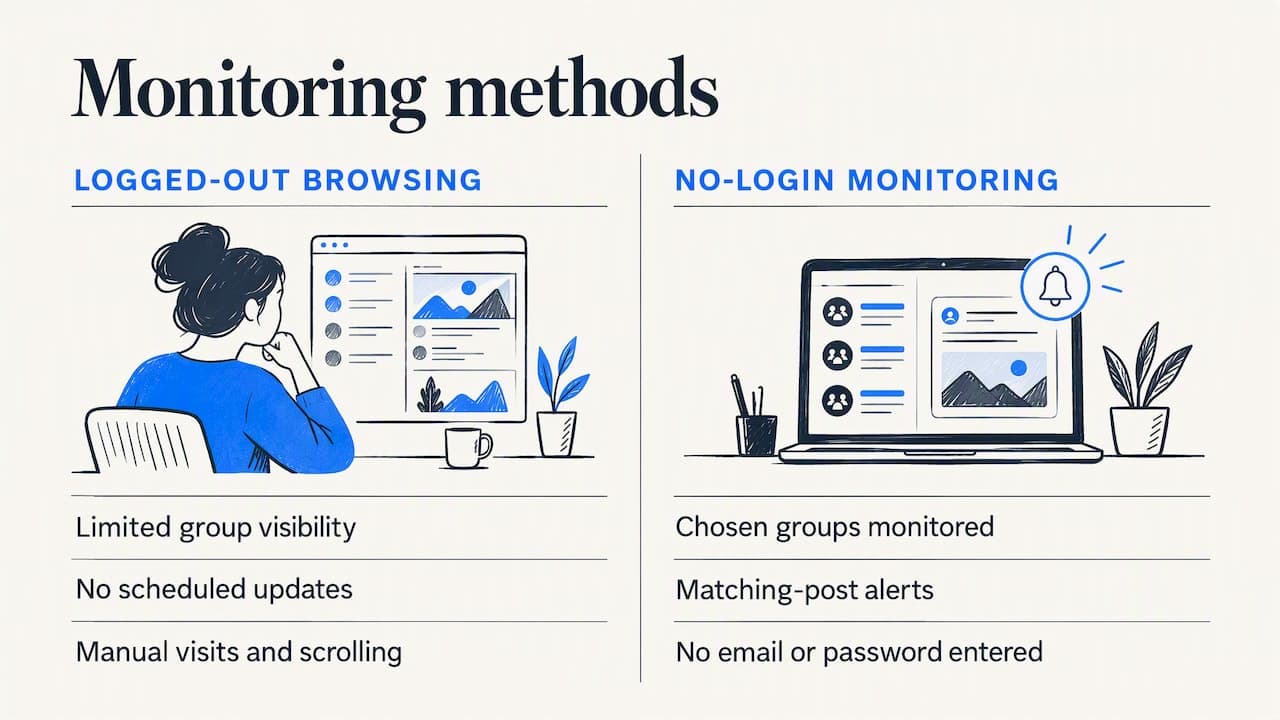
The phrase gets used for two different things, and mixing them up leads to bad purchases.
The first meaning is browsing without an account. That is a dead end for business use. Facebook shows logged-out visitors very little of a group, and nothing arrives on a schedule. You would have to remember to visit, scroll, and read.
The second meaning is monitoring without handing over your login. A service watches the groups you choose and notifies you when a post matches your criteria. You never type your Facebook email or password into the tool, and no browser extension runs inside your profile. This is the one that matters for lead generation, and it is how we built Groups Watcher. Our guide to monitoring groups without a Facebook account covers the setup in more detail.
Why does this distinction matter? Because the alternative approach, automation running through a logged-in profile, ties every action to a real person's account. Open-source documentation for one such browser-automation tool describes checkpoints, temporary feature blocks and even permanent account disablement as possible outcomes of that method. If your personal profile is also how you run your business page, ads, and community presence, that is not a risk worth taking for a lead feed.
What can be monitored: public, closed and private groups
Not every group is equally visible, and any honest guide has to say so.
| Group type | Can a tool follow it without your login? | What to expect |
|---|---|---|
| Public | Yes, this is the most reliable category | Posts are open to anyone, so discovery and tracking are realistic |
| Closed or private | Depends on the tool and the group | Access is governed by membership rules, so results vary |
| Secret | Generally not discoverable | Direct membership is required |
The pattern in the public record matches this table. An analysis published in September 2026 concludes that public groups are the only category where systematic discovery is realistically possible, while closed groups generally require joining and private or secret groups require direct membership. Older documentation from the analytics tool CrowdTangle says the same thing from the other side: its group search and lists covered public Facebook Groups only, and posts in closed groups were not accessible.
For most businesses this is good news, because the groups where people ask for recommendations are overwhelmingly public: local buy-and-sell communities, neighborhood groups, hobby and vehicle groups, wedding planning groups, landlord and host communities, and software user groups. If you work with closed communities, read our piece on social listening for closed Facebook groups for what works and what does not.
Get Facebook group alerts in 60 seconds.
Groups Watcher finds the leads in your Facebook groups and sends them to you in 60 seconds, before your competitors reply, without using your Facebook account. 7 day trial for $1 with full features.
Start your $1 trialWhy the official routes will not get you leads
It is tempting to assume Facebook offers a built-in way to do this. It does not, at least not for sales teams.
- Group admin keyword alerts exist, but they are an admin moderation feature. They help you manage a group you run, not watch groups you do not.
- Facebook's API is no longer an option for groups. Publer's help documentation, updated October 20, 2025, says Meta discontinued public API access for Facebook Groups, so even established scheduling tools cannot sync group posts through an official API.
- Meta Content Library offers public content through a controlled-access tool, but it is built for researchers. Applicants must have a primary scientific or public-interest research purpose, and API analysis happens in a secure computing environment. A business hunting for customers does not fit that profile.
- Manual scrolling and notification bells work for two or three groups. Past that, you are spending hours a week reading posts that have nothing to do with you, and still missing the ones that matter.
That gap is exactly why a dedicated monitoring service exists. The question is not whether to automate, but how to do it without putting your own account in the line of fire.
How alerts reach you, and how fast
Speed is the whole point. Someone posts "Can anyone recommend a reliable photographer for a June wedding?" and within the hour they have a dozen comments. The vendor who replies early, with a useful answer, tends to get the conversation.
When you evaluate any monitoring option, ask three questions:
- How often does it check? Some setups poll every 15 minutes, and others batch results into a daily digest. A digest is fine for research and useless for leads.
- Where does the alert land? It should arrive where you already work. If the alert sits in a dashboard you must remember to open, you will miss it.
- Does it include the post itself? You want the text, the group, the author's name and a link, so you can reply in seconds.
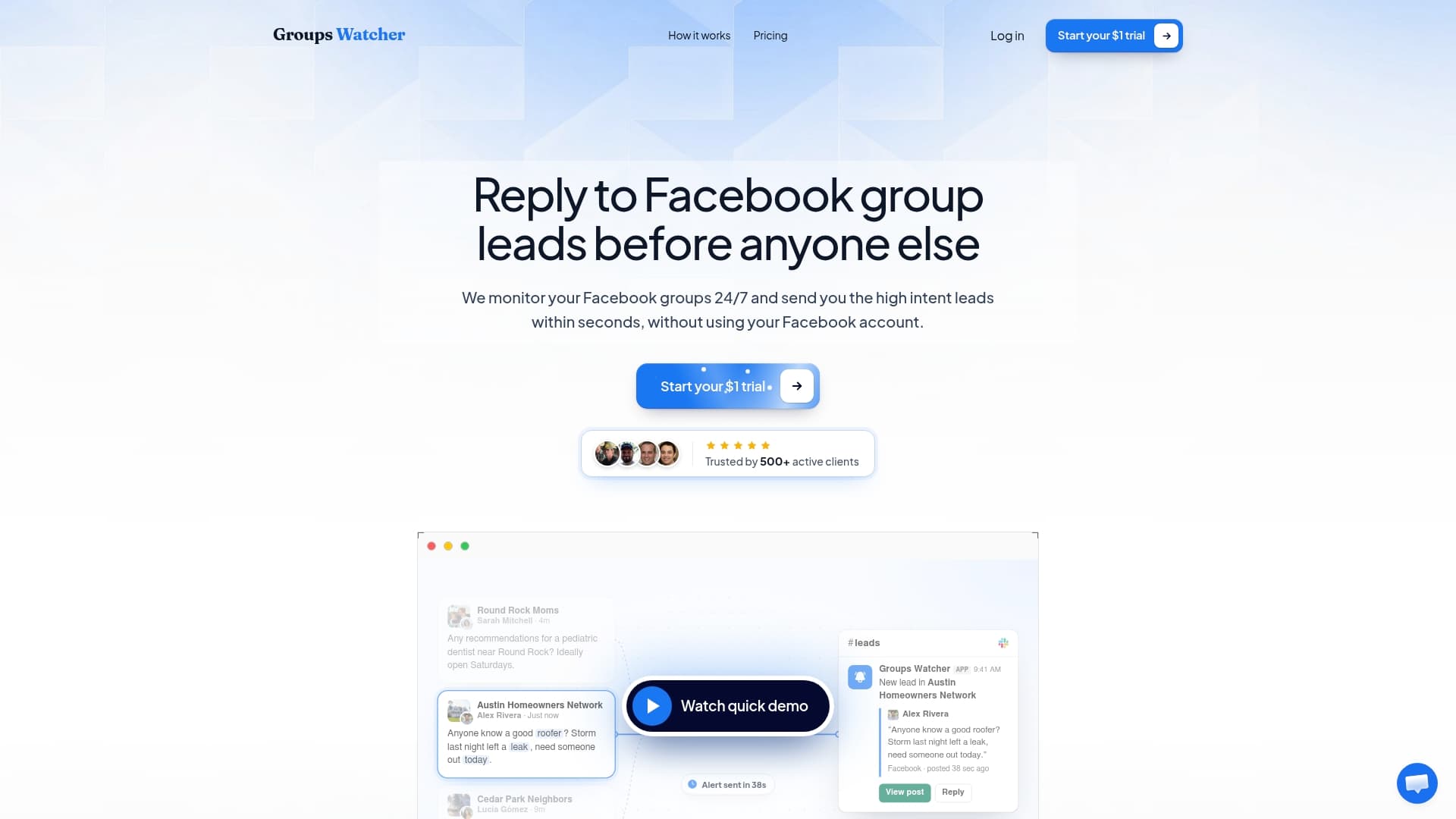
Groups Watcher alerts you within 60 seconds of a matching post, and it can send alerts through Slack, Discord, email, Microsoft Teams, webhooks and CRM integrations. A sales team can drop alerts into a shared channel, a solo owner can take them by email, and a developer can route them through a webhook into whatever system they use. Our walkthrough on setting up Facebook group instant notifications shows each channel step by step, and the page on push notifications for all posts in a group covers the case where you want every new post rather than filtered ones.
Step by step: set up monitoring that finds leads
Here is the process we recommend, in order.
1. Pick groups where buyers ask questions
Start with intent, not size. A 2,000-member local group where people ask for plumbers beats a 400,000-member general group full of memes. Think about where your customers gather before they buy:
- A performance parts store watches truck and car enthusiast groups.
- A wedding vendor watches regional wedding planning groups.
- A short-term rental host or property manager watches local host and landlord groups.
- A software brand watches industry communities where people ask for tool recommendations.
- A real estate agent watches neighborhood and relocation groups. We have a page on group lead alerts for real estate agents built around this.
If you do not know where to start, an AI group finder helps. Ours suggests relevant groups based on your business, and you can swap groups in or out at any time, so a poor choice costs you nothing but a few days of data. For local trades, see which group types local service businesses should monitor.
2. Write keywords the way buyers talk
Buyers rarely use your product category word. They write "anyone know a good...", "looking for...", "where can I find...", "need a recommendation for...". Build your list in three layers:
- Need phrases: "looking for a roofer", "need a DJ", "where to buy lift kit".
- Product and category terms: the nouns people use, including slang and common misspellings.
- Competitor names: a post that mentions a rival, especially a complaint, is often an open door.
Because buyers write in all kinds of ways, language support matters. Groups Watcher works with posts in any language, which helps if you serve communities where members post in Spanish, Portuguese, Arabic or a mix.
3. Filter for intent, not just keywords
Keyword matching alone produces noise. The word "photographer" appears in posts offering services, sharing portfolios and arguing about camera brands. Only a small share are people ready to hire.
This is where AI lead scoring earns its place. Instead of reading every match, you see a ranking of how likely each post is to be a buyer asking for help. A practical rule: start broad for the first week, read everything the scoring flags, and then tighten. Add negative keywords for the junk you keep seeing, such as "for sale", "hiring" or "giveaway", if those do not fit your offer.
4. Send alerts to the right place
Put urgent leads where someone will see them within a minute. For a team, that means a dedicated Slack or Discord channel. For a solo operator, a phone-notified email or Teams message works. If you run a CRM, push leads straight in so follow-up is tracked from the first touch.
5. Reply like a person, not an ad
A fast reply helps only if it is welcome. A few habits that work in group threads:
- Answer the question first. If someone asks about delivery times for a part, give the real answer.
- Mention what you do in one sentence, not three.
- Offer to continue by direct message or a quick call rather than pasting a price list.
- Never post the same pitch in ten threads. Groups notice, and members and admins react badly to it.
The same discipline protects your reputation. Meta's own policy on repetitive behavior says it may restrict accounts acting at lower frequencies when other signals, such as repetitive content, are present. Treat every reply as a one-off conversation and you stay on the right side of that.
Common mistakes to avoid
Watching too many groups at once. Start with 5 to 10 and expand as you see what produces replies. Each extra group adds posts to read.
Using only exact phrases. People write "recomend" and "anyone know of a guy who does...". Include variants.
Ignoring the mention side. Leads are not only "I need X" posts. Mentions of your brand, good or bad, shape how the group sees you. Our guides on Facebook group mention monitoring and tracking brand sentiment in groups cover that side.
Letting alerts pile up. A lead alert is perishable. Assign an owner for each channel so that a post is never everybody's job and therefore nobody's.
Not learning from the data. The questions people ask in groups tell you what to put on your own site. Many businesses turn recurring questions into pages and answers, which is the thinking behind AI-search optimization for local businesses: clear answers to the questions your customers already ask in public.
What to look for in a tool
Whatever you choose, check it against this list:
| Criterion | What good looks like |
|---|---|
| Login | No Facebook email or password required |
| Speed | Alerts in about a minute, not a daily digest |
| Filtering | Keywords plus intent scoring, not keywords alone |
| Channels | Slack, Discord, email, Teams, webhooks, CRM |
| Flexibility | Swap groups at any time without penalty |
| Language | Works on posts in any language |
| Pricing | Clear monthly price, with per-group costs stated |
If you are weighing categories of tools, such as scheduling suites, brand-listening platforms and group-specific lead monitors, our overview of Facebook monitoring tools sorts them by what each is actually good at.
Our perspective
We built Groups Watcher around one belief: your Facebook account should never be the price of finding leads.
Most people who look for monitoring without login have the same worry. They use Facebook for their business, their page and their ads, and they do not want a lead tool anywhere near that. So we designed ours to need no credentials at all. You choose groups and criteria, and we do the watching.
The second belief is that speed beats volume. A hundred posts in a daily report is a research project. One post in your Slack channel 60 seconds after someone asks for exactly what you sell is a sales opportunity. That is why we put effort into real-time alerts, AI scoring that ranks intent, and delivery to the channels teams already use.
Finally, we think you should be able to change your mind. Groups are swappable at any time, so if a community is quiet, you replace it and keep going.
Groups Watcher Team
Try it for $1
If you want to see how this works on your own market, Groups Watcher starts with a 7-day trial for $1. After that, the Professional plan is $99 per month, with extra groups at $2 per month per group. It includes the AI group finder, AI lead scoring and alerts to Slack, Discord, email, Teams, webhooks and CRM tools.
Pick a handful of groups, add your keywords and a competitor or two, and see what lands in your inbox in the first few days. You can review the plan details on the pricing page, or if you run a local trade, see how lead alerts for local service businesses are set up.
FAQ
Can you monitor a Facebook group without being a member?
For public groups, yes. Public group posts are open, which is why they are the category where systematic tracking is realistic. Closed and private groups are governed by their membership rules, so results there depend on the group and the tool. Start with public groups and expand once you know what works.
Do I need to share my Facebook password with a monitoring tool?
Not with Groups Watcher. It works without your Facebook account or credentials, and alerts go to your own channels such as Slack, Discord, email, Teams or a webhook. If any tool asks for your Facebook login, ask what it does with that access, since automation running through a personal profile is the approach linked to checkpoints and account blocks.
How fast will I be notified of a new post?
Groups Watcher sends alerts within 60 seconds of a post matching your criteria. Speed varies a lot between tools, so check the stated check interval before you subscribe.
Does it work for posts in languages other than English?
Yes. Groups Watcher supports posts in any language, so you can use keywords in Spanish, French, Portuguese or any other language your customers write in. Write your keyword lists in that language rather than translating English phrases word for word.
How many groups should I start with?
Five to ten is a good first set. That is enough to see patterns without drowning in posts. You can swap groups at any time, and extra groups cost $2 per month each.
Sources
- Facebook Group Monitoring: What's Actually Possible
- Publer Help Center: How to connect Facebook Groups
- Meta Content Library and API, Transparency Center
- Spam, Meta Transparency Center
- fbtool open-source documentation
- AI-search optimization for local businesses
Recommended
Stop checking Facebook groups by hand.
Groups Watcher finds the leads in your Facebook groups and sends them to you in 60 seconds, before your competitors reply, without using your Facebook account. 7 day trial for $1 with full features.