Email Alerts for Facebook Groups: Native Settings and Lead Alerts
Get Facebook group alerts in 60 seconds.
Groups Watcher finds the leads in your Facebook groups and sends them to you in 60 seconds, before your competitors reply, without using your Facebook account. 7 day trial for $1 with full features.
Start your $1 trialEmail Alerts for Facebook Groups: Native Settings and Lead Alerts
You can get email alerts for Facebook groups in two ways. Facebook's own per-group notification settings email you about new posts, but they work by group, not by phrase. For alerts that fire only when someone asks for what you sell, you need keyword-based monitoring that sends matching posts to your inbox. This guide covers both, step by step, so you can pick the setup that fits how you find leads.
TL;DR
- Facebook lets you pick a notification level per group (All Posts, Highlights, Friends' Posts or Off), and your account-level email settings decide whether those reach your inbox.
- Facebook's built-in keyword alerts are for group admins and moderators, so most people hunting for leads cannot use them.
- Groups Watcher sends email alerts, within 60 seconds, when a post in your selected groups matches your criteria. It needs no Facebook login from you.
- Alerts that arrive in the right inbox with a short, specific filter beat a flood of every post. Tune your keywords before you add more groups.
- Missed emails usually trace back to email frequency, the receiving address or spam filters, and each is a two-minute check.
Table of Contents
- What Facebook's own email notifications can do
- How to turn on email notifications for a group
- Why native alerts stop short for lead generation
- Keyword-based email alerts for Facebook group leads
- Keeping lead emails useful instead of overwhelming
- Who gets the most from email alerts
- Our perspective
- Try email lead alerts for $1
- FAQ
- Sources
What Facebook's own email notifications can do
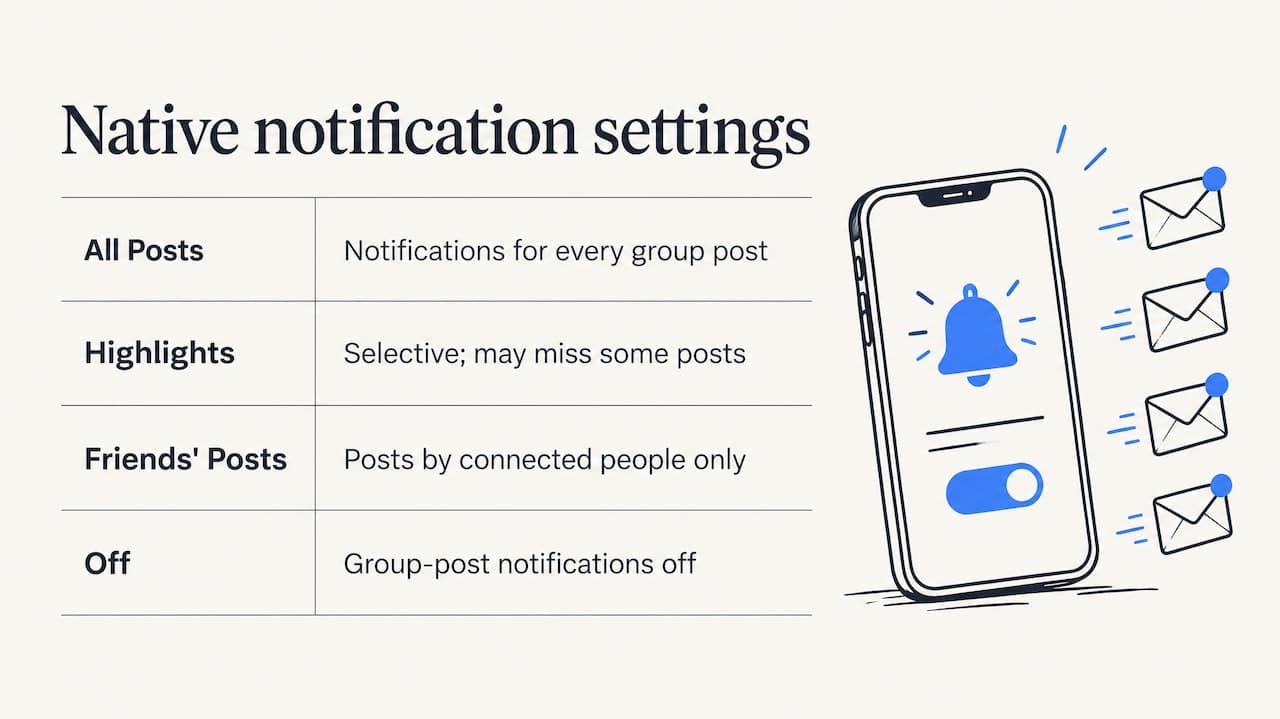
Start with what you already have. Facebook sends group-post notifications by default unless you change your settings, and the choices are All Posts, Highlights, Friends' Posts and Off, according to Royal College of Nursing guidance for group members.
That is useful for staying current in a group you belong to and care about. It has a built-in shape, though: the setting is about volume, not meaning. All Posts tells you about everything. Highlights is selective, and it is not a guarantee that you see every post. Friends' Posts only covers people you are connected to. None of these look for a sentence like "anyone know a good wedding photographer in Tampa?"
So the native route fits one job well: following a handful of groups where you want to read most of what is posted. It is a different job from catching buying intent across dozens of groups.
How to turn on email notifications for a group
The steps below follow current guidance, though Facebook moves menus around, so expect small differences in labels.
- Open the group and find its notification control, which sits under the group's options. UseCarly's October 2026 guide places it under Options, then Manage notifications.
- Choose a level. All Posts gives the most alerts. Friends' Posts or Off cuts the noise.
- Open your account settings, then Notifications, then Email, and check the Email Frequency. The same guide says it can be set to All, Suggested or Required notifications, and only All gives you the full flow.
- Confirm the email address that receives Facebook messages is the one you actually read.
One thing to know before you rely on this for revenue: the group setting controls notifications in general, and the email channel depends on your account-level choice. If you set a group to All Posts but your frequency is limited to required notifications, the group emails will not behave as you expect.
Troubleshooting missed emails
When group emails stop or never start, work through this short list in order:
- Group level. Highlights is selective, so switch to All Posts for a test week.
- Email Frequency. Set it to All in your account's email notification settings.
- Receiving address. Make sure the primary address on the account is the one you check.
- Filters and tabs. Look in spam, promotions and any label rules. If Facebook emails land in a tab you never open, fix Gmail labels and permissions so they surface in your main inbox.
Older tutorials describe a different Account Settings layout, so ignore any guide that predates the current Settings and privacy menu.
Get Facebook group alerts in 60 seconds.
Groups Watcher finds the leads in your Facebook groups and sends them to you in 60 seconds, before your competitors reply, without using your Facebook account. 7 day trial for $1 with full features.
Start your $1 trialWhy native alerts stop short for lead generation
Three limits show up quickly once you try to use group emails as a lead source.
They are not filtered by intent. A group with 40,000 members can produce hundreds of posts a day. Emailing all of them just moves the scrolling into your inbox.
Keyword alerts are an admin feature. Facebook's built-in keyword alerts for groups sit in the moderation tools, and they are meant for admins and moderators. If you are a member who wants to know when a post mentions "aftermarket exhaust" or "need a property manager," that route is closed. We cover the workaround in our guide to keyword alerts in Facebook groups without being an admin.
They depend on your personal account. Everything above runs through your own profile, your own memberships and your own email settings.
Some people try to patch this with automation. A 2026 n8n community discussion describes joining groups, turning on Facebook's email notifications and triggering a Gmail or IMAP workflow from them. The same thread reports that the Groups API no longer offers a stable route for monitoring group posts and warns that email bodies can be cut off. That makes it a fragile base for a sales process.
The broader point is that API-based group tools have gone away. CoSchedule's support notice says that from April 23, 2024, third parties could no longer publish directly to Facebook Groups because Meta discontinued the required API access, and that group analytics were discontinued as well. Any tutorial built on the old group endpoints is out of date.
Keyword-based email alerts for Facebook group leads
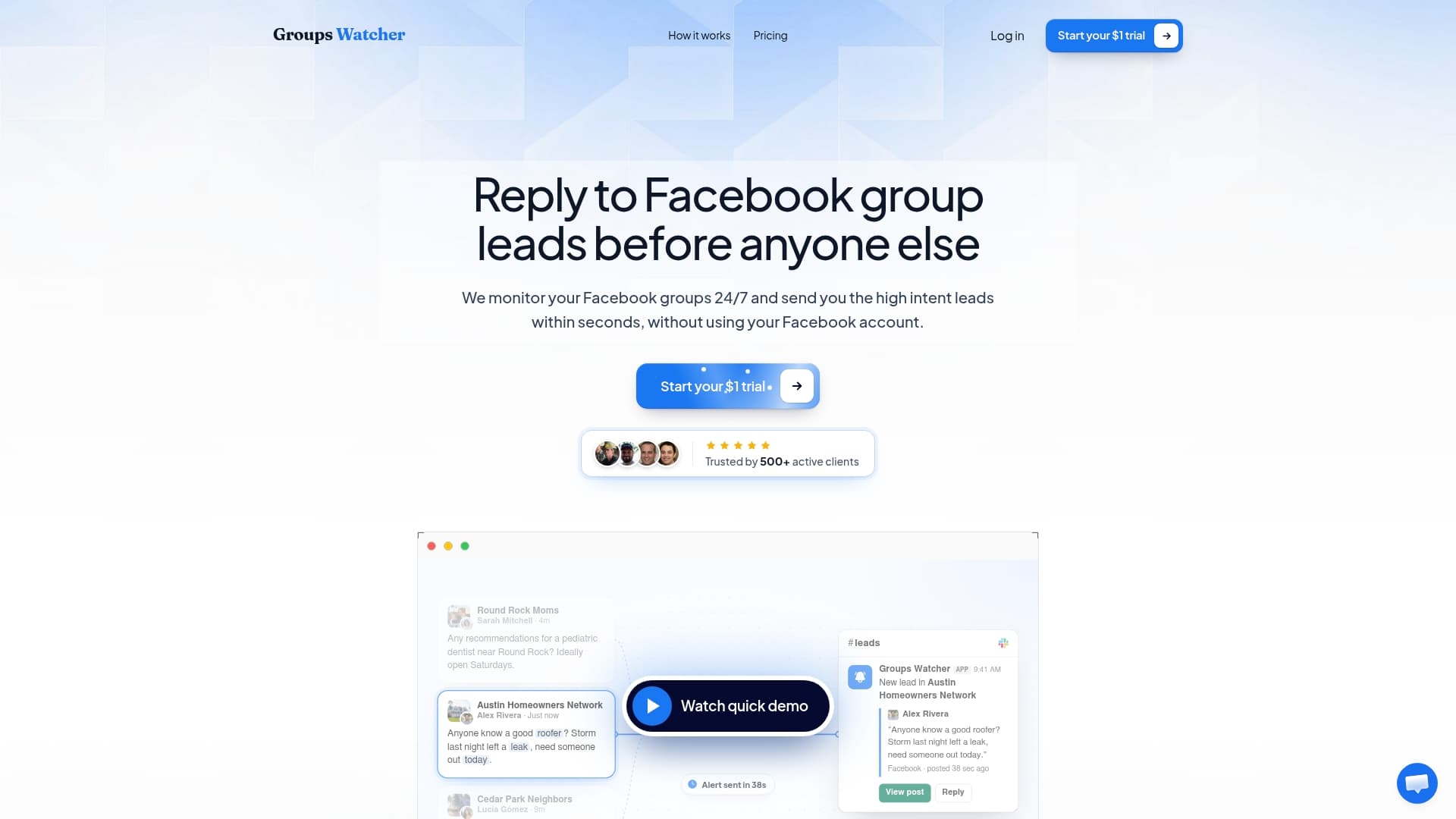
This is where a dedicated monitoring tool earns its place. Groups Watcher watches the groups you select and emails you, along with your other chosen channels, when a post matches your criteria. Here is how our setup works:
- Pick your groups. Choose public or private groups where your buyers talk. Our AI group finder suggests relevant ones if you are not sure where to look.
- Set your filters. Add the phrases that signal intent, then let AI lead scoring rank what comes through.
- Choose your channel. Email is one of 10+ options. You can also send alerts to Slack, Discord, Microsoft Teams, webhooks and CRM integrations.
- Respond fast. Alerts arrive within 60 seconds of a matching post, so you can reply while the thread is still new.
You never hand over your Facebook email or password, and nothing about the setup touches your personal account. Groups Watcher supports posts in any language, and you can swap groups at any time as your market shifts.
For the mechanics of phrase tracking, see our walkthrough on how to monitor Facebook groups for keywords. For the wider workflow, Facebook group lead monitoring covers what to do after the alert lands.
Phrases that produce good lead emails
The best alert phrases mirror how real people ask. Think in three buckets.
| Bucket | What the post sounds like | Example phrases |
|---|---|---|
| Service requests | Someone needs a provider now | "looking for a", "can anyone recommend", "need a quote" |
| Product questions | Someone wants to buy | "where can I buy", "best place to get", "anyone sell" |
| Competitor mentions | Someone is unhappy or comparing | "alternative to", "switching from", the competitor's name |
Combine a trigger phrase with your niche term. A wedding florist might pair "recommend" with "florist" or "bouquet." A performance parts store might pair "where to find" with the make and part names its customers use. A software brand can watch for the problem its product solves, plus the names of rival tools.
A few practical habits help:
- Start with 5 to 10 phrases, not 50.
- Include common misspellings and the slang your buyers use.
- Watch the first week of alerts, then delete any phrase that produced only noise.
- Add a negative angle if your niche has a confusing term, so unrelated posts drop out.
Keeping lead emails useful instead of overwhelming
Timely alerts only help if you act on them. A few choices keep your inbox workable.
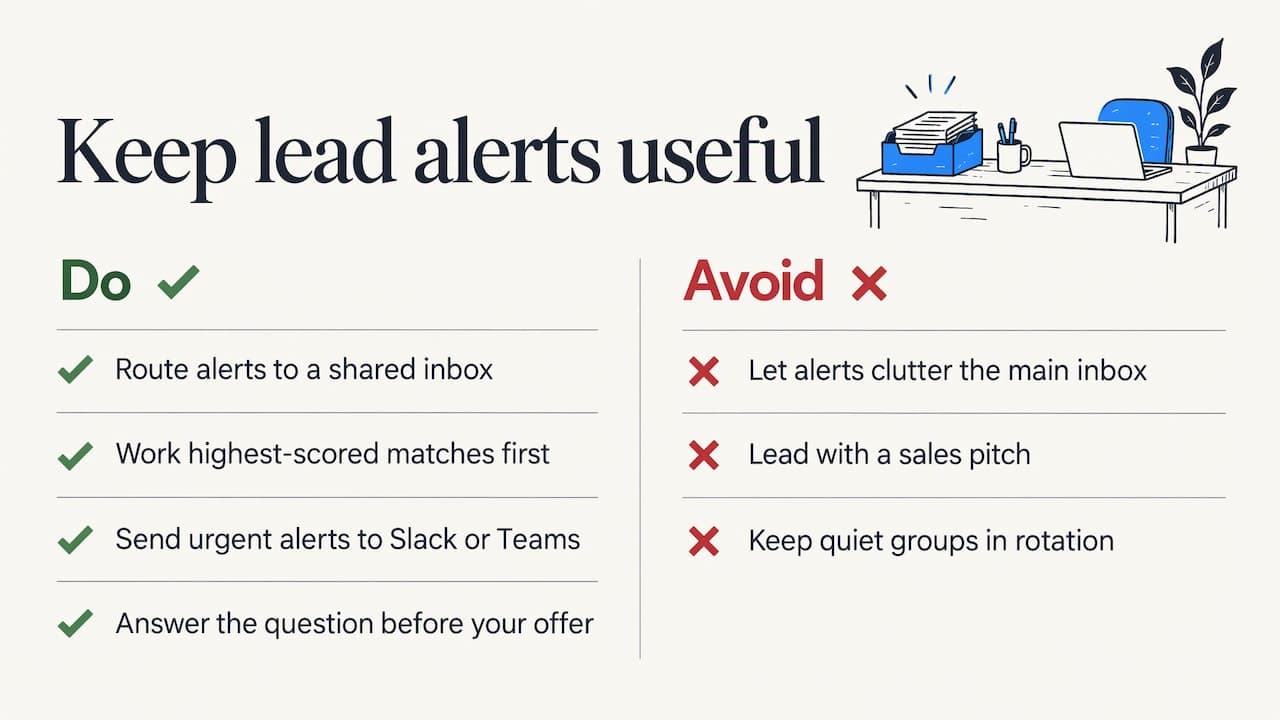
Use a dedicated address or folder. Route alerts to a shared sales inbox, or create a rule that labels them. Your team sees them as a queue, not as clutter.
Let scoring do the sorting. AI lead scoring ranks matches by intent, so a post that says "need this week, budget is set" stands out from a casual mention. Work the top of the list first.
Pair email with a faster channel. Email suits a small team that checks regularly. If response time is your edge, send the same alert to Slack, Discord or Teams, where people notice it sooner.
Reply like a person. The strongest replies answer the question first and mention your offer second. Group members can tell a helpful neighbor from a pitch.
Review monthly. Groups change. Swap out the quiet ones and add new ones. The market research guide for Facebook groups shows how to read the threads for new phrases to track.
Who gets the most from email alerts
The setup suits anyone whose buyers ask for recommendations in public conversations:
- Real estate professionals watching local community groups for people asking about agents, rentals or neighborhoods.
- Wedding, event and entertainment vendors catching requests for photographers, DJs, venues or planners.
- Short-term rental owners spotting travelers asking where to stay.
- E-commerce store owners finding shoppers asking where to buy a specific product.
- B2B and software brands seeing who asks for a tool like theirs or mentions a competitor.
If you also want to know what people say about your own name, the same alert logic applies to brand mentions on Facebook.
Our perspective
We built Groups Watcher because the best leads in Facebook groups do not wait. Someone asks for a recommendation, three businesses reply in the first hour, and the person usually picks from those. Missing that window is the most common way sellers lose group leads.
Facebook's own notification settings are good at what they were made for: keeping you informed about groups you follow. They were not made to tell a seller which of 300 daily posts is a buyer. That is the gap we focus on.
We think a lead alert should do three things. It should arrive fast, so we send it within 60 seconds. It should be filtered, so AI scoring and custom criteria keep the weak matches out. And it should not put your account at stake, so we never ask for your Facebook credentials. The email lands wherever your team already works, whether that is an inbox, Slack, Discord, Teams or a CRM.
Our advice is simple: pick a small set of groups where your buyers gather, write phrases the way they talk, and respond to the first alerts yourself. You will learn more from a week of real matches than from any amount of planning.
Groups Watcher Team
Try email lead alerts for $1
Groups Watcher costs $99 per month on the Professional plan, which includes monitoring, the AI group finder and unlimited lead scoring and alerts. Extra groups are $2 per month per group. You can start with the 7-day trial for a one-time $1 and see real matches from your own groups before you commit.
See the pricing page for the plan details, or read about the $1 trial. If you want the full setup walkthrough first, our guide to Facebook group instant notifications covers it end to end.
FAQ
Can Facebook email me every time someone posts in a group?
Yes, if you set the group to All Posts and your account's email frequency allows it. Highlights is selective and does not promise every post. If emails still do not arrive, check the receiving address and your spam or promotions folders.
Can I get email alerts for specific keywords if I am not a group admin?
Facebook's built-in keyword alerts are meant for admins and moderators, so members generally cannot use them. A monitoring tool like Groups Watcher fills that gap: you choose the groups and phrases, and matching posts reach your email without you logging in anywhere new.
Do I need to give Groups Watcher my Facebook password?
No. Groups Watcher works without your Facebook account or credentials. You select the groups and criteria in our dashboard, and alerts go to the channels you choose.
How fast do the email alerts arrive?
Groups Watcher sends an alert within 60 seconds when a post in your selected groups matches your criteria. Email delivery after that depends on your mail provider, so for the fastest response consider sending the same alert to Slack, Discord or Teams as well.
Will alerts work for posts in languages other than English?
Yes. Groups Watcher supports posts in any language, so you can monitor groups where your buyers write in Spanish, Portuguese or any other language.
Sources
- Royal College of Nursing: guidance for members and moderators of Facebook groups
- UseCarly: How to Stop Facebook Emails (and Which Ones to Keep)
- n8n Community: Monitoring Facebook Group Posts with n8n After Groups API Deprecation
- CoSchedule Support: Facebook Group Announcement
- Petĩra: Email Notification Settings
Recommended
Stop checking Facebook groups by hand.
Groups Watcher finds the leads in your Facebook groups and sends them to you in 60 seconds, before your competitors reply, without using your Facebook account. 7 day trial for $1 with full features.