Competitor Mentions in Facebook Groups: How to Catch Them Fast

Get Facebook group alerts in 60 seconds.
Groups Watcher finds the leads in your Facebook groups and sends them to you in 60 seconds, before your competitors reply, without using your Facebook account. 7 day trial for $1 with full features.
Start your $1 trialCompetitor Mentions in Facebook Groups: How to Catch Them Fast
A competitor mention in a Facebook group is one of the warmest leads you will ever see: someone is naming a rival, comparing it with alternatives or asking what else exists, and the thread is open right now. The way to win those moments is to define what counts as a mention, watch the right groups for it, and get an alert fast enough to reply while the conversation is still moving. Groups Watcher sends an alert within 60 seconds when a post in your selected groups matches your criteria, and it does this without needing your Facebook account or credentials.
TL;DR
- The best competitor mentions are switching posts, complaints, "which one should I buy" threads and requests for alternatives. Each one tells you who is ready to decide.
- Build a short list of competitor names, product names, common misspellings and problem phrases, then watch the groups where your buyers actually talk.
- Speed matters most. A reply in the first minutes lands in a thread with few answers. A reply a day later lands among thirty.
- Reply as a helpful member first and a vendor second, and follow each group's promotion rules.
- Groups Watcher watches public and private groups, scores posts for intent and sends alerts to Slack, Discord, email, Teams, webhooks or your CRM.
Table of Contents
- Why competitor mentions are the best leads in a group
- The five kinds of competitor mention worth acting on
- How to set up competitor mention monitoring, step by step
- How to reply to a competitor mention without spamming
- Finding groups and posts beyond alerts
- What to do with the mentions you collect
- A realistic example
- Start catching competitor mentions today
- FAQ
- Sources
Why competitor mentions are the best leads in a group
Most posts in a group are chatter. A competitor mention is different because the person has already done the hard part: they know the category exists, they have a budget in mind, and they are asking strangers to help them pick.
Here is what that looks like in different businesses:
- Performance auto parts store. A truck owner writes that the intake from a well-known brand keeps throwing codes and asks what people run instead. He needs a part, he has a complaint and he wants a name.
- Wedding vendor. A bride posts that her photographer just cancelled and asks for recommendations for a date in June. She is naming a problem with a competitor and she has a deadline.
- B2B software brand. A founder asks whether anyone has moved off a rival CRM because the pricing jumped. That is a switching thread, and the replies will shape the decision.
- Real estate agent. A neighbor mentions that another agent never returned her calls and asks who people trust. She is ready to talk to someone today.
- Airbnb host or property manager. An owner complains about a co-host service and asks for alternatives in the same city.
In each case the post carries three signals at once: who, what they need and when. A broad keyword like "photographer" returns noise. A competitor name plus a frustration returns buyers.
The five kinds of competitor mention worth acting on
Not every mention deserves a reply. Sort them by what the person wants.
- Switching posts. "Thinking of leaving X, anyone tried Y?" The highest intent. The person is mid-decision.
- Complaints. "X has not shipped my order in two weeks." Intent is real but emotional. A calm, useful answer works better than a pitch.
- Alternative requests. "What is a cheaper option than X?" They have named the category and the price pressure.
- Comparison questions. "X or Y for a small team?" They are weighing options and will likely read every reply.
- Recommendation requests that never name a competitor. "Where can I find a good lift kit near Dallas?" These are your own category terms, and they belong in the same alert stream.
Mentions that only praise a competitor, or name it in passing in an unrelated story, are usually not worth your time. This is where filtering pays off, because the volume of passing mentions can bury the five types above.
How to set up competitor mention monitoring, step by step
Step 1: Choose the groups where your buyers ask questions
Start where the questions are, not where the most members are. A group of 4,000 local homeowners will produce more real estate leads than a group of 400,000 people who like houses. Look for niche, active groups: local community groups, hobby and build groups, industry peer groups, vendor and planner groups, and city-specific rental or host groups.
Groups Watcher includes an AI-driven group finder that suggests groups relevant to your business, and it covers both public and private groups. You can swap groups at any time, so if a group goes quiet you replace it without rebuilding anything. Extra groups beyond your plan cost $2 per month per group, so adding a promising group is a small decision, not a big one.
Get Facebook group alerts in 60 seconds.
Groups Watcher finds the leads in your Facebook groups and sends them to you in 60 seconds, before your competitors reply, without using your Facebook account. 7 day trial for $1 with full features.
Start your $1 trialStep 2: Write your criteria
Your criteria decide whether you get leads or noise. Build four lists:
- Competitor names. The brand, the shortened version people actually type, and the obvious misspellings.
- Product names. Plenty of people name the product, not the company.
- Problem phrases. The words people use when something goes wrong: "never called me back," "won't ship," "price went up," "cancelled on me."
- Need phrases. "Looking for," "where can I find," "anyone recommend," "alternative to."
The table below shows how the same logic works across business types.
| Business | Competitor or product term | Intent phrase | Alert should mean |
|---|---|---|---|
| Truck parts store | Rival brand and part name | "where to buy," "what do you run" | Buyer needs a part now |
| Wedding photographer | Rival studio name | "cancelled," "recommend," "date open" | Couple needs a replacement |
| SaaS company | Rival product name | "alternative to," "switching from" | Active evaluation |
| Real estate agent | Rival brokerage or agent name | "who do you use," "looking for an agent" | Seller or buyer choosing an agent |
| Short-term rental manager | Rival management company | "co-host," "property manager," "fees" | Owner shopping for management |
Groups Watcher supports every language, so a Spanish-language thread in a regional group matches your criteria the same way an English one does.
Step 3: Send alerts where your team already works
A lead that sits in an inbox for three hours is a lead you have likely lost. Route alerts to the place someone is already looking. Groups Watcher can send them to Slack, Discord, email, Microsoft Teams, webhooks and CRM integrations, so a mention can appear in a sales channel, ping a phone or create a record without anyone copying and pasting.
A simple routing plan works for most teams:
- Hot switching posts and direct requests go to a Slack or Discord channel that someone owns during working hours.
- Everything else goes to a digest by email.
- Qualified leads flow to the CRM through a webhook or an integration so they are tracked like any other opportunity.
If you want to connect intent signals to a wider sales automation stack, a consultancy that builds customer intent prediction and CRM automation systems can extend what happens after the alert arrives.
Step 4: Let scoring rank what arrives
Even good keywords catch posts that are not leads. Groups Watcher applies AI lead scoring and customizable filters to the matches, so a "my buyer is asking where to purchase" post ranks above a passing mention. With unlimited lead scoring and alerts in the plan, you do not have to ration how many posts get checked. Over the first couple of weeks, read what comes through and tighten your filters: add negative phrases for the junk you keep seeing, and widen the terms that find real buyers.
Step 5: Reply while the thread is young
This is the step the whole setup exists for. Group threads move in bursts. The first helpful, specific answer usually shapes the rest of the conversation, and people often stop reading after a handful of replies. Alerts within 60 seconds mean you can be that first answer instead of the thirtieth.
For a deeper walkthrough of the setup, see our practical guide to Facebook group mention monitoring, and for the keyword side specifically, our guide to monitoring Facebook groups for keywords and leads.
How to reply to a competitor mention without spamming
The fastest alert in the world will not help if your reply gets deleted. Groups exist for their members, and moderators remove anything that reads like an ad. Some groups spell this out plainly: one entrepreneur community's published group rules allow self-promotion only on a set day with a hashtag, or when a member asks for it. Read the pinned rules and the "About" section of every group you monitor before you post.
A few habits keep you welcome:
- Answer the question first. If someone asks what people run instead of a rival part, say what fits their truck and why. Mention your store only if the group allows it or they ask.
- Never attack the competitor. Complaints are invitations to be useful, not to pile on. "Sorry that happened, here is how we handle it" beats any comparison.
- Be specific to the person. Use their city, their date, their model. Generic replies look like bots.
- Move to a message only when invited. A good reply makes people ask. Cold DMs to strangers from a thread are what get accounts reported.
- Stay honest about who you are. Use your real name and make your business clear on your profile. You never need to pretend to be a customer.
Because Groups Watcher does not use your Facebook credentials, monitoring itself never touches your personal account. Your account only shows up when you choose to reply, and that is where the good-neighbor habits above protect it.
Finding groups and posts beyond alerts
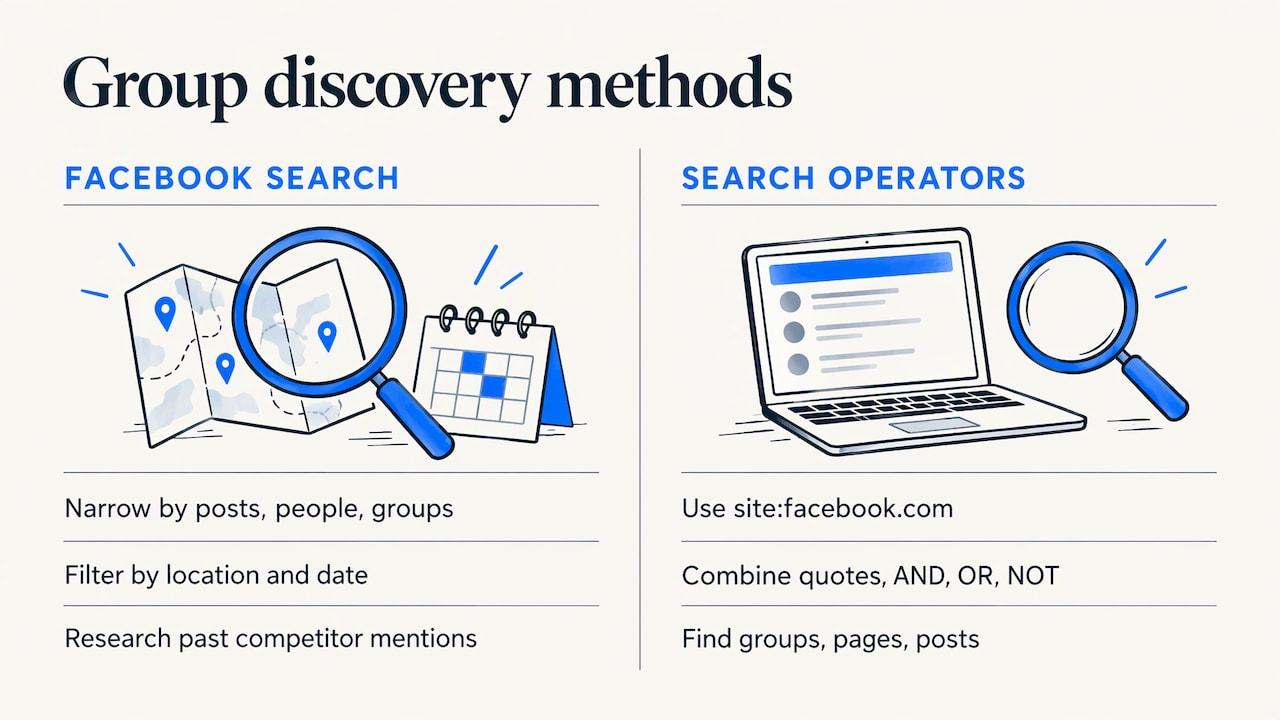
Alerts cover what is posted from now on. For research into what was said before, Facebook's own search can narrow results by category, such as posts, people or groups, and by filters like location and date posted, according to the Meta Transparency Center's explanation of Facebook Search. That is handy for scouting groups to add to your list and for seeing how people have talked about a competitor in the past.
You can also find candidate groups from outside Facebook. Search engine operators such as site:facebook.com combined with exact-phrase quotes and AND, OR and NOT are a way to surface groups, pages and posts about a topic, a competitor or a local area, as Neil Patel's guide to Facebook search operators explains. Use these to build your group list, then let monitoring handle the live stream.
If your group list includes invite-only communities, read our piece on social listening for closed Facebook groups for what works there.
What to do with the mentions you collect
Replying is the fast win. The slower win is learning from the pattern.
- Tally the complaints. If six people in a month say a competitor is slow to respond, speed becomes your headline on your site and in your intros.
- Collect the vocabulary. Buyers describe problems in their own words. Those words belong in your ad copy, landing pages and sales scripts.
- Watch the objections. Switching threads show what makes people hesitate: contract length, setup pain, price. Answer those in your content before anyone asks.
- Track sentiment over time. A rising number of complaints about a rival is a signal to increase outreach in that group. See how to track brand sentiment in Facebook groups.
If your goal is more about research than leads, our guide on using Facebook groups for market research goes into that workflow.
A realistic example
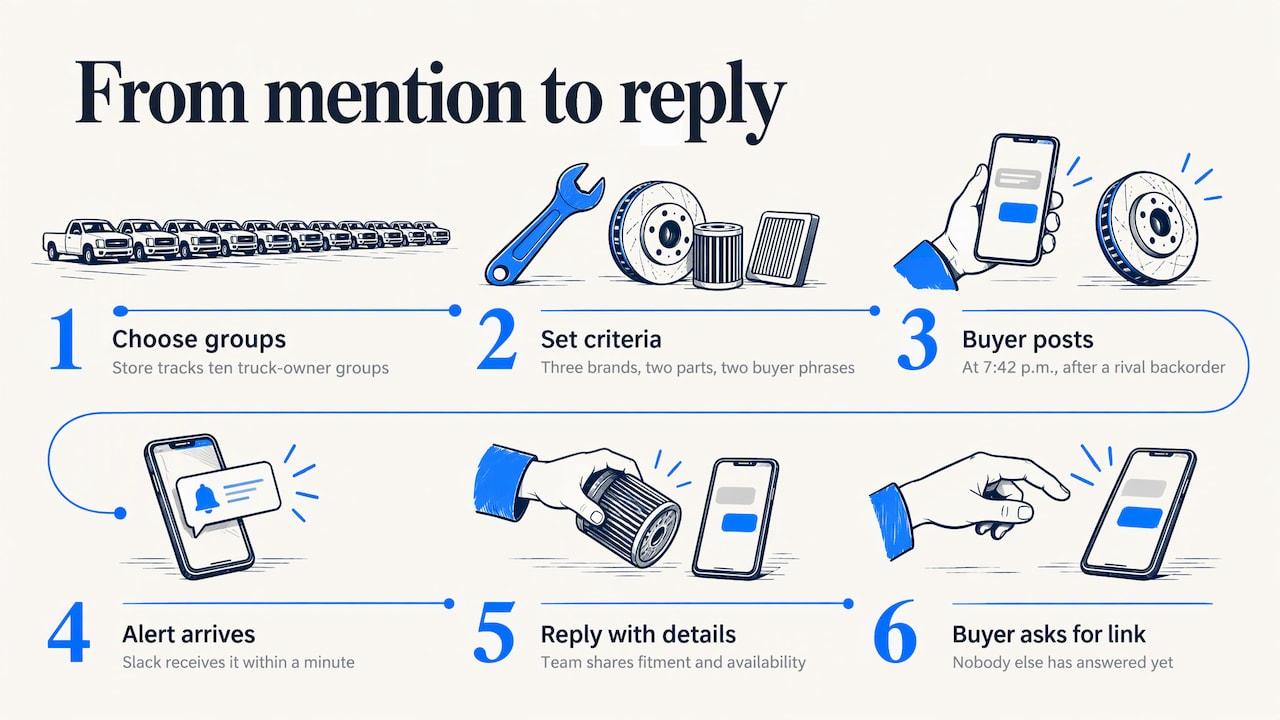
Take a performance parts store with ten truck-owner groups on its list. It sets criteria around three rival brand names, two part names and phrases like "where do you buy" and "anyone have a link." A member posts at 7:42 in the evening asking where to find an aftermarket part for his model after a rival's backorder. The alert reaches the store's Slack within a minute, a team member sees it on his phone and replies with the fitment details and a note on availability. The member asks for the link. Nobody else has answered yet.
The store did not need to scroll groups all evening. It needed the right criteria, the right groups and an alert that arrived fast enough to matter. That is the pattern across every business type in this article.
Our view: speed and safety decide who wins these threads
We built Groups Watcher around one belief: the business that answers first, and answers well, usually gets the conversation. Competitor mentions are rare, valuable and short-lived, which is why we designed alerts to arrive within 60 seconds and to land in the tools your team already uses.
We also believe monitoring should not put your own profile at stake. Groups Watcher works without your Facebook account or credentials, so you can watch public and private groups, add and swap groups whenever your market shifts, and keep your personal account out of the monitoring entirely.
And we believe a lead tool should do the sorting for you. AI lead scoring and custom filters exist so you read the post from a buyer and skip the noise, in any language, across as many groups as your business needs.
Groups Watcher Team
Start catching competitor mentions today
The Professional plan is $99 per month and includes monitoring, the AI group finder, unlimited lead scoring and alerts, with extra groups at $2 per month per group. You can try it first with the 7-day trial for $1. Set up your competitor names and need phrases, pick your first groups and see which threads reach you in the first week. Details are on the pricing page.
Selling to a specific audience? We also have pages for real estate agents and for local service businesses.
FAQ
Can I see every competitor mention in a Facebook group?
You can see every post that matches the names and phrases you set, in the groups you choose to watch. Groups Watcher compares new posts against your criteria and alerts you within 60 seconds. The more complete your list of brand names, product names and misspellings, the fewer mentions slip past.
Do I need my Facebook login to monitor groups?
No. Groups Watcher works without access to your Facebook account and without any Facebook credentials. You select the groups and criteria in the tool, and alerts arrive in Slack, Discord, email, Teams, webhooks or your CRM.
Which mentions should I reply to first?
Start with switching posts and direct requests for alternatives, because those people are deciding now. Complaints come next, with a helpful answer rather than a pitch. Passing mentions that include no question or need can usually wait or be ignored.
How do I reply without getting removed from the group?
Read the group's pinned rules, answer the member's actual question and keep promotion to what the group allows. Some groups limit self-promotion to a set day or to when someone asks for it. Offer to send details by message only after the member shows interest.
Does it work for private groups and non-English posts?
Yes. Groups Watcher monitors public and private groups and supports posts in every language, so your criteria apply across the communities where your buyers talk.
Sources
- Facebook Search, Meta Transparency Center
- 7 Advanced Facebook Search Operators, Neil Patel
- Facebook Group Rules, Entrepreneur Vault
- Data & Analytics, Brainiac AI
Recommended
Stop checking Facebook groups by hand.
Groups Watcher finds the leads in your Facebook groups and sends them to you in 60 seconds, before your competitors reply, without using your Facebook account. 7 day trial for $1 with full features.