B2B Leads From Facebook Groups: A Working Playbook
Get Facebook group alerts in 60 seconds.
Groups Watcher finds the leads in your Facebook groups and sends them to you in 60 seconds, before your competitors reply, without using your Facebook account. 7 day trial for $1 with full features.
Start your $1 trialB2B Leads From Facebook Groups: A Working Playbook
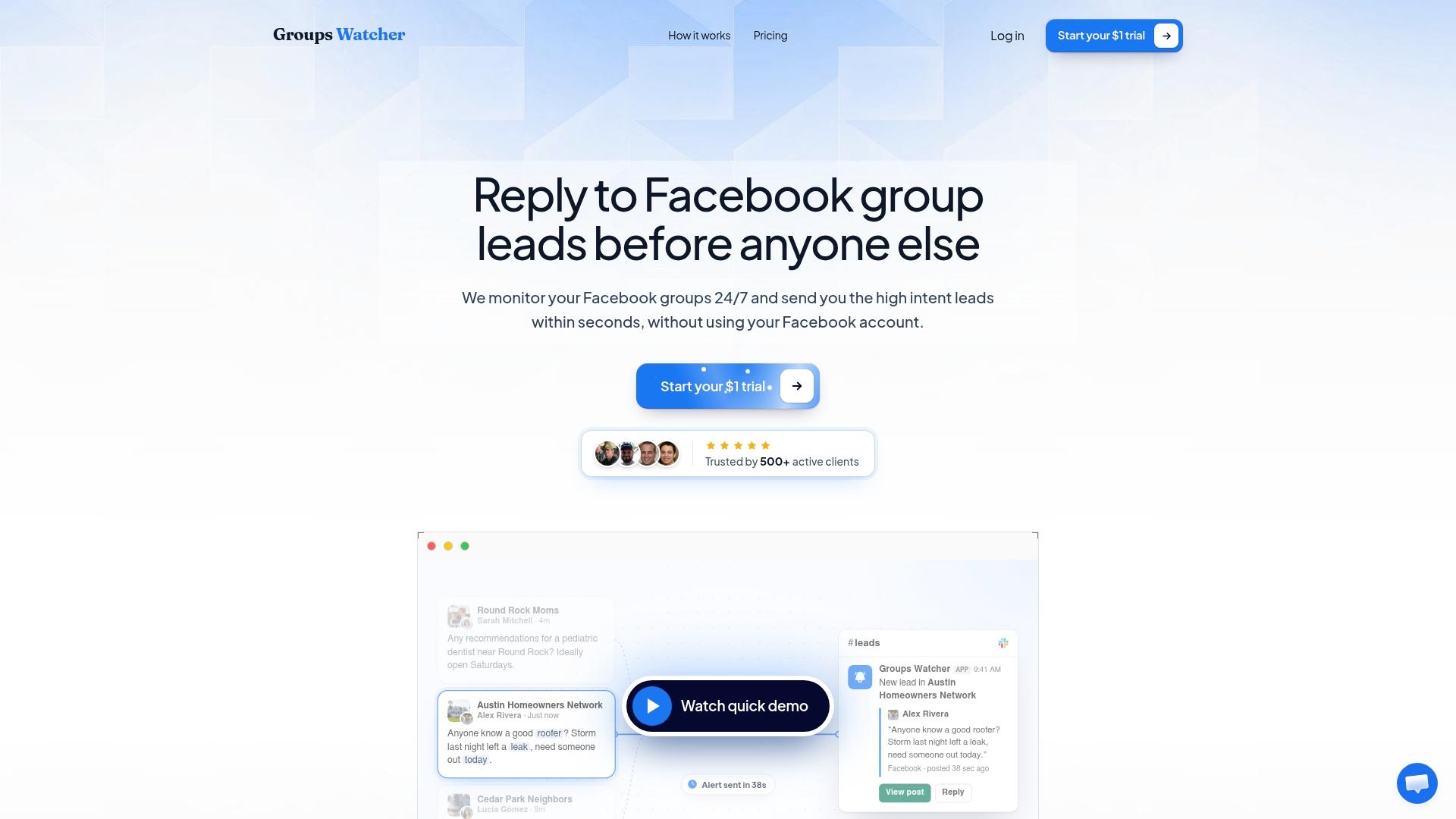
B2B leads in Facebook groups appear as a single post: someone asks which tool to use, complains about a vendor, or wants a recommendation. Within hours the thread is full of replies and the buyer has a shortlist. The teams that win these leads are the ones that see the post first. That is why we built Groups Watcher: it sends an alert within 60 seconds when a post in your selected groups matches your criteria, so you can answer while the question is still open.
This guide covers the full routine for a B2B brand, a software company, a real estate professional, an event vendor or an e-commerce store: which groups to pick, what a buying post looks like, how to set up alerts, how to reply without sounding like an ad, and how to tell whether it is working.
TL;DR
- The best B2B leads in Facebook groups are public questions: "what do you use for...", "anyone tried...", "looking for a replacement for...". Speed decides who gets the conversation.
- Pick groups by buyer fit and daily activity, not by member count. A small group full of recommendation requests beats a huge silent one.
- Groups Watcher monitors public and private groups, scores posts with AI and alerts you within 60 seconds in Slack, Discord, email, Teams, a webhook or your CRM, with no Facebook login from you.
- Reply with help first, move to a direct message second, and tag every lead with its source group so you can measure results over at least 90 days.
- Plans start with a $1 seven-day trial, then $99 per month, plus $2 per month for each extra group.
Table of Contents
- Why Facebook groups produce B2B leads
- Choose groups by buyer fit, not size
- What a B2B buying post looks like
- The timing problem
- How to set up a lead monitoring routine
- Examples by business type
- Monitoring without handing over your account
- Our view: speed and fit beat volume
- Try it on your own groups
- Measuring whether it works
- FAQ
- Sources
Why Facebook groups produce B2B leads
Most B2B channels make you interrupt someone. Groups work the other way around: members state a problem in their own words, in public, at the moment they need a solution. A SaaS founder asking a niche group about invoicing software, an agent asking a local group for a mortgage broker, a wedding planner asking who does lighting: each has already done the qualifying for you.
Community marketers say the same about their own groups. Megan Huber, interviewed by Salesloop Brand, describes her Facebook group as the hub where all roads lead, because people make buying decisions once they are inside the community. The principle carries over to groups you do not run: the decision conversation happens where the peers are.
The catch is volume and timing. Genuine requests are scattered across dozens of groups and buried in feeds that rank posts by engagement, not recency. Nobody can read twenty groups all day. If you want a deeper look at where buyers actually show up, we map the main sources in our guide to sources of leads in Facebook groups.
Choose groups by buyer fit, not size
Start with the buyer, then find the rooms they talk in. Three kinds of groups tend to produce B2B conversations:
- Industry and professional groups, such as "SaaS founders", "ecommerce owners" or "property managers".
- User groups for the software your buyers already run, including groups around tools you compete with. Complaints and "has anyone switched" posts live here.
- Regional business groups, where owners ask for local vendors, agencies and services.
Score each candidate on a few questions: Are there new posts every day? Are the members clearly your customers? Do the rules allow business replies? Do people actually talk to each other? Do recommendation requests appear regularly? A group that answers yes to most of these is worth watching. As a marketing agency's 2026 rules guide puts it, a 2,000-member group where people ask for a plumber every day is worth more than a 100,000-member group that never does. Group rules sit in each group's About section, so read them before you reply.
Finding candidates by hand means searching, joining, waiting for approval and then checking each group for weeks to see if it is active. Groups Watcher includes an AI-driven group finder to shortlist groups for your niche. You can swap groups at any time, so a quiet group is dropped without losing your setup. The alert flow for public groups is described in our public group monitoring guide.
Get Facebook group alerts in 60 seconds.
Groups Watcher finds the leads in your Facebook groups and sends them to you in 60 seconds, before your competitors reply, without using your Facebook account. 7 day trial for $1 with full features.
Start your $1 trialWhat a B2B buying post looks like
Not every keyword match is a lead. Most posts that mention your category are opinions, jokes or self-promotion. The posts worth an alert share a few traits: the person names a requirement, asks for input, and signals they will act.
| Signal | Example post | Why it matters |
|---|---|---|
| Recommendation request | "What are you all using for scheduling?" | The buyer is in the shortlist stage and invites replies |
| Experience check | "Has anyone tried a CRM that works with QuickBooks?" | Researching a specific need |
| Price pressure | "Looking for something cheaper than what we have" | Active dissatisfaction with a current vendor |
| Competitor mention | "Is anyone moving off [competitor]?" | Open to switching, often with a deadline |
| How-to problem | "How do I get my bookings out of spreadsheets?" | A problem your product solves, stated in plain words |
| Local service ask | "Need a photographer for a corporate event in Austin" | Ready to hire, usually within days |
Two cautions apply. First, volume is modest: even in active markets, a few genuine recommendation requests per week is normal for a narrow niche, so the goal is not to catch everything but to never miss the ones that appear. Second, bare keywords flood you with noise. The word "alternative" or "looking for" appears in plenty of posts that are not buying. This is why Groups Watcher pairs keyword filters with AI lead scoring: you set the criteria, and the scoring sorts high-intent posts from chatter. Every language is supported, which matters for regional or multilingual groups.
For the phrase side of the work, our walkthrough on finding buyers who are asking in Facebook groups shows how to build filters around your own product's vocabulary.
The timing problem
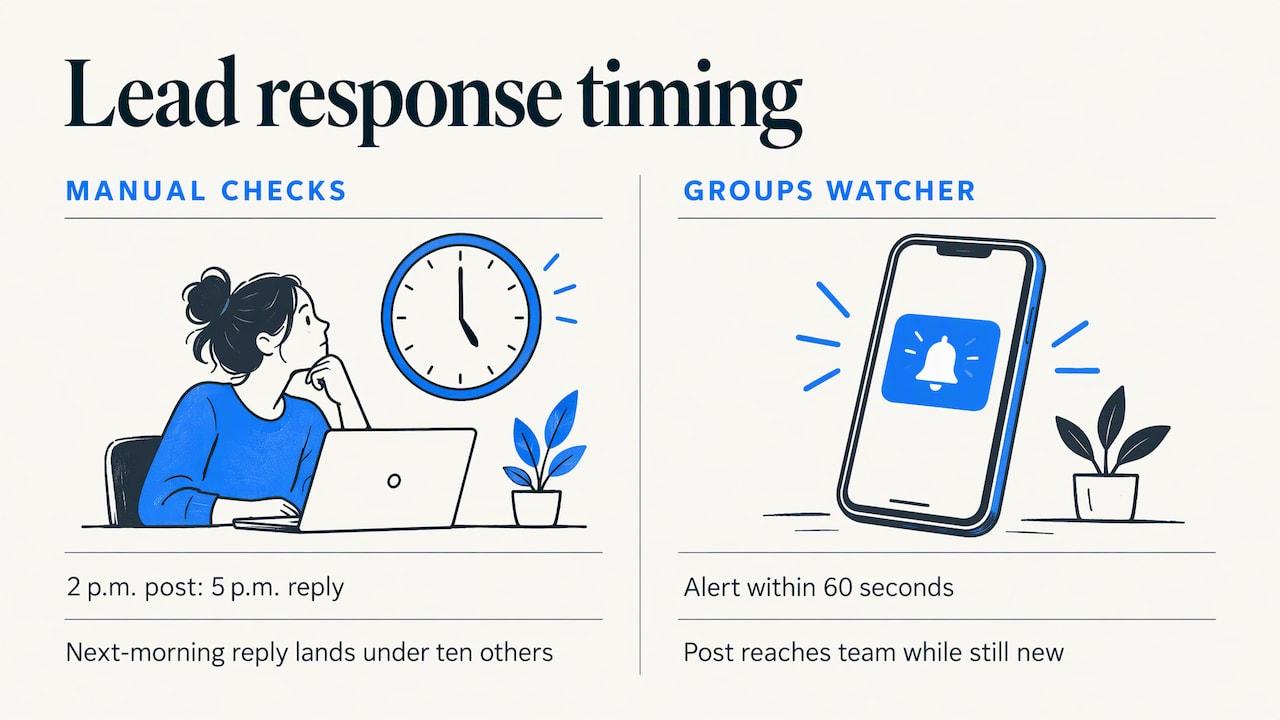
A recommendation thread works like a race. The poster asks, early commenters name vendors, and the poster picks from what is already on the page. A reply that arrives the next morning lands under ten others, or after the poster has stopped reading.
Manual checking has a ceiling. You can set aside ten minutes a day to search your groups, and some people do, but a post made at 2 p.m. gets answered at 5 p.m. at best, and groups you forget to open stay unread. Real-time alerts change the math: the post reaches your Slack channel or inbox while it is still new, and you are one of the first voices in the thread.
Groups Watcher delivers alerts within 60 seconds to more than ten channels: Slack, Discord, email, Microsoft Teams, webhooks and CRM integrations. Put alerts where your team already works. A sales team can use a Slack channel with a rule that the first person to react owns the lead. A solo founder can use email on a phone. A webhook can push the post straight into a CRM record.
How to set up a lead monitoring routine
Here is the process step by step, with the point at which each step usually breaks.
1. Define the lead in one sentence
Write who would post, what they would ask, and what would make them a fit. For a software company: "Operations managers at companies with 10 to 200 staff asking about scheduling or dispatch tools." For a performance parts store: "Truck owners asking where to buy aftermarket parts for a specific model." This sentence becomes your filter. Where it goes wrong: a definition so broad that every post qualifies, and the alerts become noise.
2. Build your group list
Aim for a focused set of groups that scored well on activity and buyer fit. Include at least one group for each of the three types above. Extra groups on the Professional plan cost $2 per month each, and you can swap one out whenever a group underperforms, so you can test widely and keep the winners. Where it goes wrong: choosing by member count and discovering six weeks later that nobody asks anything.
3. Set keywords and criteria
Combine your category terms with intent phrases: recommendation language, price complaints, switching language and competitor names. Add exclusions for the noise you see in the first week, then tighten. Where it goes wrong: copying a generic keyword list. Use your customers' actual words from sales calls and support tickets.
4. Connect your alert channel
Choose the channel your team will actually look at within a minute. Our setup guide for Facebook group instant notifications walks through it. Nothing in this setup needs your Facebook email or password, so there is no personal account tied to the monitoring. Where it goes wrong: alerts routed to an inbox that nobody opens until the afternoon.
5. Respond like a person
Answer the question first. Say what you would do in their situation, name the trade-offs, and mention your product only if it fits. If the poster is clearly a match, offer to send details by direct message. Where it goes wrong: pasting a pitch with a link. Many groups remove those posts, and members notice.
6. Qualify before you push
A group post gives you a clue, not a qualified lead. Look for a company name or role, a described problem your product solves, and a company that fits your target audience. One practical rule from a lead-generation guide is that 20 people with context beat 200 names without it. Keep a lean record: name, company, profile link, and the group and date it came from.
7. Track by source
Tag each lead with the group that produced it. Then judge the channel over at least 90 days, since group marketing is a compounding channel and early months look weaker than later ones. Count replies that became conversations, conversations that became demos, and demos that became customers. Ignore likes and reactions.
Examples by business type
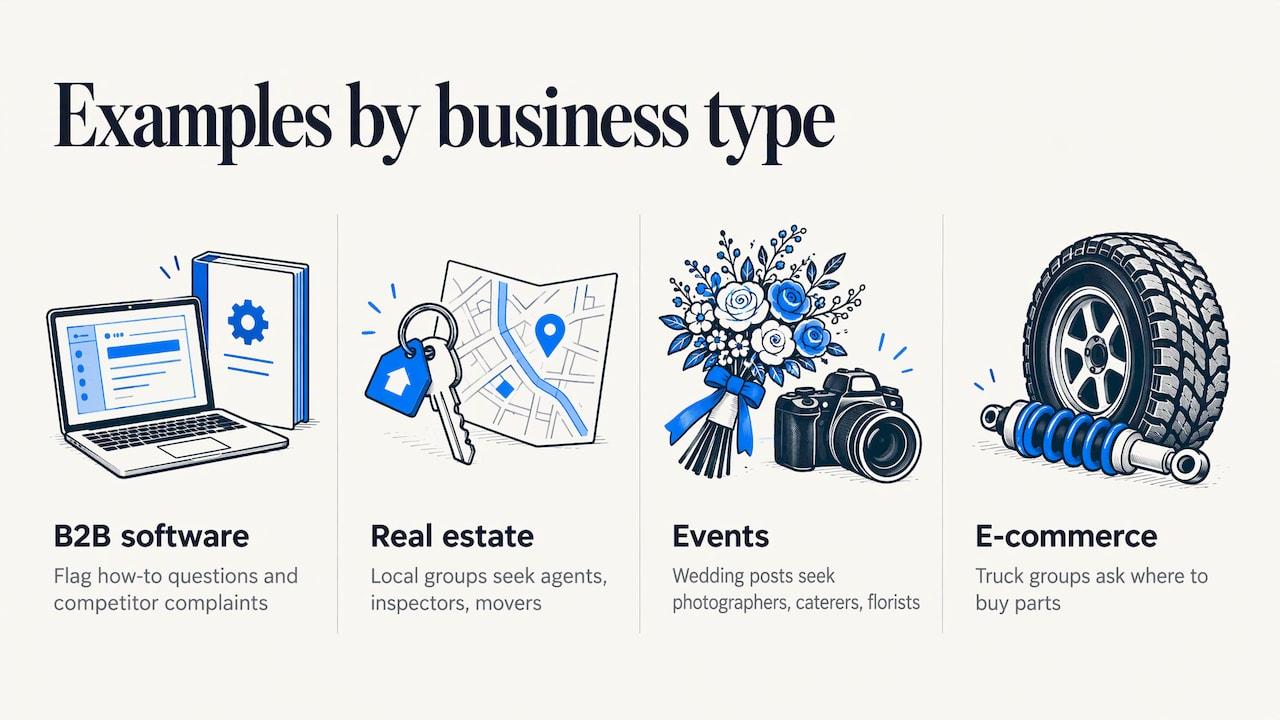
B2B software. Watch groups for the tools your buyers use and for industry owner groups. Alert on recommendation questions, "how do I" problems your product solves and competitor complaints. Our SaaS playbook for Facebook group leads goes deeper on the reply patterns.
Real estate. Local community and neighborhood groups are where people ask for agents, inspectors, movers and lenders. A fast reply with a useful local answer is the whole game. We have a dedicated page on Facebook group lead alerts for real estate agents.
Events and hospitality. Wedding vendors, venues and short-term rental hosts see requests for photographers, caterers, florists and stays. These posts get a flood of replies within the hour, so being early matters most.
E-commerce. A performance auto parts store can watch truck and vehicle owner groups for "where can I buy" posts and reply with the exact part. The buyer is asking for a source; being the first to name one wins the sale.
Local services. The same logic holds for trades. See what that looks like in our page on lead alerts for garage door companies.
Monitoring without handing over your account
Many teams hesitate to point a personal profile at dozens of groups. Groups Watcher works differently: it does not use your Facebook credentials or require access to your account, so there is no login to protect and no personal profile involved in the monitoring. If you want the details, read how group post alerts work without membership.
Our view: speed and fit beat volume
Most advice about B2B leads in Facebook groups is about posting more: more groups, more content, more comments. We see the opposite problem in the buying moment. The lead is already there, written in plain words. What is missing is a way to notice it before the thread fills up.
That is why we built Groups Watcher around three things. Alerts arrive within 60 seconds, so you are early. AI scoring and custom filters keep the alerts to posts that look like real demand, so your team keeps trusting the channel. And the monitoring runs without your Facebook account, so a sales team can use it without tying a personal profile to the work.
Our advice is to start narrow. Pick a handful of groups where your buyers ask real questions, write filters in their words, send alerts to the place your team already lives, and answer like a helpful peer. Review which groups produce conversations, swap out the rest, and let the routine compound.
Groups Watcher Team
Try it on your own groups
The Professional plan is $99 per month and includes monitoring, the AI group finder, and unlimited lead scoring and alerts. Each additional group is $2 per month. You can begin with the 7-day trial for $1, point it at the groups where your buyers ask questions, and see what arrives in your channel. Full details are on the pricing page, or start from Groups Watcher.
If you manage several accounts or teammates, the referral program earns credits for Professional plan sign-ups.
Measuring whether it works
A monitoring routine needs a scoreboard, otherwise it becomes another tab nobody opens. Four numbers are enough each week:
- Alerts received and the share you judged worth answering.
- Time to first reply, measured from alert to your comment.
- Conversations started: replies, direct messages and call requests.
- Pipeline and revenue by group, using a source tag in your CRM that names the group.
Add a tracked link or a "how did you hear about us" question to your reply flow so you can attribute deals that close weeks later. After 90 days, drop the groups that produced alerts but no conversations and replace them. Using the swap feature, you keep the plan cost steady while the list improves.
FAQ
How many Facebook groups should I monitor for B2B leads?
Start with five to ten well-matched groups rather than fifty loosely related ones. Watch which groups produce conversations over the first month, then swap out the quiet ones. Each extra group on Groups Watcher is $2 per month, so rotating groups is inexpensive.
Do I need to join every group I want to monitor?
Groups Watcher monitors public and private groups and does not need your Facebook account or credentials. The monitoring page explains how alerts work without membership. To reply in a group, follow the rules of that group.
What should I say when I reply to a buying post?
Answer the actual question first, with specifics. Offer a direct message for details only after you have given something useful. Keep the reply short, name the person's situation back to them, and leave the link out of the first comment unless the group's rules allow it.
Which alert channel works best?
The one your team checks within a minute. Slack and Teams suit sales teams, Discord suits communities, email suits solo owners, and webhooks or CRM integrations suit teams that want each post logged as a record automatically.
How long before Facebook group leads pay off?
Expect a ramp. Groups compound as you learn which ones produce requests and as your replies build recognition, so judge the channel over at least 90 days instead of the first two weeks.
Sources
- Facebook Groups For B2B Leads With Guest Megan Huber, Salesloop Brand
- Best Facebook Groups to Advertise In (2026 Rules), Lightray
- Find leads in Facebook groups, Compleadly
- Facebook Groups Analytics for B2B, Conbersa
Recommended
Stop checking Facebook groups by hand.
Groups Watcher finds the leads in your Facebook groups and sends them to you in 60 seconds, before your competitors reply, without using your Facebook account. 7 day trial for $1 with full features.