AI Lead Scoring for Facebook Group Posts: How It Works
Get Facebook group alerts in 60 seconds.
Groups Watcher finds the leads in your Facebook groups and sends them to you in 60 seconds, before your competitors reply, without using your Facebook account. 7 day trial for $1 with full features.
Start your $1 trialAI Lead Scoring for Facebook Group Posts: How It Works
AI lead scoring ranks leads by how likely they are to buy, so you spend your first minutes on the right person. In Facebook groups the "lead" is a post: someone asking for a plumber, a wedding photographer, a CRM or a set of aftermarket truck parts. Most posts in a group are noise. A few are buyers who will choose whoever answers first. Scoring each post as it appears is what separates those two groups, and Groups Watcher does exactly that: it monitors the groups you choose, scores posts with AI, and alerts you within 60 seconds when one matches your criteria, without needing your Facebook account or credentials.
TL;DR
- AI lead scoring replaces hand-assigned points with a score learned from patterns and context. For Facebook groups, it reads the post itself: what the person asks for, how urgent it sounds and whether it fits what you sell.
- A score is only useful if it reaches you fast. Groups Watcher sends alerts within 60 seconds through Slack, Discord, email, Teams, webhooks and CRM integrations.
- Good scoring starts with clear criteria: the product or service, the location, the competitor names and the phrases that signal intent.
- Treat the score as a prioritization input, then review the top posts yourself and reply like a person.
- Measure it with three numbers: time to first reply, reply-to-conversation rate and conversations-to-customers.
Table of Contents
- What AI lead scoring actually is
- Why Facebook group posts need a different kind of scoring
- How a post becomes a scored lead
- Setting criteria that produce useful scores
- Use cases by industry
- Keep a human in the loop
- What accuracy looks like, and where scoring slips
- Scoring against a small deal history
- Measure whether it is working
- Alert channels: put the score where you already work
- Our view: score the post, then show up fast
- Try it on your own groups
- FAQ
- Sources
What AI lead scoring actually is
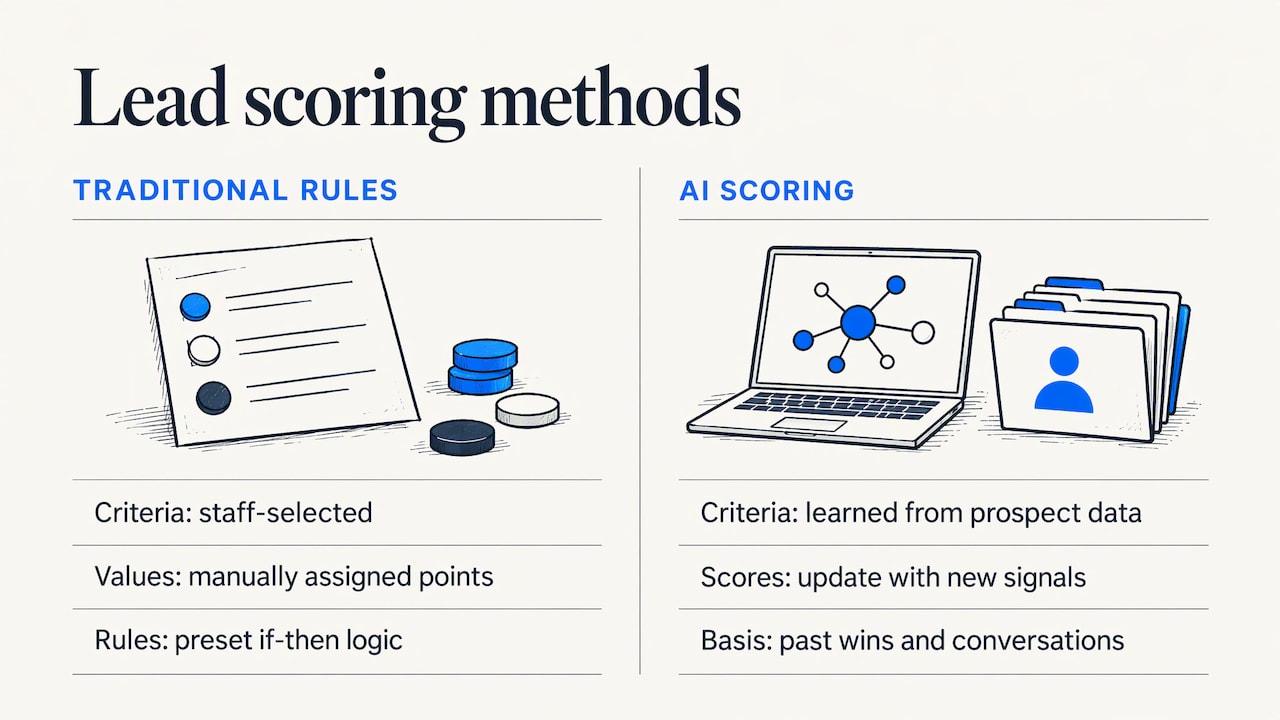
Lead scoring is the practice of putting a number on each lead so a team knows who to contact first. The traditional version is a point system that people design. Twilio's guide describes staff choosing criteria such as demographics, company information and behavior and assigning numerical values to each. Opened a pricing page: plus ten. Works at a company with 200 employees: plus five. It is readable, but it only knows the rules someone wrote down.
AI scoring changes where the criteria come from. Clay's guide contrasts preset if-then rules with predictive analytics that learns dynamic criteria from prospect data. Salesforce describes AI lead qualification as scoring, prioritizing and following up on leads using past wins and customer conversations, with scores that update as new signals arrive rather than staying fixed.
You will also see the phrase "AI-powered lead qualification." It is a little broader. Qualification means deciding whether a lead is worth pursuing and what happens next, which can include a conversation with the prospect. Scoring is the ranking step inside that. For a Facebook group, the practical version is simple: rank the post, tell a human immediately, and let that human start the conversation.
Why Facebook group posts need a different kind of scoring
Most scoring guides assume you already have a contact record: an email address, a company, a website visit history, a stack of past deals. Snowflake's guide notes that predictive models draw on behavioral, firmographic and historical conversion data. A Facebook group post has none of that. It has a few sentences, sometimes a photo, a location hint and a tone.
That changes what a good score looks at. Instead of past behavior, it has to read the words:
- What the person wants. "Anyone know where to buy a lift kit for a 2021 F-150?" is a request. "Just installed my lift kit, look at this" is a showcase.
- Whether they are ready to act. "Need someone this weekend" outranks "thinking about it for next year."
- Fit with your offer. A wedding florist in Ohio does not want a post from a bride in Oregon.
- Competitor mentions. A user complaining about a rival tool or asking for an alternative is often further along than a general browser.
This is why simple keyword alerts disappoint. A keyword like "photographer" fires on job ads, self-promotion and jokes. A scored feed asks a better question: is this person asking for what I sell?
How a post becomes a scored lead
Here is the path a post takes in Groups Watcher, built from what the product does.
Get Facebook group alerts in 60 seconds.
Groups Watcher finds the leads in your Facebook groups and sends them to you in 60 seconds, before your competitors reply, without using your Facebook account. 7 day trial for $1 with full features.
Start your $1 trial- You pick the groups. The AI-driven group finder helps you discover groups where your buyers talk. It covers public and private groups, and you can swap groups at any time.
- You set your criteria. Customizable filters define what a match looks like for your business.
- AI scores each post. Posts in your groups are evaluated for lead quality, in any language, so a request written in Spanish is read as readily as one in English.
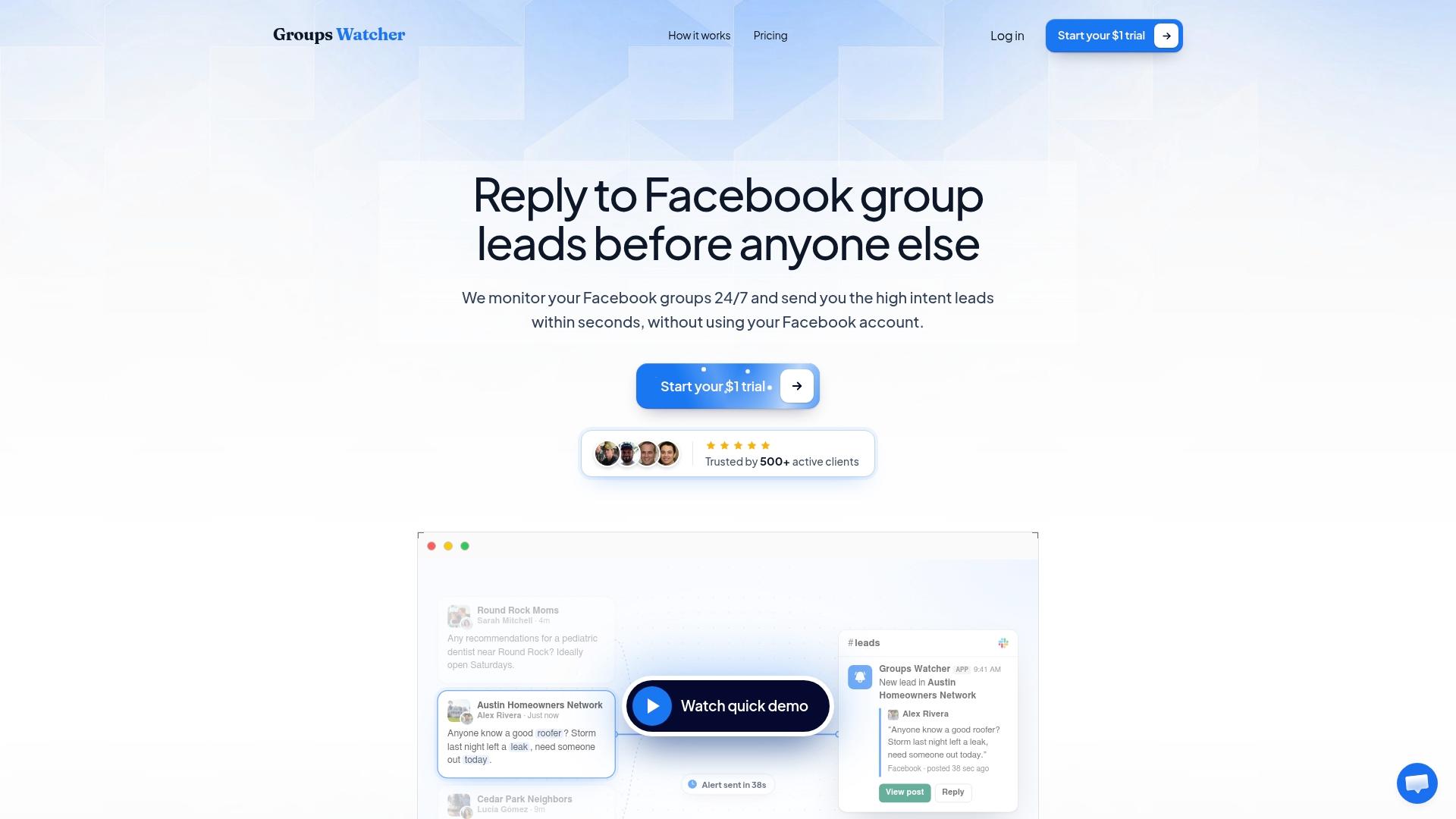
- The alert reaches you in about a minute. Matches go to Slack, Discord, email, Teams, webhooks or a CRM integration, over 10+ channels in total.
- You reply. A person answers while the question is still fresh.
None of this needs your Facebook login, so there is nothing on your personal account to put at risk. That matters most for teams: the people who respond do not need to share access to anyone's profile.
Setting criteria that produce useful scores
The score is only as sharp as the question you ask it. Spend twenty minutes on criteria before you spend a dollar on groups.
Start from what buyers actually write
Read twenty past posts in a group where your customers hang out. Note the phrases that came before a real sale. Wedding vendors will see "looking for a DJ," "recommendations for a venue" and "budget around." An auto parts store will see part numbers, model years and "where can I find." A software brand will see "alternative to" and the names of rivals.
Write criteria in three layers
| Layer | Question it answers | Example for a wedding photographer |
|---|---|---|
| Topic | Is the post about what I sell? | Asking for a photographer or recommendations |
| Fit | Can I serve this person? | Event within your travel area, date still open |
| Intent | Are they ready to talk? | Asking for names, prices or availability |
A post that passes all three should rise to the top. A post that passes only the first is worth a glance, not an interruption.
Keep group lists tight
Twenty well-chosen groups beat two hundred loosely related ones. Extra groups on Groups Watcher cost $2 per month per group, so a pruning habit pays for itself: review each group after a month, keep the ones that produced real conversations and swap out the rest.
Use cases by industry
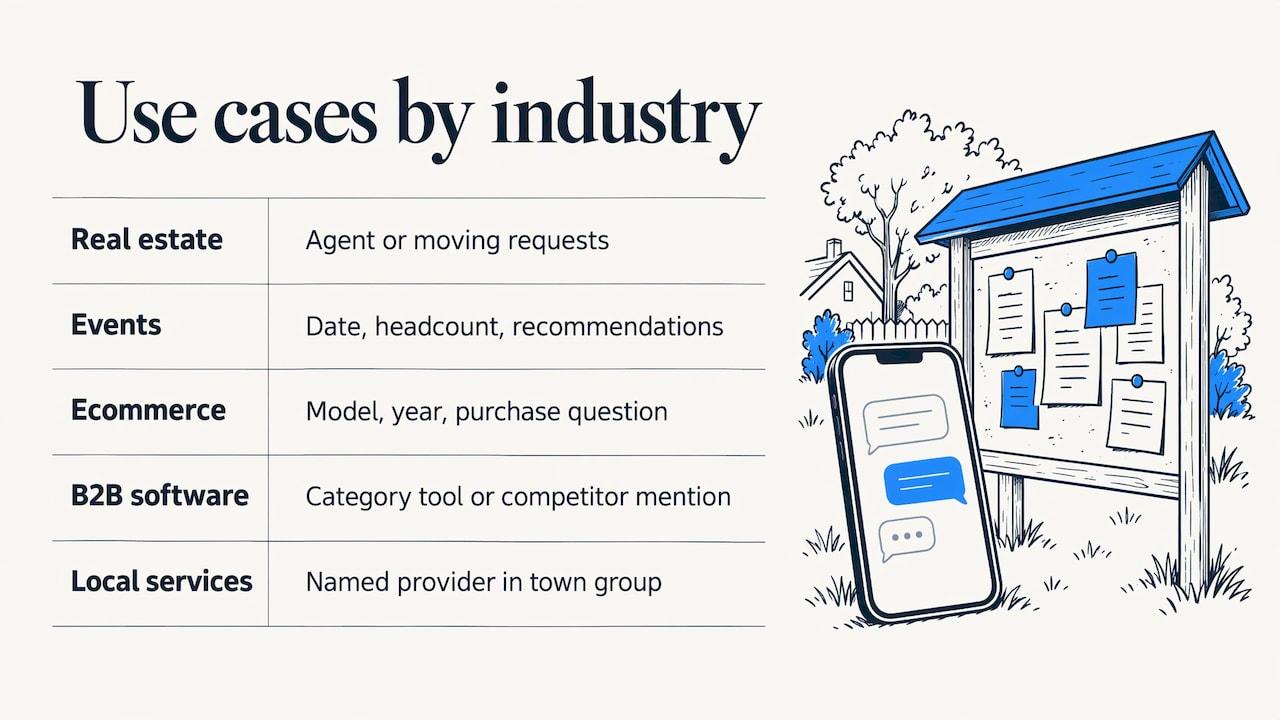
Real estate. People ask neighborhood groups about agents, school districts, moving timelines and landlords. A score that favors "looking for an agent" and "moving to" over general neighborhood chatter lets an agent reply while the question is still near the top of the feed.
Events and entertainment. Wedding vendors, Airbnb hosts and event planners deal with dates. The best signals are a date, a headcount and a request for recommendations. These posts tend to collect many comments quickly, so a fast reply is part of how you get noticed.
Ecommerce. A performance auto parts store can monitor truck and car owner groups for people asking where to find a specific part. The score should favor posts with a model, a year and a purchase question over showcase posts.
B2B and software. Look for people asking for a tool in your category and for mentions of competitors. Our own playbook for SaaS leads from Facebook groups goes deeper on how to word those filters.
Local services. Plumbers, cleaners and landscapers are asked for by name in town and neighborhood groups. See how this works for local service businesses.
Keep a human in the loop
A score ranks. It does not close. Clay's guide recommends human oversight, treating AI scores as inputs to a rep's decision instead of the final word. In Facebook groups that advice is easy to follow, because the reply itself has to come from a person.
A simple review routine:
- Open the alert and read the full post and the comments already there.
- Check whether someone has already answered well. If so, add value or move on.
- Reply with something useful before you pitch: an answer, a question, a relevant example.
- Move the lead into your CRM so it does not live only in a chat channel. Our guide to CRM integration for Facebook leads covers the handoff, and the piece on tracking Facebook group leads shows how to log each one.
Twilio's guide also cautions that AI does not remove bias, because the people designing the criteria can introduce it. The fix is the same review habit: read what is being surfaced and adjust your filters when the feed drifts from what you sell.
What accuracy looks like, and where scoring slips
No independent accuracy benchmark exists for scoring Facebook group posts, so be wary of any tool that quotes a single universal number. What research does show is the shape of the errors. A 2025 study in Frontiers in Artificial Intelligence evaluated a web-based lead system and reported 89.7% precision and 86.5% recall. Precision is the share of flagged leads that were truly good. Recall is the share of all good leads that were found. That study covered web pages rather than Facebook posts, so treat it as an illustration of the two measures, not a promise for your groups.
The same study found that false positives came from keyword overlap hiding a poor fit, while missed leads often involved niche or jargon-heavy wording. You can plan for both:
- Reduce false positives by adding fit criteria, such as location or product type, so a shared word is not enough to trigger an alert.
- Reduce misses by including the slang your buyers use. Truck owners say "lifted," "leveled" and "deleted" long before they say "aftermarket parts."
- Review weekly. Look at the posts you replied to and the ones you skipped, and tune the filters from what you see.
Data quality matters downstream too. Snowflake's guide warns that missing, outdated or duplicate CRM records can lead to inaccurate scores. If you send Facebook leads into a CRM, keep one record per person and note the source group.
Scoring against a small deal history
A model trained on your own won deals needs deals. Zite's guide points out that AI learns weights from past wins and can be data-starved when a business has few closed deals. That is a common situation for a solo vendor or a new store. With Groups Watcher you do not wait for a conversion history to build up: the AI scores posts using the filters you set, so a new business can start from day one and refine the criteria as real conversations come in.
Measure whether it is working
Scoring is a means to faster, better-aimed replies, so measure the outcome, not the score.
| Metric | How to track it | What to look for |
|---|---|---|
| Time to first reply | Alert timestamp versus your reply timestamp | Shrinking toward minutes |
| Reply-to-conversation rate | Replies that led to a comment thread or message | Rising as filters improve |
| Conversation-to-customer rate | Conversations that became quotes, bookings or orders | Compare across groups |
| Cost per customer | Subscription plus group add-ons divided by customers won | Falling month over month |
Tag each lead with its group in your CRM or spreadsheet. After 30 days you will see which groups carry your revenue and which only carry volume. Our overview of real-time Facebook group alerts explains why the first minutes matter when a question is still fresh.
Alert channels: put the score where you already work
A score nobody sees is worth nothing. Route alerts to the place your team already checks. A solo owner might choose email or a phone-friendly chat app. A sales team can use Slack, Teams or Discord channels, with a separate channel per product line. A team with a CRM can use the integration or a webhook to create a record automatically. If you are comparing tools in this category, our roundup of social media lead alert software lays out what to look at.
Our view: score the post, then show up fast
We built Groups Watcher around one observation: in a Facebook group, the buyer and the browser look alike until you read the post, and by the time you have scrolled to it, someone else has answered.
That is why we pair AI lead scoring with speed. The AI filters for high-intent posts and the alert reaches your channel within 60 seconds, so your attention goes to the handful of posts that deserve it.
We also think a monitoring tool should not put your own account in the picture. Groups Watcher works without Facebook credentials, which means no login to hand over and no profile for your team to share.
Finally, scoring should be adjustable. Your groups, filters and channels are yours to change at any time, and because the tool supports every language, your buyers do not have to write in English to be found.
Groups Watcher Team
Try it on your own groups
The Professional plan is $99 per month and includes monitoring, the AI group finder, and unlimited lead scoring and alerts. Extra groups are $2 per month each. A 7-day trial costs $1, enough time to point the tool at your groups, tune the filters and see which posts it surfaces for your business.
Start with the groups where your buyers already ask for recommendations. You can see the full details on the Groups Watcher pricing page or look at the product overview.
FAQ
How does AI score a Facebook post as a lead?
It reads the post and judges it against the criteria you set: whether the person is asking for what you sell, whether they fit your area or product range, and whether they sound ready to act. Posts that match are alerted to you, and the rest stay out of your way. You can tighten or widen the filters whenever the feed feels off.
Is AI lead scoring different from AI lead qualification?
Yes, slightly. Scoring ranks leads by likelihood to convert. Qualification is wider: it decides whether a lead is worth pursuing and what happens next, sometimes through a conversation with the prospect. In a Facebook group, the AI does the ranking and you do the conversation.
How do I prioritize Facebook leads when several arrive at once?
Work the posts in this order: clear requests with a deadline, then requests for recommendations, then competitor mentions, then general questions. Reply to the first group within minutes. Log every lead with its group name so you can see later which sources paid off.
Do I need past customer data for AI scoring to work?
Not with Groups Watcher. You set filters describing your ideal post, and the AI scores new posts against them in any language. As you close deals, use what you learn to refine the filters and the group list.
Sources
- Twilio: The Complete Guide to Lead Scoring Models
- Clay: AI Lead Scoring: Definition, Benefits, and How It Works
- Salesforce: AI Lead Qualification: How It Works, Benefits & Top Tools
- Snowflake: AI Lead Scoring: How It Works & Best Practices
- Zite: What Is AI Lead Scoring? How It Works and How to Build It
- Frontiers in Artificial Intelligence: A review of AI-based business lead generation
- Docket: AI Lead Qualification: The Complete Guide for B2B Sales
Recommended
Stop checking Facebook groups by hand.
Groups Watcher finds the leads in your Facebook groups and sends them to you in 60 seconds, before your competitors reply, without using your Facebook account. 7 day trial for $1 with full features.